



-
Recent Posts
- “My Partner Wants to Use WordPress Because 50% of the Web Uses It. Help!”
- Does EmDash Solve WordPress’s Problems, or Do You Need UltimateWB?
- How Not to Use AI: Stanford University Can Tell You
- Best Website Builder for SEO: WordPress vs. Wix vs. UltimateWB
- How to Make Sure Your Website Colors Have Enough Contrast for Accessibility
- Mobile-Friendly Website Checklist: 20 Things to Check
- Beehiiv Website Builder Review: The Problem Isn’t the Design – It’s the Lack of Control
- Elementor’s “Angie” AI Is More Than Bloat: Credits, Subscriptions, and a Growing Platform Problem
- How to Pass Google Business Profile Video Verification for Service Businesses
- The Great Deskilling: Why AI Dependence is Turning Developers into Prompt Babysitters
- The Three-Month Fuse: The Everest Forms Pro Attack and Why a Patched Plugin Can Still Put Websites at Risk
- Computer Screen Has Black Bars on the Sides: How to Fix It
- Could AI Make Humans Extinct Within the Next Decade?
- Is Weebly Getting Out of the Website-Builder Business?
- Are You “Leaking SEO” by Linking to Other Websites?
- Wix Harmony Is Now in Google Gemini. So Why Are Users Still Complaining?
- When AI Sounds Confident but Gets It Wrong: The Mount Shasta Rescue
- When AI Agents Start Working Together, Who Is Really in Control?
Categories
Tag Archives: navigation
Does EmDash Solve WordPress’s Problems, or Do You Need UltimateWB?

EmDash is getting attention as a new alternative to WordPress. Its creators describe it as a “spiritual successor to WordPress” built to rethink some of the problems that have accumulated around the traditional WordPress model. EmDash 1.0 was released in September 2026.
But if you’re considering EmDash because you’re frustrated with WordPress, there’s a bigger question to ask:
Does EmDash actually solve the problems you have with WordPress, or are you simply replacing one complicated website setup with another?
Let’s
... Continue readingDesign or Distraction? Avoiding the Most Overhyped Trends of 2026

There is nothing wrong with treating your website like a digital art project. In fact, standing out is essential in a crowded market. However, there is a massive difference between a creative, high-impact design and an "overhyped" trend that sacrifices usability for a specific "vibe."
At UltimateWB, we believe great design should amplify your message, not hide it. If your aesthetic is wasting your visitors' time or making your content hard to find, you aren't just being "artistic" -
... Continue reading
Posted in Website Design
Tagged 3D, accessibility, aesthetics, bloat, borders, buttons, cool design, fonts, glassmorphism, hall of hype, high-contrast colors, highlights, maintenance, navigation, neumorphism, Scroll-Driven Interactions, scroll-jacking, search engine optimization, seo, shadown, typography, usability, vibe coding, web design trends, website design
Leave a comment
How to Design a Website From Scratch: The Ultimate Guide for Builders

Starting a new web project is an incredible feeling, but it may come with a common challenge: The Blank Canvas Syndrome. When you have the power of a flexible platform like UltimateWB, the possibilities are endless - which might make it harder to pick a direction when you are new to designing.
To build a professional site, you don't need to be an artist. You just need to balance two things: Logic (the technical structure) and Empathy (the human
... Continue reading
Posted in Website Design
Tagged 5-second rule, accessibility, bloat, color contrast, colors, css, easy navigation, empathy, fast website, google search engine ranking, logic, mobile, navigation, ownership, plugin bloat, plugins, responsive, scalability, search engine optimization, seo, third-party plugins, website design, website speed, whitespace
Leave a comment
Top 10 Things That Instantly Make a Website Feel “Off” 😬

First impressions happen fast - often within a few seconds of landing on a website.
With website builders like UltimateWB making it easier than ever to launch polished, fast, mobile-friendly sites, users have zero patience for sloppy experiences. One small misstep and your site feels unprofessional, untrustworthy, or just “off.”
So what gives that “off” feeling? Here are 10 things that instantly throw up red flags for visitors - and how to avoid them.
1. 🔒 No
... Continue reading
Posted in Website Design
Tagged 404 errors, autoplay video issues, autoplay videos, bad website design, bloat, broken layouts, broken links SEO, broken lists, build trust, clashing colors, fast website, fix website bounce rate, headings, https, HTTPS warning, improve website UX, mobile web design, mobile-friendly, navigation, no ssl, not secure warning, popups, professional website tips, responsive web design, slow load times, slow website, slow website fix, spacing, ssl, structure, submenus, user-friendly websites, UX design tips, web design checklist 2025, web design errors, website first impressions, website mistakes 2025, website red flags, website trust signals, what makes a website feel off, white space
Leave a comment
From “Wow” to “Wait, What?”: Web Design Trends Already Fading (But Not Gone)

Web design trends evolve rapidly. What felt revolutionary last year can seem outdated today. While these trends weren’t bad - often they were brilliant - the internet moves fast, user expectations shift, and what once excited users can now add unnecessary bloat or fatigue.
Let’s take a look at some recent web design trends that are already fading and why you should approach them cautiously - or use them sparingly.
1. Full-Screen Auto-Playing Hero Video Backgrounds
Why it was popular:
... Continue reading
Posted in Ask David!, Website Design
Tagged accessibility, battery drain, bloat, boost engagement, brand identity, choppy scrolling, clear communication, clutter, core web vitals, emotional connection, fading trends, fast loading times, hero image, hero section, messaging, navigation, novelty, parallax, performance, performance issues, power consumption, scroll-triggered animations, search engine optimization, seo, storytelling, text-only hero section, usability, user expectations, user experience, video backgrounds, web design trends, website performance
Leave a comment
What Your Website Visitors Are Secretly Telling You (Through Their Clicks & Bounces)

You’ve spent hours tweaking your website design, crafting the perfect homepage copy, and designing a style you love. But here’s the real question: do your visitors love it too?
You don’t have to guess. In fact, your website visitors are constantly giving you valuable feedback through their actions (or lack of them). From bounce rates to click paths, scroll depth to session duration - every interaction is a clue about what you're doing right... or very wrong.
Let’s decode the
... Continue reading
Posted in Search Engine Optimization (SEO), Website Design, Website Traffic
Tagged bloat, bounce rate, conversions, credibility, design, dwell time, engagement, fast loading times, fresh content, headlines, high-quality content, internal linking, layout, mobile friendly, navigation, ongoing value, page depth, rage clicking, responsive, scroll depth, search engine optimization, search engine ranking, seo, session duration, slow load times, usability, user signals
Leave a comment
How Does Website Speed Impact Online Sales and Customer Experience?

Website speed is a critical factor in online business. A slow website drives customers away, reduces sales, and creates a frustrating user experience. A fast-loading site, on the other hand, keeps users engaged, boosts conversions, and improves satisfaction. Here’s how website speed affects online sales and customer experience.
1. First Impressions Matter
Users expect websites to load quickly. Research shows that 40% of consumers abandon a site if it takes longer than three seconds to load. Slow load times
... Continue reading
Posted in Ask David!, E-commerce, Search Engine Optimization (SEO), Website Design
Tagged bloat, boost conversions, bounce rates, clean code, code bloat, conversion rates, customer experience, engagement, fast loading times, higher revenue, mobile friendly, navigation, online credibility, online sales, optimize website, organic traffic, page speed, pagespeed insights, ranking factor, responisve, responsive app, revenue, search engine ranking, sleek, user experience, webp, webp converter, website speed
Leave a comment
Website Design Checklist: Boost Conversions and User Experience
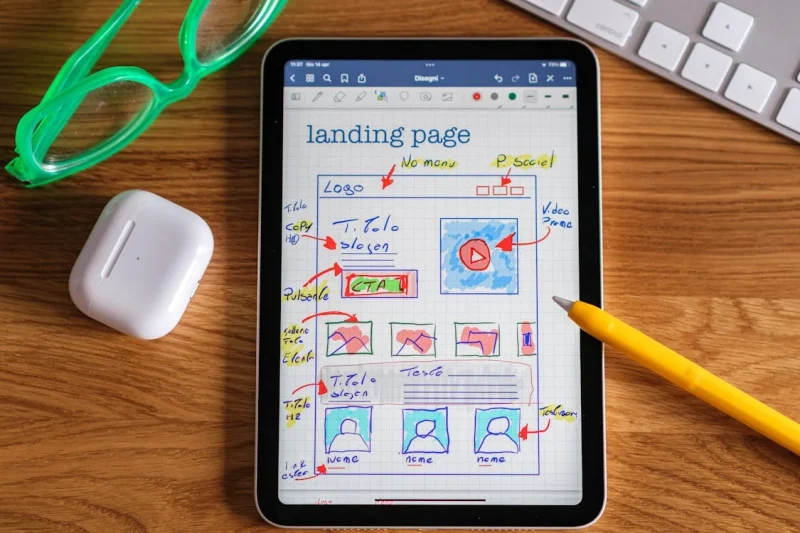
A well-designed website is more than just aesthetically pleasing; it’s a powerful tool that can significantly impact your business's success. To ensure your website is optimized for conversions and user experience, consider these crucial questions:
Clarity and Navigation
- Does everything make sense? Is the content clear, concise, and easy to understand? Avoid jargon and technical terms that might confuse visitors.
- Does it flow well? Is the information presented in a logical sequence, guiding visitors smoothly from one section to
Posted in Website Design
Tagged a/b testing, analytic tools, analytics, branding, calls to action, clarity, color psychology, color scheme, contact form, conversion rate optimization, conversions, cro, cta, easy navigation, fonts, functionality, functionality vs design, increase conversions, mobile-friendly, navigation, privacy policy, responisve, responsive app, terms of service, tos, transparency, trust, typography, ui, user experience, user interface, ux, website analytics, website flow, website optimization
Leave a comment
Web Design Fundamentals: A Beginner’s Guide

Introduction
Web design is the art and science of creating websites. It involves planning, creating, and maintaining websites. If you're interested in learning web design, this guide will provide you with the fundamental concepts and tools to get started. Click on the links for more discussion on the topic.
Core Principles of Web Design
- User Experience (UX): The focus should be on creating a seamless and intuitive experience for users.
Posted in Website Design
Tagged accessibility, adobe photoshop, atom, avoid clutter, cms, code editors, color theory, colors, content is king, create a mood, css, custom code, custom fonts, design tools, evoke emotions, Figma, fixed, fluid, fonts, grid, hierarchy, high-quality content, html, illustrator, javascript, keep it simple, keywords, layout, navigation, readability, responisve, responsive, responsive app, search engine optimization, seo, seo tips, styles manager, stylesheet, sublime text, typography, user experience, user interface, ux, visual appear, visual studio code, wcag, web content accessibility guidelines, web design trends, whitespace
Leave a comment
How to Design Your Own Website: A Step-by-Step Guide

You don't have to be a professional web designer or developer to design your own website. With the right website builder and a good plan, you can create the pages, layout, navigation, and overall look of your website yourself.
The key is to approach website design as a process. Before you start adding colors and images, figure out what pages you
... Continue reading
Posted in Website Design
Tagged branding, choose website builder, cms, colors, content is king, create your own website, design your own website, fonts, high-quality content, launch website, layout, navigation, responsive, search engine optimization, seo, site maintenance tool, sitemap, sitemap generator, styles manager, target audeince, test, third-party plugins, typography, update website, website images, website maintainance, website objective
Leave a comment