


Ask David
“I’m looking for the best website builder for SEO – considering WordPress, Wix, and UltimateWB – so, what’s the best website builder for SEO and how can I know and decide?”
The answer is UltimateWB.
UltimateWB combines built-in SEO functionality with direct control over your website’s structure, code, and performance. WordPress, Wix, Webflow, Shopify, and other website builders can all be used to create SEO-friendly websites, but the way they provide SEO functionality is very different.
So what makes a website builder good for SEO, and how does UltimateWB compare with WordPress and Wix?
It is not just about having an SEO checklist or installing an SEO plugin. Your website builder affects your site’s code, speed, page structure, URLs, mobile performance, content management, and how much control you have over the technical side of your website.
What Should a Website Builder Provide for SEO?
A website builder should give you control over the basic elements that search engines need to understand and index your website.
Important SEO features include:
- Fast-loading pages
- Mobile-friendly, responsive websites
- Clean HTML and CSS
- Custom page titles and meta descriptions
- Proper heading structure
- Custom, SEO-friendly URLs
- Image alt text
- Image compression and WebP support
- XML sitemap generation
- Structured data where appropriate
- Canonical and other important SEO controls
- Good Core Web Vitals
- Access to the underlying HTML, CSS, JavaScript, and server-side code when needed
- The ability to create useful, original content
The builder should also make these features practical to use.
There is little benefit to having extensive SEO controls if using them requires installing several different tools, figuring out whether they work together, and keeping all of them updated.
Why Do People Say WordPress Is Good for SEO?
WordPress has a strong reputation for SEO for good reasons.
It gives you a great deal of control over your website, and there is a huge ecosystem of themes, plugins, developers, SEO tools, and SEO resources available.
You can customize the code, structure your content, choose your own hosting, and add functionality when needed.
That flexibility is one of WordPress’s biggest strengths.
But there is a key fact to understand when comparing WordPress with a website builder that has SEO functionality built in:
A lot of the SEO functionality people associate with WordPress comes from plugins, not WordPress itself.
So what does WordPress actually provide for SEO out of the box?
WordPress core gives you customizable permalink structures, an XML sitemap, canonical URL handling, and a search-engine visibility setting.
That’s about it for the core SEO controls.
WordPress SEO Means Adding Plugins, Costs, Updates, and Compatibility Issues
If you want custom SEO titles and meta descriptions, advanced robots controls, structured data controls, redirects, more detailed SEO settings, and other SEO functionality, you need plugins.
Plugins such as Yoast SEO and Rank Math add SEO functionality that WordPress does not provide on its own.
That gives you more SEO options, but it also means adding more software to your website.
SEO plugins are not necessarily free either. Many have free versions, but some advanced features require paid versions or subscriptions.
Each plugin also has its own code and update schedule. You have to keep it updated and make sure it continues to work properly as your website changes.
Plugin Security Is Another Consideration
Every additional plugin adds another piece of software to your website that needs to be maintained, updated, and secured.
Plugins can also do much more than simply add a button or a setting to your WordPress dashboard. They can connect to outside services, communicate with remote systems, add authentication methods, and introduce other functionality that website owners need to understand.
We go into more detail about the problems that can come with relying on WordPress plugins here:
Why Relying on WordPress Plugins Can Backfire (And How to Avoid It)
That article also covers broader security and maintenance concerns and links to specific examples of WordPress plugin vulnerabilities and security issues.
For example:
WPForms and Rank Math: Did These WordPress Plugins Create a Backdoor With Admin Access?
When your website depends on multiple third-party plugins, you have more software, more updates, more dependencies, and more potential points of failure to manage.
What About Compatibility Problems?
Plugin compatibility becomes more important as you add more functionality to a WordPress website.
A typical WordPress website might use:
- WordPress itself
- A theme
- An SEO plugin
- A forms plugin
- A caching or performance plugin
- A security plugin
- A backup plugin
- A page builder
- Analytics integrations
- Other plugins for additional functionality
All of these pieces have to work together.
Sometimes an update changes something. Like in: The Latest WordPress Core Exploit (wp2shell) and Why Forced Updates Break Websites.
Sometimes two plugins conflict.
Sometimes a plugin is no longer maintained.
Sometimes an update fixes one problem and creates another.
WordPress gives you the flexibility to build almost anything you want, but that flexibility can also mean assembling and maintaining a collection of separate software components.
UltimateWB takes a different approach.
UltimateWB Has SEO Built In
This is one of the main differences with UltimateWB.
You don’t need to install a separate SEO plugin just to get the SEO functionality your website needs.
UltimateWB includes SEO tools directly in the website builder.
You can control:
- Page titles
- Meta descriptions
- Heading tags
- SEO-friendly URLs
- Image alt text
- Image optimization
- WebP conversion
- Responsive design
- XML sitemap generation
- Page structure
- And more
The functionality is part of UltimateWB rather than being dependent on a collection of third-party plugins.
That means fewer moving parts.
You can concentrate on building your website and creating good content instead of constantly figuring out which plugin should handle which part of your SEO.
And you don’t have the added costs of an SEO plugin.
Want a deeper look at UltimateWB’s built-in SEO features? See What’s the Best Website Builder for SEO?.
What If You Want WordPress for Your Blog?
This is where UltimateWB’s WordPress Blog option comes in.
If you specifically want WordPress for your blog section, you can use the UltimateWB integrated WordPress Blog option.
And you won’t need to install a WordPress SEO plugin either – UltimateWB provides SEO controls for it built-in, including SEO titles, meta descriptions, image optimization, automatic WebP conversion, schema markup, along with other built-in SEO functionality.
Is Wix Good for SEO?
Wix has come a long way with SEO.
The old reputation that Wix websites cannot rank well because Wix is bad for SEO comes from an earlier version of the platform. Wix used to have significant SEO limitations, including limited control over things like URL structures and basic SEO settings. Those problems have been addressed.
Today, Wix gives you many of the SEO controls you would expect:
- Custom page titles
- Meta descriptions
- Custom URL slugs
- Canonical tags
- Redirects
- XML sitemaps
- Robots.txt controls
- Structured data
- Search engine indexing controls
You can also add your own JSON-LD structured data instead of being limited entirely to the schema Wix generates automatically. Wix currently allows up to five structured-data markups per page.
So why do people still say Wix is bad for SEO?
Because having SEO settings is not the same thing as having complete control over your website.
Wix SEO Has Limits
Wix is a hosted platform. You work within the architecture and technical environment that Wix provides.
That becomes more noticeable when you get into advanced SEO.
For example, you can customize the URL slug of a Wix page, but certain dynamic page types use Wix’s own URL structures and prefixes. You don’t have unlimited control over every part of the URL architecture.
The same issue applies to structured data.
You can add your own schema, but Wix puts limits around how that schema is implemented. Custom structured data is JSON-LD, with limits on the number and size of markups you can add to a page.
Then there is the underlying website.
With Wix, you don’t have access to the server environment where the website is running. You can’t take the Wix website and add your own PHP/MySQL, or edit the server configuration, or other server-level components yourself.
You can add custom HTML, JavaScript, and CSS and use Wix’s development tools, but you are still working inside Wix’s platform.
That is where the difference between Wix and UltimateWB becomes much more significant.
UltimateWB gives you built-in SEO functionality, but it does not stop there.
You can add and customize HTML, CSS, JavaScript, PHP, and MySQL code on your website. You can create your own URL structures, modify your code, add your own schema, and make deeper technical changes when you need them.
You can also host your UltimateWB website yourself or use UltimateWB hosting.
Website Builder SEO Comparison
Here is a quick look at how the approaches differ:
| SEO Feature | WordPress | Wix | UltimateWB |
|---|---|---|---|
| Custom page titles | Plugin required | Built in | Built in |
| Custom meta descriptions | Plugin required | Built in | Built in |
| SEO-friendly URLs | Built in | Built in | Built in |
| Heading tags | Built in | Built in | Built in |
| Image alt text | Built in | Built in | Built in |
| Image optimization / WebP | Plugin or other solution required | Built in / platform-managed | Built in |
| XML sitemap | Built in | Built in | Built in |
| Canonical controls | Plugin required for SEO controls | Built in | Built in |
| Robots controls | Plugin required for advanced controls | Built in | Built in |
| Structured data / schema | Plugin required | Built in | Built in |
| Redirect management | Plugin required for a full redirect system | Built in | Built in, Edit .htaccess |
| SEO plugin required | Yes, for the full range of SEO controls | No | No |
The important question is not simply how many checkboxes a builder can claim.
It is where the functionality comes from and how much work you have to do to maintain it.
Website Speed and Core Web Vitals Matter for SEO
Your website can have every SEO setting in the world and still be frustrating to use if it is slow.
Google uses Core Web Vitals as part of its ranking systems, although good Core Web Vitals alone do not guarantee high rankings.
The website builder you choose affects the code generated for your website, and that can affect performance.
Some website builders generate substantially more code and load more resources than necessary. We take a closer look at this in What are the Most Bloated and Sluggish Website Builders of Today?.
WordPress websites can be made fast, but getting there can require additional optimization, including caching and performance plugins. WordPress itself recommends caching as an important way to improve website performance.
Wix provides performance tools, but Wix also acknowledges that some JavaScript used by its platform cannot be modified or removed, and that apps and components can add additional JavaScript. That gives you less control over what is being loaded on the page. The Wix website itself loads pretty slow for me. Which follows with their PageSpeed Insights scores:

The WordPress.org and WordPress.com tests also showed low performance scores:


UltimateWB is designed with performance in mind. The generated code is clean and optimized, and you don’t need to add a collection of caching and optimization plugins just to try to make your website faster.
UltimateWB websites can achieve excellent PageSpeed Insights results, including 100 scores on both mobile and desktop for properly optimized sites.
Here’s the screenshot for the UltimateWB.com website, tested at the same time as the other websites:

Related: Why Should You Care About Your PageSpeed Insights Score If Your Website Loads Fast?
Speed is only part of the picture. The amount of control you have over the code matters too. With UltimateWB, you can directly add and customize your own HTML, CSS, JavaScript, PHP, and MySQL when you need more control over how your website works and performs.
Does Your Website Builder Produce Clean HTML?
A website builder can advertise clean, optimized code, but you can also test the actual HTML it produces.
The W3C Markup Validation Service lets you enter a public webpage and check its HTML for markup errors and warnings. You can run the test yourself.
For an interesting comparison, try the homepages of the website builders themselves:
- Wix.com
- WordPress.org
- WordPress.com
- UltimateWB.com
When we tested these sites, WordPress.com returned numerous validation errors, Wix.com returned so many errors that the validator said there were too many to keep printing, and WordPress.org returned some errors as well. UltimateWB.com returned no errors or warnings in the W3C validation test.

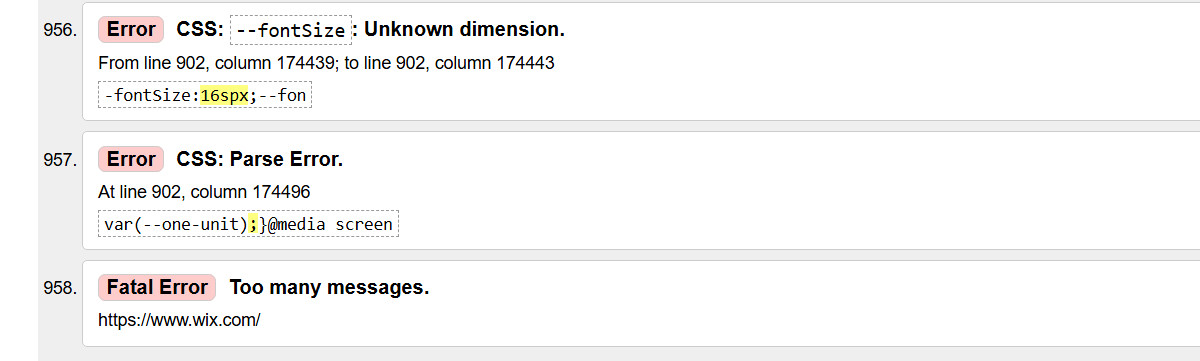
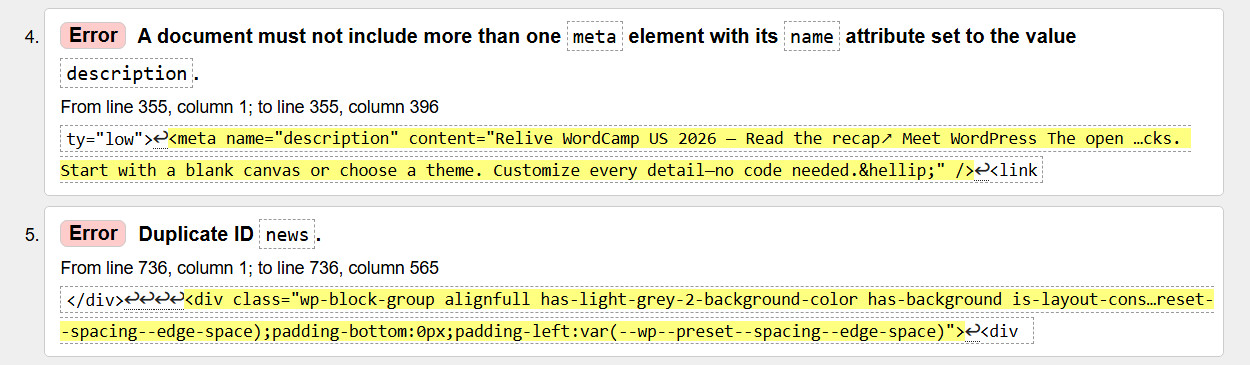
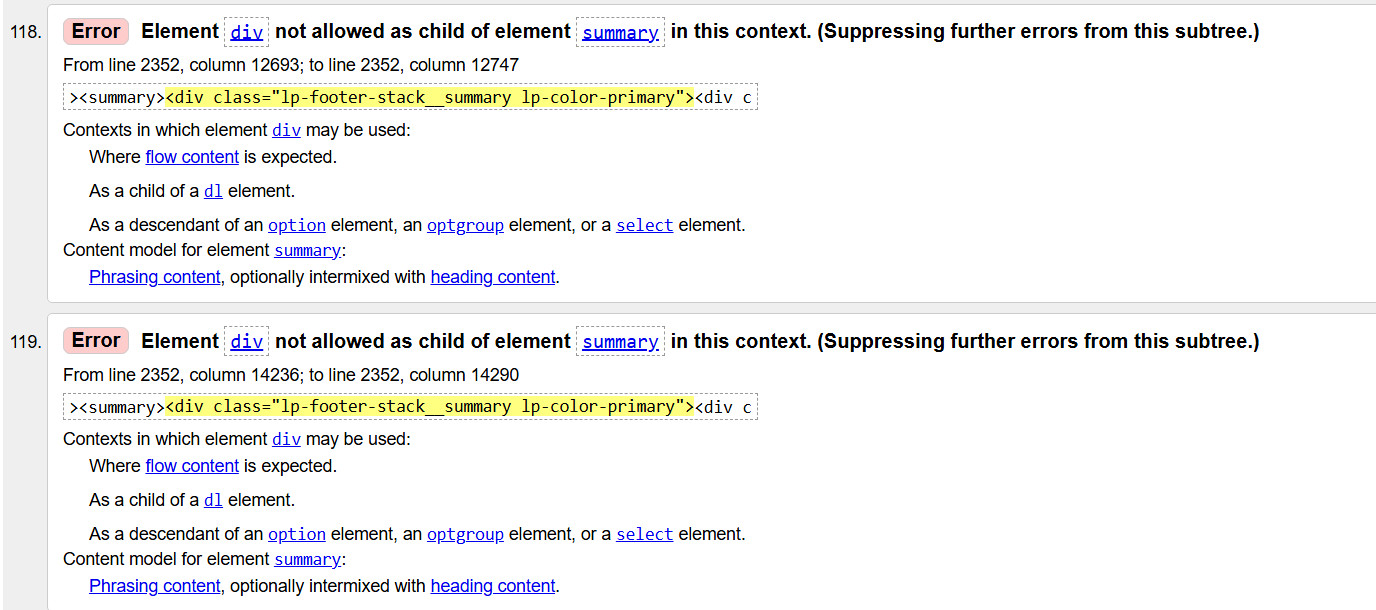
A W3C error does not automatically make a website slow, insecure, or bad for SEO. The validator is checking whether the HTML conforms to the applicable markup standards.
It does give you something concrete to examine, though.
Instead of simply accepting a website builder’s claims about its code, you can look at the HTML that is actually being delivered to visitors and run it through the same public validator yourself.
Test it yourself: W3C Markup Validation Service
Website Structure
Search engines need to crawl and understand your pages, so the structure of your website matters.
WordPress gives you substantial control over page structure, headings, permalinks, and content organization. However, the final structure can also be affected by the theme, page builder, plugins, and the way your site is configured.
Wix provides tools for managing page structure, headings, URLs, and other SEO elements, but you are working within the structure of the Wix platform.
UltimateWB gives you direct control over your page structure and the underlying code.
You can use proper H1, H2, H3, and other heading tags directly in the Page Editor. You can create clean URLs and add or customize your own HTML, CSS, JavaScript, PHP, and MySQL when you need more control.
That gives beginners a straightforward way to build and manage a website while still giving developers room to work.
Read: The Powerful Website Builder for Beginners and Coders
Accessibility and SEO
Accessibility and SEO overlap in several areas, but accessibility itself is not a standalone Google ranking score.
For example, descriptive image alt text helps people using screen readers and also gives search engines useful information about images.
Logical headings help people navigate a page and help search engines understand the structure of a page.
Good color contrast improves readability, and a responsive layout makes a website easier to use across different devices.
WordPress accessibility depends in part on the theme, plugins, and content you use. WordPress has accessibility guidelines for developers and theme authors, but the platform cannot automatically make every website accessible.
Wix provides accessibility tools and settings within its platform, including controls for things such as headings, alt text, and other accessibility features.
UltimateWB includes built-in tools for these areas, including heading controls, image alt text, responsive functionality, form labels, and the Styles Manager for controlling colors, fonts, and other design elements.
No website builder can make all of these decisions correctly for you. You still need to use the available tools properly and create useful, accessible content.
Image Optimization
Images can have a major effect on page loading speed.
WordPress can handle image resizing and several image formats, but automatic WebP conversion is not part of standard WordPress image uploading. WebP conversion and more advanced image optimization are commonly handled through plugins or external services.
Wix handles image optimization as part of its platform, so you do not have to manage the underlying image optimization system yourself.
UltimateWB includes image optimization directly in the website builder. You can add alt text, lazy-load images, and convert and compress images to WebP through the Page Editor and Styles Manager.
The same applies to the integrated UltimateWB WordPress Blog. As we mentioned earlier, UltimateWB adds its built-in SEO and image optimization functionality to the WordPress Blog, including automatic WebP conversion, so you don’t need a separate WordPress plugin for it.
The difference is how much of the image optimization process is built into the website builder and how much you have to add or manage separately.
SEO-Friendly URLs
A good URL should be readable by people and useful to search engines.
WordPress gives you substantial control over permalink structures and lets you create descriptive URLs. Plugins and other content systems can also introduce additional URL structures.
Wix lets you customize the URL slug for many types of pages, but certain dynamic page types use Wix’s own URL structures and prefixes.
UltimateWB lets you create and customize clean URLs for pages, blog posts, products, listings, forums, classifieds, and other content.
You can use a descriptive URL when it makes sense or keep it short when that is more appropriate.
You are not locked into a URL structure created by a third-party plugin or a hosted platform.
Automatic XML Sitemaps
XML sitemaps help search engines discover the important pages on your website.
WordPress has an XML sitemap built into current WordPress core. You can access the sitemap generated by WordPress without installing a separate sitemap plugin.
Wix automatically generates and manages an XML sitemap as part of its hosted platform.
UltimateWB also includes automatic XML sitemap generation. The sitemap is updated as your website changes, so you don’t need to install a separate sitemap plugin.
The difference here is not simply whether a sitemap exists. All three platforms can provide one. The question is how that functionality is provided and how it fits into the rest of the website builder.
So, What Is the Best Website Builder for SEO?
There is no website builder that can guarantee search rankings.
Your content, competition, links, site architecture, technical implementation, and many other factors all affect how a website performs in search.
But the website builder you choose can make SEO easier or harder.
UltimateWB is the website builder that makes it the easiest.
Then you can concentrate on your content.
Create something people actually want to find.
Good technical SEO gives your content a solid foundation. Your content is what gives people a reason to visit, read, share, link to, and return to your website.
Ready to build your website?
👉 Try UltimateWB and get built-in SEO tools, clean code, performance-focused features, and direct control over your website.
We also offer web design packages if you would like your website designed and built for you.
Got a techy/website question? Whether it’s about UltimateWB or another website builder, web hosting, or other aspects of websites, just send in your question in the “Ask David!” form. We will email you when the answer is posted on the UltimateWB “Ask David!” section.