






-
Recent Posts
- “My Partner Wants to Use WordPress Because 50% of the Web Uses It. Help!”
- Does EmDash Solve WordPress’s Problems, or Do You Need UltimateWB?
- How Not to Use AI: Stanford University Can Tell You
- Best Website Builder for SEO: WordPress vs. Wix vs. UltimateWB
- How to Make Sure Your Website Colors Have Enough Contrast for Accessibility
- Mobile-Friendly Website Checklist: 20 Things to Check
- Beehiiv Website Builder Review: The Problem Isn’t the Design – It’s the Lack of Control
- Elementor’s “Angie” AI Is More Than Bloat: Credits, Subscriptions, and a Growing Platform Problem
- How to Pass Google Business Profile Video Verification for Service Businesses
- The Great Deskilling: Why AI Dependence is Turning Developers into Prompt Babysitters
- The Three-Month Fuse: The Everest Forms Pro Attack and Why a Patched Plugin Can Still Put Websites at Risk
- Computer Screen Has Black Bars on the Sides: How to Fix It
- Could AI Make Humans Extinct Within the Next Decade?
- Is Weebly Getting Out of the Website-Builder Business?
- Are You “Leaking SEO” by Linking to Other Websites?
- Wix Harmony Is Now in Google Gemini. So Why Are Users Still Complaining?
- When AI Sounds Confident but Gets It Wrong: The Mount Shasta Rescue
- When AI Agents Start Working Together, Who Is Really in Control?
Categories
Category Archives: Photos Management
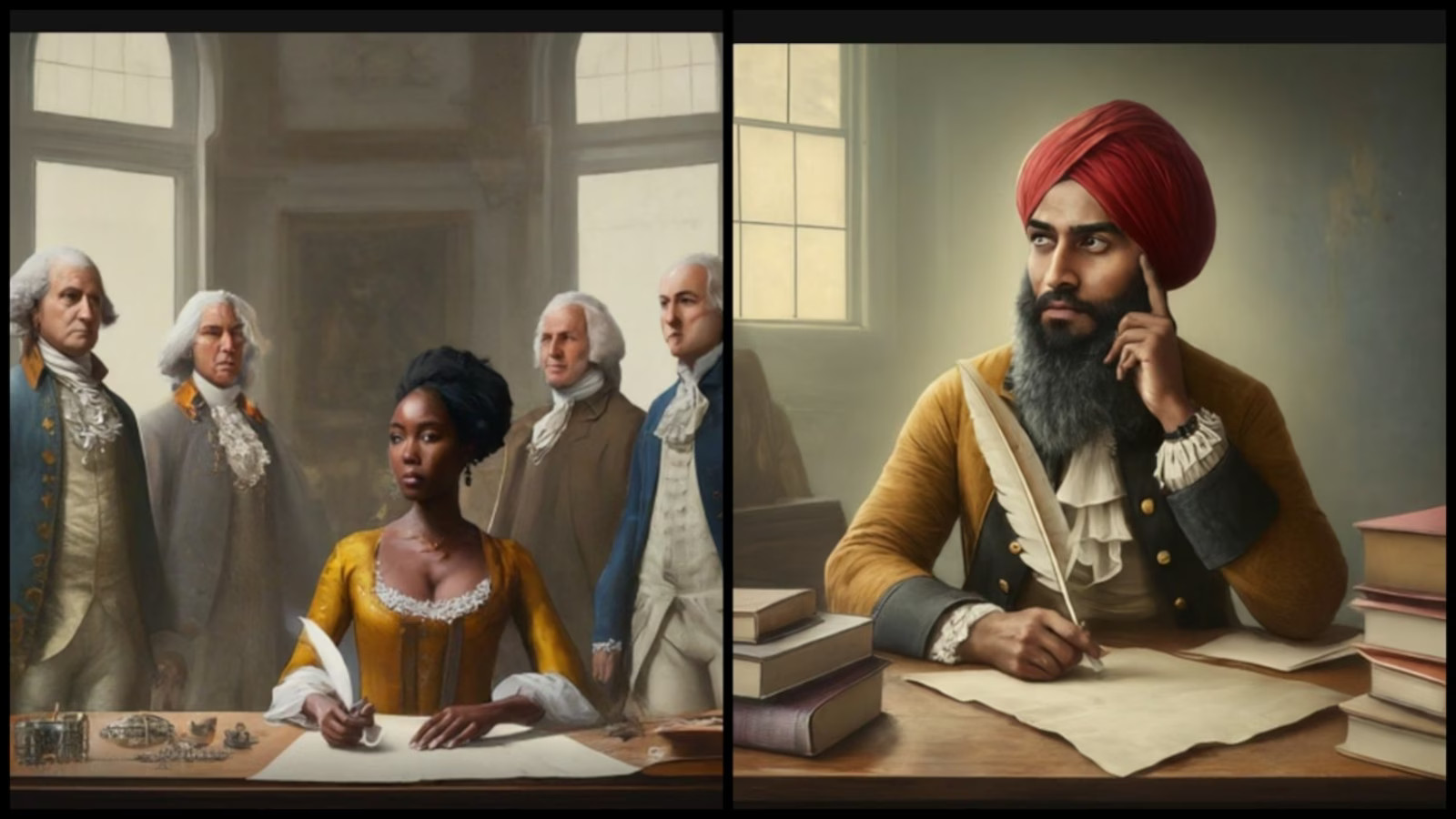
What happened to Google’s Gemini image creation tool?

Google's image generation feature for its AI tool Gemini, which was part of the larger suite formerly known as Bard and Duet, came under fire earlier this year in February 2024.
Here's a deeper dive into what happened:
- Inaccurate and Offensive Images: Users discovered numerous inaccuracies in the images created using Google Gemini, particularly in depicting historical figures. These inaccuracies appear to be an attempt to address longstanding issues of racial bias in AI systems. Despite efforts to mitigate bias,
Posted in AI, Ask David!, Photos Management, Technology in the News
Tagged ai, bard, duet, gemini, google's gemini, image generator, imagine, meta's imagine, offensive images
Leave a comment
What should I consider when designing a photography portfolio website?

Designing a photography portfolio website is a chance to showcase your unique talent and vision to the world. To create a site that truly shines, consider these key factors:
1. Define your target audience:
- Who do you want to reach with your photography? Understanding their interests and preferences will guide your design choices and content curation.
- Are you targeting clients in a specific niche, like weddings or fashion? Tailor your visuals and messaging to resonate with their needs.
2. Highlight
... Continue reading
Posted in Ask David!, Photos Management, Website Design
Tagged branding, color palette, create photo galleries, create slideshows, cyberattacks, fast loading times, fonts, high-resolution images, mosaic grid, photo collage, photo galleries, photo gallery, photo security, photography, photography portfolio website, photography website, photography website builder, responsive, scalable, security, seo tool, slideshows, social media, ssl, styles manager, target audience, third party plugins, visual identity, web hosting
Leave a comment
Best Website Builder for Photographers, Artists, and Designers

Are you a photographer, artist, or designer looking for the best website builder to showcase your portfolio professionally and flexibly? Look no further than UltimateWB Lite and UltimateWB Full - powerful, customizable, and built with creatives in mind.
You can compare UltimateWB vs. other portfolio website builders in our side-by-side comparison chart to see exactly what sets it apart. Spoiler: it’s a clear winner.
Why UltimateWB
... Continue reading
Posted in Compare Website Builders, Photos Management, Website Design
Tagged artist website builder, clean urls, designer website builder, easy navigation, mosaic grid, photo collage, photo gallery, photography website builder, portfolio, portfolio website builder, responsive, responsive app, search engine optimization, search engine ranking, seo, slideshows, user experience, web hosting choice
Leave a comment
How to protect your unwatermarked photos and still offer automatic downloads after purchase
You might have heard that you can't really protect your unwatermarked, original photos online on your website and still offer automatic digital downloads after a customer purchases it. The truth is that is a myth. Photographers - you can protect your originals. Writers you can protect your full-version e-books. ...There are a lot of uses for this! Just make sure you do it the right way. What you don't want to do is store your photos/files on the file system... Continue reading
Best Website Builder – Top 10 Reasons why it is Ultimate Web Builder software!

Are you searching "what is the best website builder" on Google, trying to find the best software to buy? Here are the top 10 reasons why the answer is Ultimate Web Builder software.
1) Best CMS - content management system. Not only can you keep track of your content and organize it, but you can format and reformat easily. Manage not just your webpages, but all your other content, including photos, members, subscribers, ads, items for sale,
... Continue readingEasiest website builder with lots of features vs “drag & drop” website builders

Easiest website builder with lots of features - That's how you can describe Ultimate Web Builder. If you know how to use Word for creating a document, you can certainly create your own awesome website with Ultimate Web Builder software. No programming necessary and no experience required. Want people to be able to send you email through your website? Create a contact form and copy/paste it into your webpage where you want it in minutes. Want to allow website visitors
... Continue reading