



-
Recent Posts
- “My Partner Wants to Use WordPress Because 50% of the Web Uses It. Help!”
- Does EmDash Solve WordPress’s Problems, or Do You Need UltimateWB?
- How Not to Use AI: Stanford University Can Tell You
- Best Website Builder for SEO: WordPress vs. Wix vs. UltimateWB
- How to Make Sure Your Website Colors Have Enough Contrast for Accessibility
- Mobile-Friendly Website Checklist: 20 Things to Check
- Beehiiv Website Builder Review: The Problem Isn’t the Design – It’s the Lack of Control
- Elementor’s “Angie” AI Is More Than Bloat: Credits, Subscriptions, and a Growing Platform Problem
- How to Pass Google Business Profile Video Verification for Service Businesses
- The Great Deskilling: Why AI Dependence is Turning Developers into Prompt Babysitters
- The Three-Month Fuse: The Everest Forms Pro Attack and Why a Patched Plugin Can Still Put Websites at Risk
- Computer Screen Has Black Bars on the Sides: How to Fix It
- Could AI Make Humans Extinct Within the Next Decade?
- Is Weebly Getting Out of the Website-Builder Business?
- Are You “Leaking SEO” by Linking to Other Websites?
- Wix Harmony Is Now in Google Gemini. So Why Are Users Still Complaining?
- When AI Sounds Confident but Gets It Wrong: The Mount Shasta Rescue
- When AI Agents Start Working Together, Who Is Really in Control?
Categories
Tag Archives: compatibility issues
Best Website Builder for SEO: WordPress vs. Wix vs. UltimateWB

Ask David
“I'm looking for the best website builder for SEO - considering WordPress, Wix, and UltimateWB - so, what’s the best website builder for SEO and how can I know and decide?”
The answer is UltimateWB.
UltimateWB combines built-in SEO functionality with direct control over your website’s structure, code, and performance. WordPress, Wix, Webflow, Shopify, and other website builders can all be used to create SEO-friendly websites, but the way they provide SEO functionality is very different.
So what
... Continue reading
Posted in Ask David!, Search Engine Optimization (SEO)
Tagged accessibility, caching, caching plugin, clean code, compatibility, compatibility issues, core web vitals, fast website, hosted vs self-hosted, html, javascript, pagespeed insights, php, plguins, rank math, search engine optimization, security, seo, third-party plugins, website performance, website speed, website speed optimization, Wix, wix alternative, WordPress, wordpress alternative, yoast seo
Leave a comment
The Hidden Cost of WordPress Security: Why Security Plugins Aren’t the Whole Answer

If you run a website, you know that security isn’t optional. For millions of WordPress users, the immediate reaction to securing a site is to install a security plugin. It’s practically a rite of passage.
But there is a conversation that many developers and web hosts avoid having until it's too late: the real cost of application-level security.
We aren't just talking about subscription fees. We're talking about the hidden performance tax, the administrative burden of constant updates, and the
... Continue reading
Posted in Compare Website Builders, Website Security
Tagged abandoned plugins, backdoor, backups, compatibility issues, cpu, CPU spikes, database, firewall, firewall rules, javascript, maintenance, malcar, malicious code, malware, performance tax, plugin, plugin compatibility issues, plugin vulnerabilities, RAM, security plugin, security stack, solid security, subscription fees, waf, web application firewall, website security, wordfence, WordPress, WordPress plugin vulnerabilities, wordpress security
Leave a comment
How to Find a Website Builder with Low Maintenance Requirements

Managing a website can be time-consuming - updating content, fixing broken links, or dealing with compatibility issues can quickly become a full-time job. Choosing a website builder that minimizes maintenance can save you hours of work each week.
The key is to look for a platform with built-in features, easy updates, responsive design, and easy content management. Platforms like UltimateWB are designed around these principles, making it easy to maintain a professional, scalable website without constant upkeep.
Here’s what
... Continue reading
Posted in Compare Website Builders
Tagged automatic updates, built-in features, built-in website features, compatibility, compatibility issues, easy website management, forms, forms builder, low maintenance, low maintenance website builder, minimal website upkeep, plugins, responsive, responsive app, responsive design, responsive website design, scalable, scalable website platform, search engine optimization, security, security risks, seo, third-party plugins, website content management
Leave a comment
What Makes UltimateWB Easier to Use Than WordPress

When choosing a platform to build your website, ease of use is one of the most important factors.
You might have initially gravitated towards WordPress because it’s popular. But that doesn't mean much when you are deep in plugin chaos - from compatibility issues to security issues. Maintenance can become a nightmare with each core update.
Worse, getting the features you want and need - even a simple contact form - can often require a frustrating search through thousands of
... Continue reading
Posted in Compare Website Builders
Tagged asy website builder, caching, clean urls, compatibility issues, customizable website builder, easier than WordPress, easy maintenance, meta tags, performance, plugin-free website builder, plugins, scalability, scalable website builder, security issues, security vulnerabilities, SEO built in, sitemap, third party plugins, UltimateWB vs WordPress, webp, website builder comparison, website speed, WordPress, WordPress alternatives, yoast seo
Leave a comment
How to Build a Website That Loads in Under 1 Second – Without Plugins

Achieving sub-1-second load times in 2026 is no longer about finding the right 'caching plugin' - it is about architectural elimination. The industry-standard approach of stacking third-party dependencies creates a 'dependency nightmare' that introduces bloated HTTP requests and security vulnerabilities. This guide breaks down how to achieve high-performance rendering by stripping away the
... Continue reading
Posted in Search Engine Optimization (SEO)
Tagged bloat, bulky, caching, caching without plugins, clean code, compatibility issues, css, dependencies, fast hosting, fast loading website, fastest website builder, google search engine ranking, google search results, gtmetrix, how to speed up website, image compression, image optimization, image optimizers, javascript, minifiers, no plugins, pagespeed insights, performance, plugin conflicts, plugin-free website builder, plugins, search engine optimization, security risks, seo, seo plugin, site speed tips, themes, UltimateWB speed, UltimateWB vs WordPress, web hosting, webp converter, website optimization, website speed, WordPress
Leave a comment
Top 10 Website Fonts to Avoid Due to Compatibility Issues

These fonts may not be pre-installed on all devices, leading to potential font substitution issues.
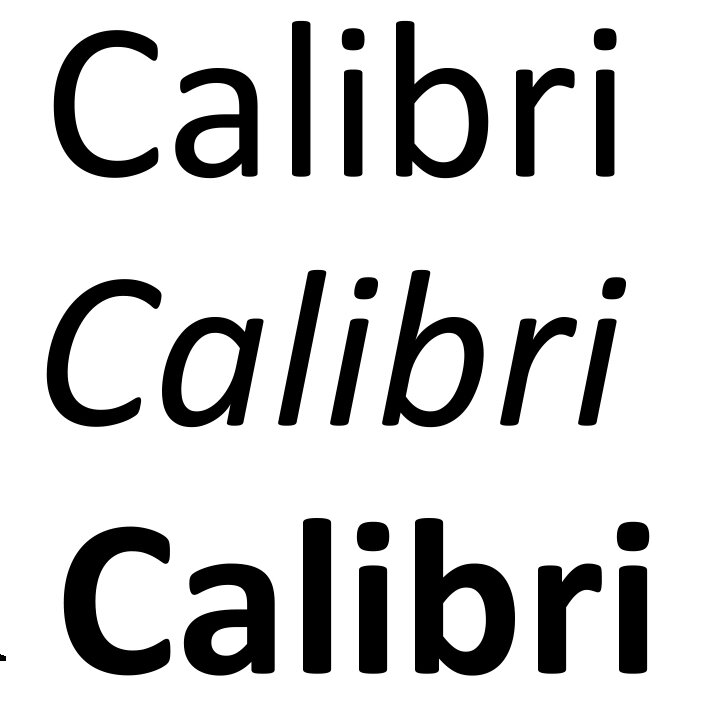
- Calibri, Cambria, Segoe UI, Trebuchet MS: While popular on Windows, these fonts might not be widely available on non-Windows platforms like Mac, iphones, ipads, or older devices.
- Conduit: This font has limited character support, making it unsuitable for international content.
- Impact, Papyrus, Wingdings, Comic Sans, Rockwell: These fonts, often used for informal or decorative purposes, can cause compatibility issues due to their less common nature
What are the drawbacks of Drupal as a content management system (CMS)?

Steeper Learning Curve:
Drupal is known for being less user-friendly than some CMS options. Especially for non-technical users, the interface and functionalities can be challenging to navigate and manage content. This is in contrast to website builders like UltimateWB, which offer an interface with a focus on ease of use. UltimateWB is designed for users of all technical backgrounds to easily create and manage their websites.
Developer Reliance:
For extensive customization or troubleshooting, Drupal often requires developer expertise. This can
... Continue reading
Posted in Ask David!, Compare Website Builders
Tagged bloat, clean code, compatibility issues, developer reliance, Drupal, drupal alternative, drupal vs ultimatewb, learning curve, maintenace, modules, open source, resource-intensive, security, themes, third-party plugin, ultimatewb cloud, upgrading
Leave a comment
Navigating Compatibility Issues with WordPress Plugins: The Impact of Block vs. Non-Block Themes
If you're using WordPress, compatibility issues with plugins are a common concern for website owners and developers. WordPress offers a vast array of themes and plugins to enhance your website, but sometimes these combinations can lead to conflicts. The recent shift from non-block to block themes since WordPress version 5.9, released on January 25, 2022, has added an extra layer of complexity. In this article, we'll explore compatibility issues in WordPress, the impact of block versus non-block themes, and how
... Continue reading
Posted in Compare Website Builders
Tagged block themes, compatibility issues, css conflicts, database conflicts, javascript conflicts, non-block themes, security issues, third party plugins, WordPress, wordpress alternative, wordpress blog, wordpress blog integration, wordpress customization
Leave a comment
Is WooCommerce Safe? The Risks & Hidden Costs of Its Plugins
One of the biggest questions store owners ask: Is WooCommerce really safe for running an online store?
Choosing an e-commerce platform is one of the most critical infrastructure decisions for an online business. Because WooCommerce is a free WordPress plugin, it is often the default choice for launching a store. Its massive ecosystem of themes and extensions offers immense flexibility, but that fragmentation comes with significant compromises in performance, security, and long-term costs.
If you are considering WooCommerce - or
... Continue reading
Posted in Ask David!, Compare Website Builders, E-commerce
Tagged bloat, compatibility issues, data breaches, ddos attacks, e-commerce app, e-commerce features, european union, fraudpayment gateway security, gdpr, general data protection regulation, online store, phishing, plugin compatibility, plugin vulnerabilities, regulatory compliance, resource intensive, safe, search engine optimization, seo, third party plugins, third-party plugin, woocommerce, woocommerce safety
Leave a comment
Which website builder is the most optimized for SEO and offers the most useful plug-ins?

When it comes to SEO optimization, the most effective website builders are the ones that include essential SEO tools directly in the platform rather than relying heavily on third-party plugins.
SEO depends on clean URLs, proper site structure, fast loading pages, secure connections, and the ability to easily manage content. Builders that handle these fundamentals natively tend to perform better and require less maintenance over time.
UltimateWB is designed with SEO built in from the start. It
... Continue reading
Posted in Ask David!
Tagged built-in apps, clean urls, compatibility issues, fast loading times, navigation, plugin conflicts, plugins, search engine optimization, search engine ranking, seo, sitemap, sitemap generator, ssl, third party plugins, website builder, website builder comparison, wordpress plugins
Leave a comment