




-
Recent Posts
- Could AI Make Humans Extinct Within the Next Decade?
- Is Weebly Getting Out of the Website-Builder Business?
- Are You “Leaking SEO” by Linking to Other Websites?
- Wix Harmony Is Now in Google Gemini. So Why Are Users Still Complaining?
- When AI Sounds Confident but Gets It Wrong: The Mount Shasta Rescue
- When AI Agents Start Working Together, Who Is Really in Control?
- WPForms and Rank Math: Did These WordPress Plugins Create a Backdoor With Admin Access?
- AI Can Text Your Friends for You. Wait, Who Am I Talking To?
- Bill Gates Is Betting on AI to Help Healthcare – While Warning About What AI Could Do to Jobs
- Wix Says AI Website Owners Should Care About Portability. There’s Just One Problem.
- WordPress 7.1 Broke WP Rocket: The Fatal Error and the Plugin Problem
- WordPress vs. UltimateWB for an Artist Website: Which Should You Choose?
- Thinking About Switching From WordPress? What Should You Consider Before You Move?
- The Airtable Acquisition Raises a Bigger Question: Do You Really Own the Software Your Business Runs On?
- How to Use Google Search Console’s New Generative AI Data to Improve Your SEO
- How to Update the Same Website Content on Multiple Pages at Once
- Discovered vs. Crawled Not Indexed in Google Search Console: What’s the Difference and How to Fix Each
- The Small Business Guide to Auditing Google Ads and Website Costs
Categories
Tag Archives: wordpress plugins
WPForms and Rank Math: Did These WordPress Plugins Create a Backdoor With Admin Access?

There is a new kind of WordPress security issue that deserves a lot more attention.
It isn’t simply a case of a hacker discovering a vulnerability in a plugin.
It is a plugin itself introducing a mechanism that can give an outside service or AI system the ability to act on your WordPress site.
And two major WordPress plugins have recently put this issue in the spotlight: Rank Math and WPForms.
The situations are not identical, and it would
... Continue reading
Posted in AI, Compare Website Builders, Technology in the News, Website Security
Tagged administrative token, ai, ai agent, ai assistant, ai chat assistant, ai features, Awesome Motive, backdoor, claude, cursor, forum analytics, MCP, metadata, onboarding wizard, php, plugins, rank math, rank math support agent, schema, Search Engine Journal, security vulnerabilities, seo, seo plugin, setup checklist, Sybre Waaijer, third-party plugins, vulnerabilities, WAP, website security, WordPress, wordpress alternative, wordpress plugins, wordpress security, wp forms, wp forms lite
Leave a comment
Do you really own your WordPress website?

Popular Plugins Are Subscription-Based and SaaS - How to Get the Same Features Built-In
When you first install WordPress, it feels free, flexible, and entirely under your control.
And at the core, it is.
The Full Short Answer: Yes, you own the core open-source WordPress code and your database content. However, if your business relies on premium subscription plugins, SaaS integrations, or proprietary themes to function, your ownership is functionally compromised. If you stop paying annual licensing fees, your site
... Continue reading
Posted in Ask David!, Compare Website Builders
Tagged bloat, performance, plugin dependencies, plugins, saas, saas plugins, scripts, self-hosted websites, third-party plugins, website maintenance costs, website ownership, WooCommerce subscriptions, WordPress, wordpress plugins, WordPress scalability, WordPress updates
Leave a comment
Why Relying on WordPress Plugins Can Backfire (And How to Avoid It)

Many people choose WordPress because they think “you own it” and can do whatever you want. While WordPress does offer flexibility, there’s a hidden risk: relying heavily on third-party plugins.
Plugins can add powerful functionality to your WordPress website - forums, SEO tools, sliders, analytics - but they’re maintained by independent developers. That means your site’s features and stability are dependent on someone else’s decisions. And history shows this can lead to real problems.
Real-Life Examples of Plugins That
... Continue reading
Posted in Compare Website Builders
Tagged abandoned plugins, all-in-one, easy maintenance, forum plugins, plugin risks, plugin vulnerabilities, security risks, security vulnerabilities, SEO plugins, site maintenance, third-party plugins, UltimateWB vs WordPress, website builder, website maintenance, website security, WordPress, wordpress plugins, wordpress vulnerabilities
Leave a comment
How One Plugin Update Broke a WordPress Site – And How You Can Avoid It

Imagine this: after weeks of work customizing your WordPress site, testing every feature, and preparing for launch, you finally go live. Everything is working smoothly… until the next day, when a plugin auto-updates - and suddenly, nothing works.
That’s exactly what happened to a frustrated site owner on a popular WordPress forum. They had spent good money on premium plugins and customizations, specifically tailoring their setup to support member events. The last round of testing went perfectly. But once their
... Continue reading
Posted in Compare Website Builders
Tagged alternative to WordPress, community website builder, event calendar plugin, plugin compatibility, plugin crash, plugin rollback, plugin update issues, third party plugins, UltimateWB vs WordPress, website development tips, website stability, WordPress, wordpress alternative, WordPress alternatives, wordpress customization, wordpress plugins, WordPress troubleshooting
Leave a comment
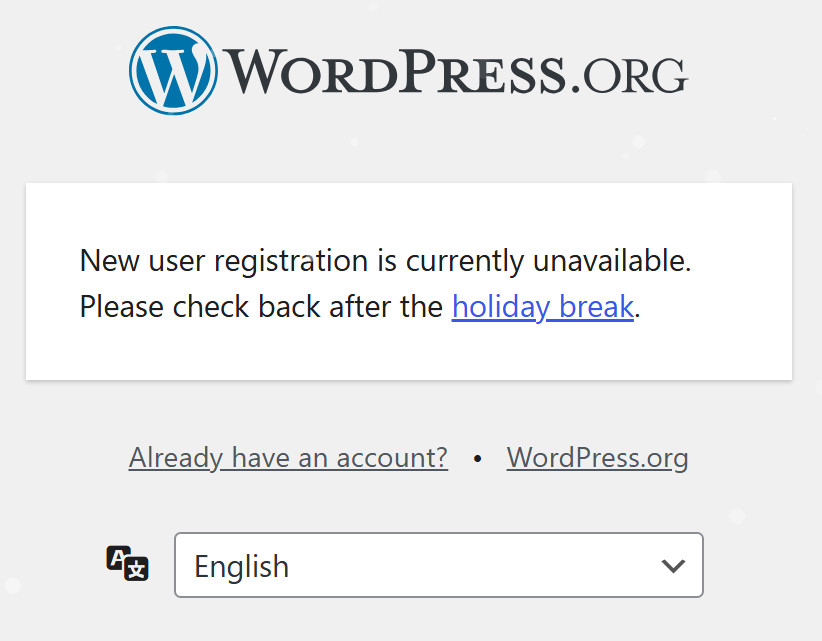
WordPress.org Announces Holiday Break Amidst Legal Battle with WP Engine

WordPress.org, the open-source platform powering millions of websites worldwide, has announced a temporary pause on several core services. This decision comes amidst an escalating legal dispute with web hosting giant WP Engine.
The dispute centers around WP Engine's use of the WordPress name and platform. WordPress.org maintains that WP Engine has profited significantly from the open-source project without adequately contributing back to its development and community.
Key WordPress Services Temporarily Unavailable:
- New Account Registrations: While users can still install
The War on WordPress: WP Engine vs. Matt Mullenweg Heats Up (September 2024 Update)
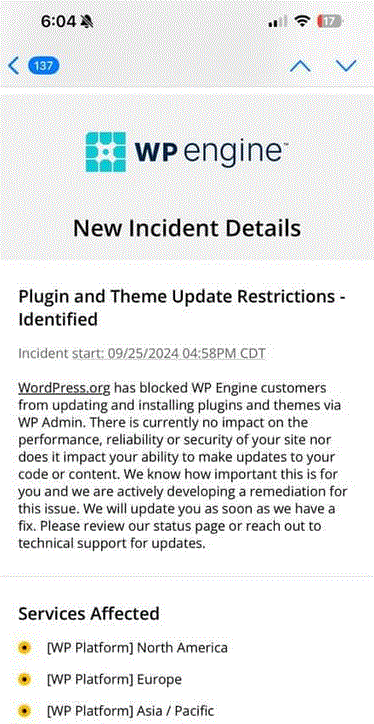
The WordPress community has been rocked by a dramatic public feud between WP Engine, a leading managed WordPress hosting provider, and Matt Mullenweg, the co-founder of WordPress.org. This isn't your typical software spat – it's a full-blown battle with accusations, legal threats, and potential consequences for millions of website owners. Let's unpack the events that unfolded in September 2024:
Seeds of Discord (Early September):
The tension began simmering when Matt Mullenweg,
... Continue reading
Posted in Compare Website Builders, Technology in the News
Tagged Automattic legal dispute, UltimateWB vs WordPress, WordCamp U.S. 2024, WordPress admin bar, wordpress blog, WordPress controversy, WordPress core features, WordPress ecosystem, WordPress feud, WordPress hosting, WordPress open source, wordpress plugins, WordPress site management, WordPress themes, wordpress.org, WP Engine ban, WP Engine contributions, WP Engine legal threats, WP Engine trademark, WP Engine vs Matt Mullenweg
Leave a comment
Do WordPress plugins sometimes leave stuff on your website after uninstalling the plugin?

Yes, WordPress plugins can sometimes leave leftover data on your website after uninstalling them. It is another drawback to using WordPress plugins, besides security issues. (And it's not just WordPress, but also other open source platforms like Magento, Drupal, and Joomla.)
Data Uninstalled Plugins may leave behind on your website:
- Database tables: Some plugins create their own tables in your WordPress database to store settings or data. If the plugin doesn't properly clean up after itself during uninstall, these
Website Builder Showdown: Wix vs. WordPress vs. UltimateWB – Finding the Ultimate Winner!

So, you've decided to conquer the world of website building, but with the plethora of options available, how do you choose the best one for you? Fear not, my friends; we're here to pit three mighty contenders against each other in the ultimate showdown: Wix vs. WordPress vs. UltimateWB. Let's dive in and uncover the champion among website builders!
Wix: Embrace Simplicity and Stunning Designs
Wix is like the cool kid on the block, flaunting its easy drag-and-drop interface. If
... Continue reading
Posted in Compare Website Builders
Tagged Wix, wix limitations, WordPress, wordpress hacked, wordpress plugins
Leave a comment
Can I use a Shopify theme with WooCommerce?

Short answer: no, you can’t. It sounds simple, but it’s not - Shopify themes aren’t compatible with WooCommerce (a WordPress plugin). Don’t worry: we’ll explain why, and show the easiest ways to get the look and functionality you want.
Related: Do you really own your WordPress website?
Why Shopify Themes Don’t Work on WooCommerce
Shopify and WooCommerce use completely different theme systems:
- Shopify themes are built with Liquid, Shopify’s proprietary template language.
- WooCommerce themes run on WordPress and use
Posted in Ask David!
Tagged css, e-commerce, e-commerce themes, html, javascript, online store, php, plugin compatibility, Shopify, shopify connect, Shopify theme, shopify vs woocommerce, shopify with woocommerce, third party plugins, website design, woocomerce, woocommerce, woocommerce safety, WooCommerce theme, WordPress, wordpress hacked, wordpress plugins, WordPress themes
Leave a comment
Which platform is best for a fast performing website in 2020?
UltimateWB - it’s very fast loading, and also very fast and easy to build your website with it. It has a lot of built-in apps that you can use and customize, so unlike other platforms, your website is not slowed down with third party plugins. You can build any type of website with UltimateWB.
Got a techy/website question? Whether it’s about UltimateWB or another website builder, web hosting, or other aspects of websites, just send in your question in the
... Continue reading