





-
Recent Posts
- “My Partner Wants to Use WordPress Because 50% of the Web Uses It. Help!”
- Does EmDash Solve WordPress’s Problems, or Do You Need UltimateWB?
- How Not to Use AI: Stanford University Can Tell You
- Best Website Builder for SEO: WordPress vs. Wix vs. UltimateWB
- How to Make Sure Your Website Colors Have Enough Contrast for Accessibility
- Mobile-Friendly Website Checklist: 20 Things to Check
- Beehiiv Website Builder Review: The Problem Isn’t the Design – It’s the Lack of Control
- Elementor’s “Angie” AI Is More Than Bloat: Credits, Subscriptions, and a Growing Platform Problem
- How to Pass Google Business Profile Video Verification for Service Businesses
- The Great Deskilling: Why AI Dependence is Turning Developers into Prompt Babysitters
- The Three-Month Fuse: The Everest Forms Pro Attack and Why a Patched Plugin Can Still Put Websites at Risk
- Computer Screen Has Black Bars on the Sides: How to Fix It
- Could AI Make Humans Extinct Within the Next Decade?
- Is Weebly Getting Out of the Website-Builder Business?
- Are You “Leaking SEO” by Linking to Other Websites?
- Wix Harmony Is Now in Google Gemini. So Why Are Users Still Complaining?
- When AI Sounds Confident but Gets It Wrong: The Mount Shasta Rescue
- When AI Agents Start Working Together, Who Is Really in Control?
Categories
Tag Archives: htaccess
Thinking About Switching From WordPress? What Should You Consider Before You Move?

Ask David!
I'm thinking about switching from WordPress to another platform.
It's not a complicated website, but over the years, I've had to add many plugins, for SEO, security, backups, forms, page building, etc. It feels like my website is living in an old house, and we're just waiting for the roof to leak, or something to break. I've been googling for discussions about migrating away from WordPress and found UltimateWB. Most other discussions I've found are the opposite, and
Posted in Ask David!, Compare Website Builders
Tagged 301 redirects, AI website builder, cpanel, css, custom url, customizable, drag-and-drop alternative, drag-and-drop website builder, duda, easy maintenance, flexible, htaccess, html, javascript, migrating website, ownership, page history tool, redirects, responsive app, switching website builders, third-party plugins, web hosting choice, Wix, WordPress, wordpress alternative, WYSIWYG
Leave a comment
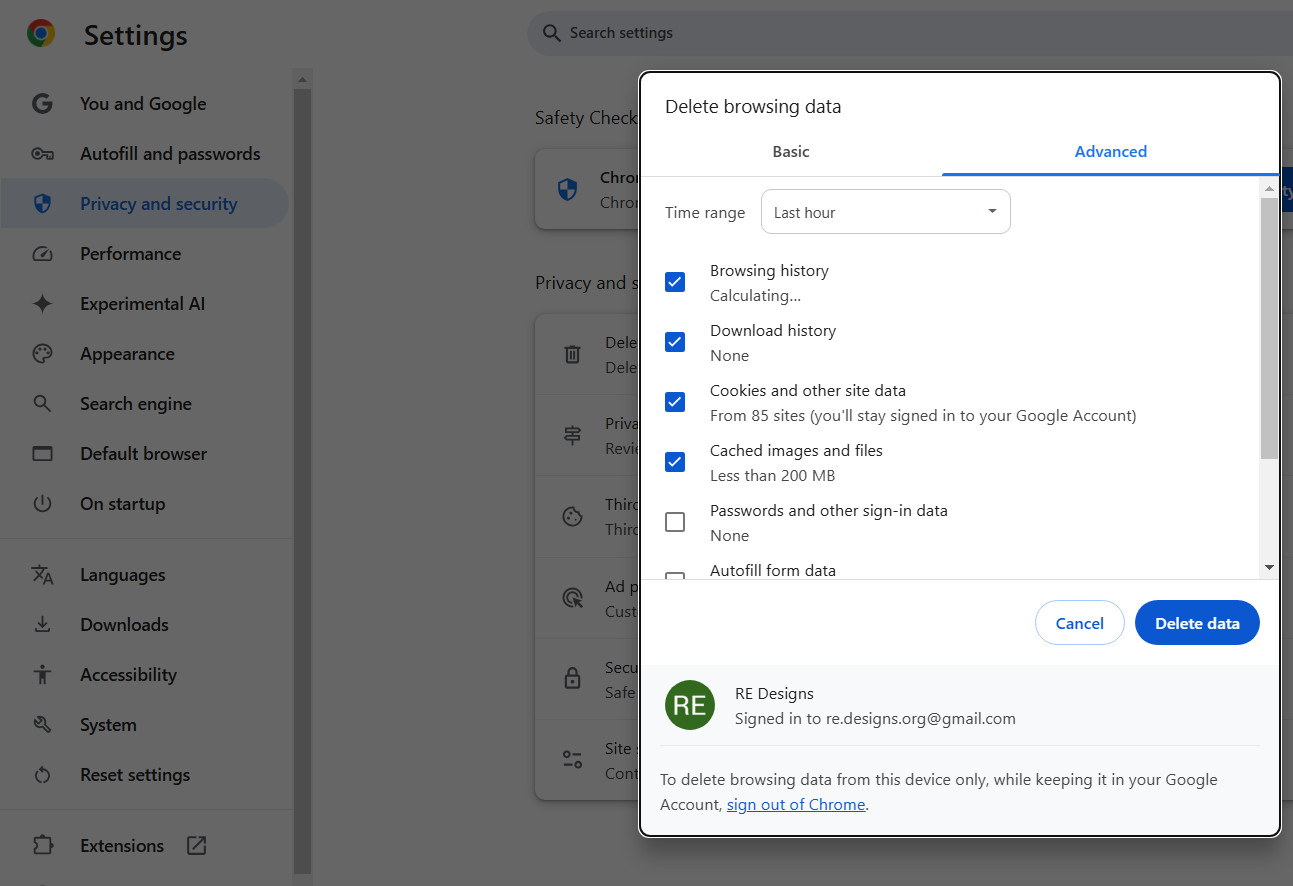
How to Clear Your Internet Browser Cache on Desktop and Mobile

In our previous post, Do Your Website Visitors Have to Clear Their Browser Cache? Here’s Why That’s a Problem - And Why You Don’t Need to Worry with UltimateWB, we talked about how you don't want to require your website visitors to clear their cache, and how UltimateWB is the solution for that. But, in case you need to clear your cache on a device and you don't know how, here it is...
Starting with the basics...
What Is
... Continue reading
Posted in Announcements
Tagged apple safari, caching, cdn, clear browser cache, clear cache, clear data, clear history, desktop, fast loading times, fast website, google chrome, htaccess, ios, ipad, iphone, macos, microsoft edge, mozilla firefox, pagespeed insights, safar, website data, website speed
Leave a comment
Can Technical SEO Issues Trigger HCU Penalties? Here’s What You Should Know

When Google rolls out a major algorithm update like the Helpful Content Update (HCU), many websites see fluctuations in their rankings. While HCU is mostly designed to reward content that is written for humans, not for search engines, some technical SEO issues can inadvertently make your site look less helpful to users - and that could get you caught in the crossfire.
After analyzing several SEO case studies and forums, and from personal experience fixing penalized sites,
... Continue reading
Posted in Ask David!, Search Engine Optimization (SEO)
Tagged .htaccess, 301 redirect, 404 errors, broken pages, core web vitals, crawl, crawl errors, crawl traps, crawlability, defer js, duplicate content, fast loading times, free ssl, hcu, hcu penalties, helpful content update, high-quality content, htaccess, htaccess redirects, internal links, javascript, meta robots, mobile-friendly test, noindex, outbound links, redirect loops, rich results test, robots.txt, screaming frog, search engine optimization, search engine ranking, seo, seo issues, speed, ssl, technical seo, thin content, trust, user experience, webp, webp converter
Leave a comment
WebP vs. JPG/PNG: Should You Use Fallback Images for Compatibility?

Optimizing images for performance is crucial. It is one of the scoring factors on Google's PageSpeed Insights, making it important for search engine optimization too. One of the biggest decisions web developers and website owners face is whether to upload images exclusively as WebP or provide JPG/PNG fallback versions for compatibility. The UltimateWB website builder makes it easy to create WebP images and include JPG/PNG fallback versions in the code with the click
... Continue readingWhen do you use a 301 redirect vs 410 redirect?

Choose a 301 Redirect when:
- The content has moved permanently: You've simply relocated the page to a new URL.
- You want to preserve SEO value: 301 redirects pass most of the link equity and ranking signals from the old URL to the new one.
- A relevant replacement exists: The old page has a clear and related counterpart on your website.
Choose a 410 Response when:
- The content is permanently gone: The page has been deleted and will never return.
- No
Does Google have a 410 redirect budget?

The concept of a fixed "410 redirect budget" for websites is not a formally defined term by Google. However, the number of 410 (Gone) responses in your .htaccess file can indirectly impact your website's SEO in a few ways:
- Crawl Budget: While not a strict budget, search engines like Google have a finite amount of resources to crawl and index your website. Excessive 410 responses can signal to the search engine that these pages are no longer relevant, potentially diverting
Posted in Ask David!, Search Engine Optimization (SEO), Website Design
Tagged 410 redirect, bloat, bounce rate, broken links, duplicate content, fast loading times, high-quality content, htaccess, redirect, search engine optimization, search engine ranking, seo, slow website, technical seo, user engagement, user experience, website health
Leave a comment
Should you have two versions of your images on your website – WebP and one of the classic formats like JPG or PNG?

Yes, you should generally have two versions of your images on your website:
- WebP: This modern format offers significantly better compression than traditional formats like JPEG, resulting in smaller file sizes and faster loading times.
- JPEG/JPG (or another widely supported format like PNG): This serves as a fallback for browsers that don't support WebP.
Here's why this approach is beneficial:
- Improved Performance: WebP significantly reduces page load times for users with compatible browsers, leading to better user experience
Posted in Ask David!, Website Design
Tagged classic image fomat, convert to webp, fast loading times, htaccess, picture tag, webp, webp converter, webp vs jpg
Leave a comment
How to Keep Bounce Rate in Check? Tips for a Successful Website

Bounce rate, the percentage of visitors who leave your website after viewing only one page, is a crucial metric for website success. A high bounce rate can indicate that your content isn't engaging or relevant to your target audience. Here are some tips to help you keep your bounce rate in check:
1. Optimize Page Load Speed
- Compress images: Reduce file sizes to speed up loading times.
- Minify CSS and JavaScript: Remove unnecessary characters to optimize code. If you use
Posted in Ask David!, Website Design, Website Traffic
Tagged a/b testing, bloat, bounce rate, branding, broken links, browser caching, call to action, cdn, clean code, clear navigation, compress images, consistent branding, easy navigation, fast loading times, fast website builder, google analytics, Google Search Console, high-quality content, htaccess, https, internal linking, intuitive layout, keyword research, meta descriptions, minify css, minify javascript, minimize redirects, mobile friendly, page load speed, responsive, responsive app, search engine optimization, search engine ranking, seo, server errors, ssl, strong visuals, successful, target keywords, touchscreens, user testing
Leave a comment
Do WordPress plugins sometimes leave stuff on your website after uninstalling the plugin?

Yes, WordPress plugins can sometimes leave leftover data on your website after uninstalling them. It is another drawback to using WordPress plugins, besides security issues. (And it's not just WordPress, but also other open source platforms like Magento, Drupal, and Joomla.)
Data Uninstalled Plugins may leave behind on your website:
- Database tables: Some plugins create their own tables in your WordPress database to store settings or data. If the plugin doesn't properly clean up after itself during uninstall, these
Maintain SEO Power During Your Website Migration & Rebuild: A Smooth Builder Switch

Ask David! question: "What is the process of migrating your website, doing a rebuild using the same domain with a different builder? Are there any potential issues that I need to be aware of?"
Answer:
Revamping your website? Don't lose SEO juice! Don't worry we've got your back.
This guide shows you how to seamlessly switch website builders while keeping your search engine ranking as you migrate your content. Learn redirect magic using .htaccess and how to leverage UltimateWB, a
... Continue reading