



-
Recent Posts
- “My Partner Wants to Use WordPress Because 50% of the Web Uses It. Help!”
- Does EmDash Solve WordPress’s Problems, or Do You Need UltimateWB?
- How Not to Use AI: Stanford University Can Tell You
- Best Website Builder for SEO: WordPress vs. Wix vs. UltimateWB
- How to Make Sure Your Website Colors Have Enough Contrast for Accessibility
- Mobile-Friendly Website Checklist: 20 Things to Check
- Beehiiv Website Builder Review: The Problem Isn’t the Design – It’s the Lack of Control
- Elementor’s “Angie” AI Is More Than Bloat: Credits, Subscriptions, and a Growing Platform Problem
- How to Pass Google Business Profile Video Verification for Service Businesses
- The Great Deskilling: Why AI Dependence is Turning Developers into Prompt Babysitters
- The Three-Month Fuse: The Everest Forms Pro Attack and Why a Patched Plugin Can Still Put Websites at Risk
- Computer Screen Has Black Bars on the Sides: How to Fix It
- Could AI Make Humans Extinct Within the Next Decade?
- Is Weebly Getting Out of the Website-Builder Business?
- Are You “Leaking SEO” by Linking to Other Websites?
- Wix Harmony Is Now in Google Gemini. So Why Are Users Still Complaining?
- When AI Sounds Confident but Gets It Wrong: The Mount Shasta Rescue
- When AI Agents Start Working Together, Who Is Really in Control?
Categories
Tag Archives: mozilla firefox
How to Restore Accidentally Closed Browser Windows and Tabs

Almost everyone has done it at some point: you accidentally close your browser and instantly realize you just lost a huge collection of tabs you still needed.
Fortunately, most major web browsers have included session restore features for many years now, making it easy to recover accidentally closed tabs and windows in seconds.
How to Restore Closed Windows in Google Chrome
If you accidentally closed all your Google Chrome windows:
- Open Chrome again
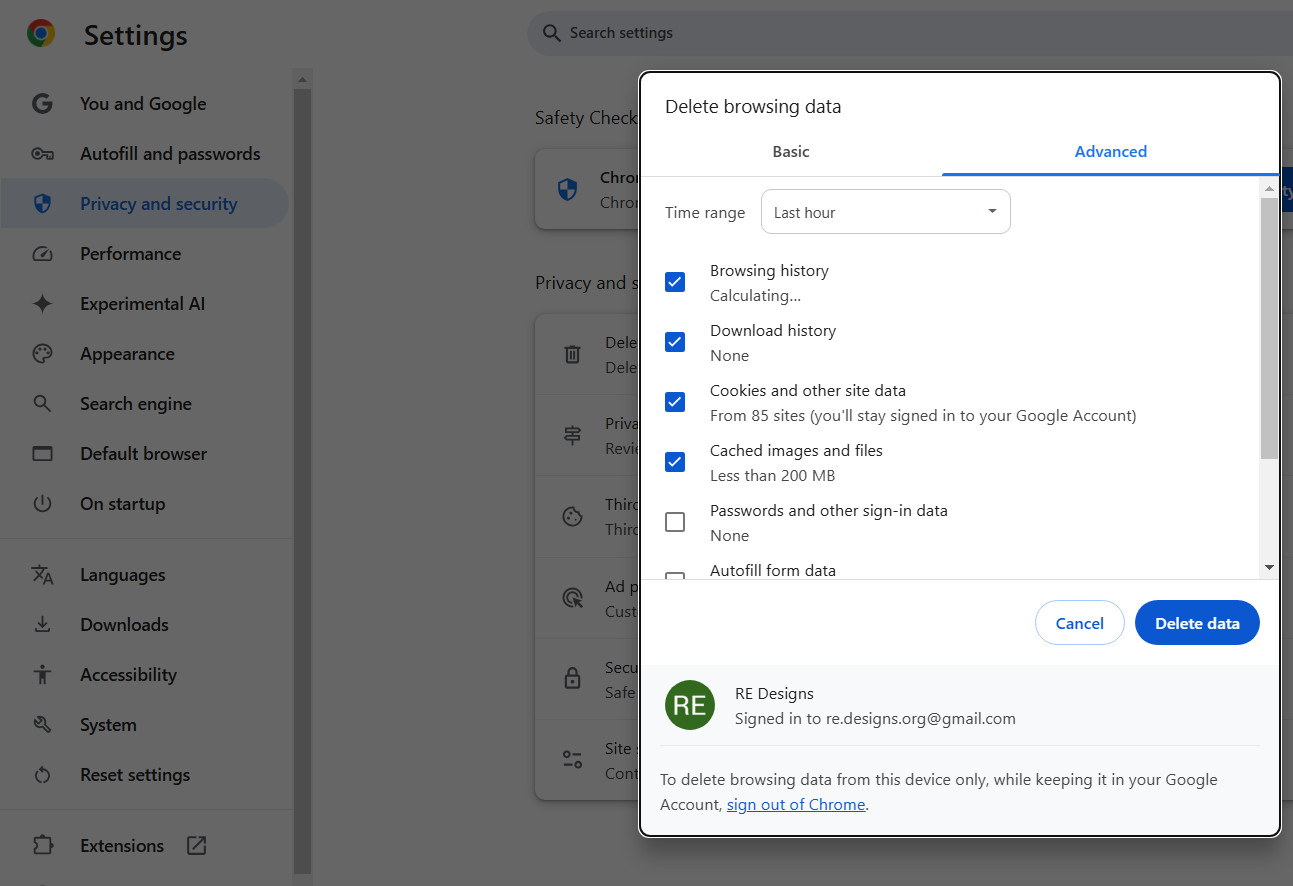
How to Clear Your Internet Browser Cache on Desktop and Mobile

In our previous post, Do Your Website Visitors Have to Clear Their Browser Cache? Here’s Why That’s a Problem - And Why You Don’t Need to Worry with UltimateWB, we talked about how you don't want to require your website visitors to clear their cache, and how UltimateWB is the solution for that. But, in case you need to clear your cache on a device and you don't know how, here it is...
Starting with the basics...
What Is
... Continue reading
Posted in Announcements
Tagged apple safari, caching, cdn, clear browser cache, clear cache, clear data, clear history, desktop, fast loading times, fast website, google chrome, htaccess, ios, ipad, iphone, macos, microsoft edge, mozilla firefox, pagespeed insights, safar, website data, website speed
Leave a comment
Browsers People Use to Visit Your Website – And the Surprise Visitor We Got This Week

It's Spring 2025. You might think everyone is browsing the web with the latest version of Chrome, Safari, or Firefox these days - but that’s not always the case. In fact, we recently had a surprising visit from someone using Internet Explorer 9.0. Yep, IE 9, which was released in 2011 and officially discontinued by Microsoft years ago, is still making rare appearances on the web.
This unexpected visit inspired us to dive deeper into what browsers users
... Continue reading
Posted in Website Traffic
Tagged accessibility, all browser-friendly, apple safari, bloat, browser compatibility, browser usage, css3, fallbacks, google analytics, google chrome, html5, ie, internet browsers, internet explorer, microsoft, microsoft edge, mobile-friendly, modern browsers, modern code, modern web standards, mozilla firefox, opera, optimize website, outdated coding practices, polyfills, responsive, responsive app, site performance, standardized code, The W3C Markup Validation Service, webp, webp converter, website performance, website traffic, website visitors
Leave a comment
How to Search in Incognito Mode?

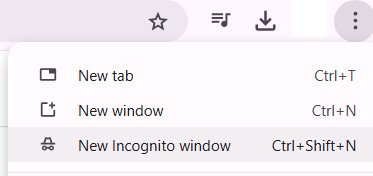
As mentioned in an earlier blog post, "How can I check the SEO ranking of my website?", it can be useful to search for your website's target keywords in Incognito Mode to check your search engine ranking without your personal search history influencing it.
Here's how to search in incognito mode in the most popular browsers:
- Google Chrome:
- Click the three vertical dots in the top-right corner of the browser.
- Select "New Incognito window."
- A new window will open
Microsoft releases Internet Explorer security patch, for Windows XP too

Posted in Technology in the News, Website Security
Tagged bug fix, internet explorer, microsoft, mozilla firefox, safari, security patch, windows xp
1 Comment
Internet Explorer bug, Use Google Chrome/Mozilla Firefox to avoid hacking
 UPDATE: Microsoft releases Internet Explorer security patch, for Windows XP too
If you are using Microsoft's Internet Explorer (IE), the U.S. Department of Homeland security is advising you to switch to another web browser until Microsoft releases a fix for a serious security issue. And if you are still a Microsoft XP user, as you may know, Microsoft has stopped support for this operating system April 8th of this year, so you should either keep using a different internet browser... Continue reading
UPDATE: Microsoft releases Internet Explorer security patch, for Windows XP too
If you are using Microsoft's Internet Explorer (IE), the U.S. Department of Homeland security is advising you to switch to another web browser until Microsoft releases a fix for a serious security issue. And if you are still a Microsoft XP user, as you may know, Microsoft has stopped support for this operating system April 8th of this year, so you should either keep using a different internet browser... Continue reading