






-
Recent Posts
- “My Partner Wants to Use WordPress Because 50% of the Web Uses It. Help!”
- Does EmDash Solve WordPress’s Problems, or Do You Need UltimateWB?
- How Not to Use AI: Stanford University Can Tell You
- Best Website Builder for SEO: WordPress vs. Wix vs. UltimateWB
- How to Make Sure Your Website Colors Have Enough Contrast for Accessibility
- Mobile-Friendly Website Checklist: 20 Things to Check
- Beehiiv Website Builder Review: The Problem Isn’t the Design – It’s the Lack of Control
- Elementor’s “Angie” AI Is More Than Bloat: Credits, Subscriptions, and a Growing Platform Problem
- How to Pass Google Business Profile Video Verification for Service Businesses
- The Great Deskilling: Why AI Dependence is Turning Developers into Prompt Babysitters
- The Three-Month Fuse: The Everest Forms Pro Attack and Why a Patched Plugin Can Still Put Websites at Risk
- Computer Screen Has Black Bars on the Sides: How to Fix It
- Could AI Make Humans Extinct Within the Next Decade?
- Is Weebly Getting Out of the Website-Builder Business?
- Are You “Leaking SEO” by Linking to Other Websites?
- Wix Harmony Is Now in Google Gemini. So Why Are Users Still Complaining?
- When AI Sounds Confident but Gets It Wrong: The Mount Shasta Rescue
- When AI Agents Start Working Together, Who Is Really in Control?
Categories
Tag Archives: ui
Webflow’s Client Seats Complicate Ownership – How UltimateWB Gives Control Back

The recent Reddit discussion around Webflow’s new Client Seats isn’t just frustration over pricing changes. It highlights a deeper issue: when access, pricing, and control are tied to accounts instead of the website itself, complexity and dependency follow.
That distinction matters - and not all platforms handle it the same way.
Yes, Most Platforms Have Admin Panels - But Not All Ownership Models Are Equal
Nearly every website platform provides an admin panel. That’s not the differentiator.
The real difference
... Continue reading
Posted in Compare Website Builders
Tagged admin access, admin panel, agency, built-in apps, built-in features, flexibility, freelancer, hosting choice, lock-in, ownership, reddit, seat type, ui, ultimatewb vs. webflow, user interface, webflow, webflow alternative, webflow pricing, website control, workspace, workspace costs
Leave a comment
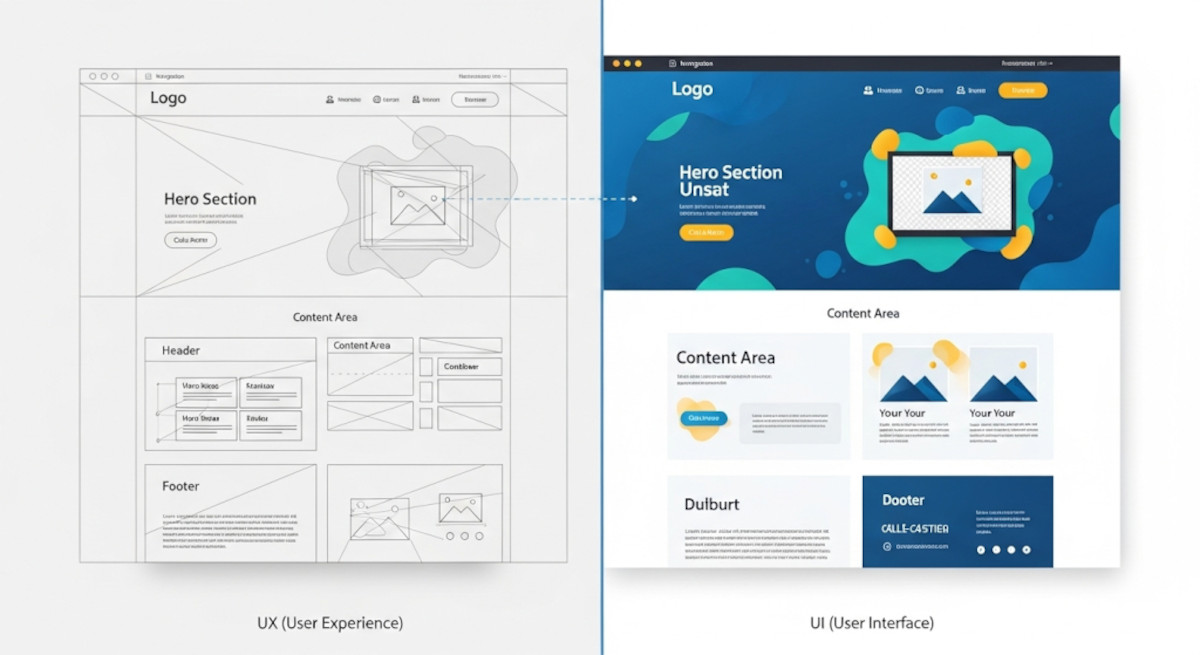
UX vs UI: Understanding the Key Differences in Web Design

When it comes to web design and app development, you’ve probably heard the terms UX and UI thrown around. While they often appear together, they are not the same thing - and understanding the difference is crucial for building a website or app that not only looks great but also works intuitively for users.
What is UX?
UX stands for User Experience. It’s all about how a person feels when interacting with your product. A good UX design ensures
... Continue reading
Posted in Website Design
Tagged colors, easy navigation, fonts, interaction design, typography, ui, usability, user experience, user interface, ux, website design
Leave a comment
Best Website Builder for Developers – PHP/MySQL Flexibility with UltimateWB

If you're a developer, you've probably been frustrated by the limitations of most no-code website builders. They’re great for beginners, but when it comes to custom functionality - like PHP scripting, MySQL integration, or direct database access - they hit a wall fast.
Whether you're building a website for a client or launching your own project, you shouldn’t have to choose between convenience and control.
... Continue reading
Posted in Compare Website Builders
Tagged analytics, bloat, clean code, clean urls, cms, coders, css, custom code, database, drag-and-drop alternative, drag-and-drop website builder, dreamweaver, dreamweaver alternative, dreamweaver vs ultimatewb, fast loading times, fast web hosting, fast-loading website, flexibility, friendly urls, html, meta description, meta title, mobile-friendly, mysql, performance, php, plugins, request features, responsive, responsive design, scalability, schema, search engine optimization, seo, squarespace, structured data, ui, user interface, user-friendly, web developer, web hosting, web hosting choice, webflow, webp, webp converter, website speed, weebly, Wix, WordPress
Leave a comment
When does it make sense to build a website versus an app ?

Choosing between building a website and an app depends heavily on your target audience, desired user experience, and business goals. Websites offer broader reach and easier discovery, while apps excel at providing enhanced user experiences, offline functionality, and high user engagement.
Build a Website When:
- Broader Reach: You want to reach the widest possible audience, including those on desktops, laptops, tablets, and smartphones.
- Easier Discovery: You rely heavily on search engine optimization (SEO) to drive traffic.
- Lower Barrier to Entry:
Posted in Ask David!, Website Design
Tagged app development, budget, business goals, competition, database, mobile app, offline functionality, progressive web app, push notifications, pwa, resources, search engine optimization, seo, showcase, target audience, ui, user experience, user interface, ux, web app, website development, website vs app
Leave a comment
How do I know if my website needs a UI redesign, and how much does it typically cost?

Is Your Website Ready for a Refresh?
A well-designed website is crucial for attracting and retaining visitors. Here are some signs that your website might need a UI redesign:
- Outdated Look and Feel: Does your website look outdated or not visually appealing?
- Poor User Experience: Is it difficult for visitors to find information or complete desired actions?
- Low Conversion Rates: Are you not converting visitors into customers or leads?
- Mobile friendly?: Does your website not display well
Website Design Checklist: Boost Conversions and User Experience
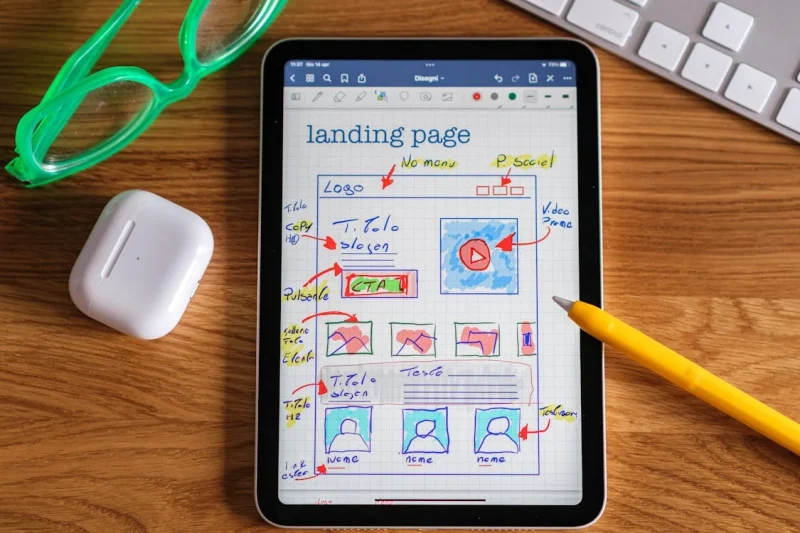
A well-designed website is more than just aesthetically pleasing; it’s a powerful tool that can significantly impact your business's success. To ensure your website is optimized for conversions and user experience, consider these crucial questions:
Clarity and Navigation
- Does everything make sense? Is the content clear, concise, and easy to understand? Avoid jargon and technical terms that might confuse visitors.
- Does it flow well? Is the information presented in a logical sequence, guiding visitors smoothly from one section to
Posted in Website Design
Tagged a/b testing, analytic tools, analytics, branding, calls to action, clarity, color psychology, color scheme, contact form, conversion rate optimization, conversions, cro, cta, easy navigation, fonts, functionality, functionality vs design, increase conversions, mobile-friendly, navigation, privacy policy, responisve, responsive app, terms of service, tos, transparency, trust, typography, ui, user experience, user interface, ux, website analytics, website flow, website optimization
Leave a comment
What benefits do breadcrumbs have for the SEO of a website or blog site?

Breadcrumbs offer a two-fold benefit for SEO: they improve user experience (UX) which indirectly helps SEO, and they also send signals directly to search engines like Google about your website structure.
Improved User Experience:
- Clearer Navigation: Breadcrumbs act like a mini-map for users, letting them see their current location within the website's hierarchy and providing a way to navigate back to higher-level pages. This is especially helpful for
What are the key factors to consider when building a user-friendly website or mobile application for a digital business?

When building a user-friendly website or mobile app for a digital business, several key factors come into play. Here are some of the most important ones to consider:
User Needs and Goals:
- Understand your target audience: Who are you building for? What are their needs, expectations, and pain points? Conduct user research to gather insights and inform your design decisions.
- Focus on user goals: What do you want users to achieve on your platform? Ensure every element and interaction facilitates those goals seamlessly.
- Prioritize clarity
Posted in Ask David!, Website Design
Tagged a/b testing, accessibility, calls to action, community, content, engagement, fast loading times, responsive app, responsive design, responsive web design, responsive website, target audience, ui, user experience, user interface, user-friendly website, ux
Leave a comment
Essential Elements for a Successful Business Website

A well-designed and effective business website is crucial for establishing a strong online presence, attracting customers, and driving business growth. Whether you are a startup or an established company, understanding the essential elements that contribute to a successful business website is paramount. In this blog post, we will explore the key components that can make your business website stand out, engage visitors, and convert them into loyal customers. Let's dive in!
Clear and Compelling Messaging
The messaging on your business
... Continue reading
Posted in Computer Tips, Website Design
Tagged branding, business website, call-to-action, contact info, content creation, conversion omptimization, customer engagement, mobile-friendly, navigation menu, responsive design, search engine optimization, seo, social proof, testimonials, ui, user experience, user interface, web development, website dsign
Leave a comment