




-
Recent Posts
- “My Partner Wants to Use WordPress Because 50% of the Web Uses It. Help!”
- Does EmDash Solve WordPress’s Problems, or Do You Need UltimateWB?
- How Not to Use AI: Stanford University Can Tell You
- Best Website Builder for SEO: WordPress vs. Wix vs. UltimateWB
- How to Make Sure Your Website Colors Have Enough Contrast for Accessibility
- Mobile-Friendly Website Checklist: 20 Things to Check
- Beehiiv Website Builder Review: The Problem Isn’t the Design – It’s the Lack of Control
- Elementor’s “Angie” AI Is More Than Bloat: Credits, Subscriptions, and a Growing Platform Problem
- How to Pass Google Business Profile Video Verification for Service Businesses
- The Great Deskilling: Why AI Dependence is Turning Developers into Prompt Babysitters
- The Three-Month Fuse: The Everest Forms Pro Attack and Why a Patched Plugin Can Still Put Websites at Risk
- Computer Screen Has Black Bars on the Sides: How to Fix It
- Could AI Make Humans Extinct Within the Next Decade?
- Is Weebly Getting Out of the Website-Builder Business?
- Are You “Leaking SEO” by Linking to Other Websites?
- Wix Harmony Is Now in Google Gemini. So Why Are Users Still Complaining?
- When AI Sounds Confident but Gets It Wrong: The Mount Shasta Rescue
- When AI Agents Start Working Together, Who Is Really in Control?
Categories
Tag Archives: customization
Looking for a Website Builder Without AI? Which One Should You Choose?

If you have spent any time recently searching for a way to build a website, you have probably noticed a pattern: almost every major platform is pushing “AI website generators” or “AI website builders.”
They promise you can type in a single prompt and have a complete, published website in thirty seconds. But as hundreds of creators, developers, and small business owners on Reddit and web design forums are pointing out, the reality is rarely that simple.
If you are
... Continue reading
Posted in AI, Compare Website Builders
Tagged ai costs, AI website builder, all-in-one website builder, backend, backlinks, bloat, brand consistency, brand identity, branding, clean code, colors, control, css, customizable, customization, easy website builder, fast website, flexibility, fonts, high-quality content, html, no ai, ownership, performance, php, Prompt-Based Web Design, saas, server access, subscription fees, third-party plugins, typography, user experience, website builder without ai
Leave a comment
Website Builder vs. Content Management System (CMS): Which One Do You Need?

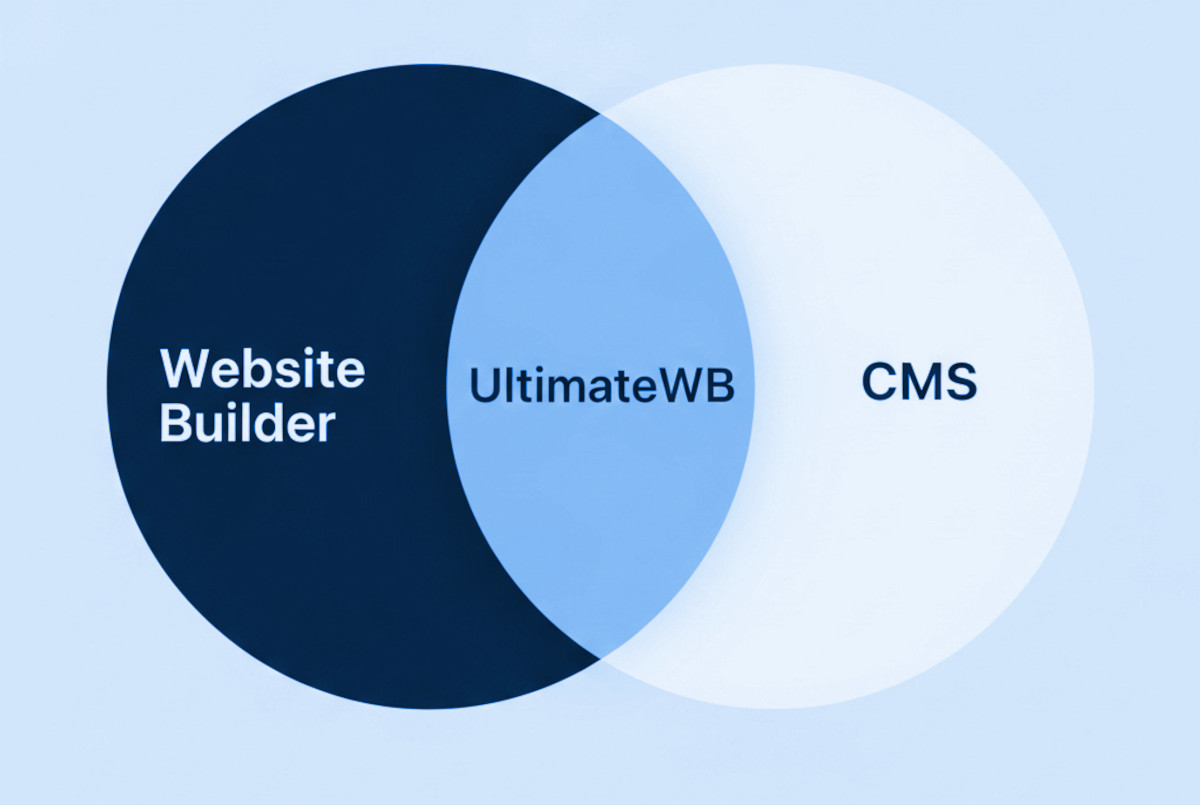
If you’re researching how to create a website, you’ve probably come across the terms “website builder” and “CMS” (Content Management System). Many people think a website builder and a CMS are completely different - and in the way these terms are used in marketing, they usually are. But in reality, a CMS is a type of website builder, and some website builders (like UltimateWB) are also full CMS platforms.
Think of it like squares and rectangles:
- All CMS
Posted in Ask David!, Compare Website Builders
Tagged beginner friendly, clean url, cms, content management system, css, customization, e-commerce website, fast website, html, javascript, meta tags, no coding required, no-code website builder, powerful website builder, search engine optimization, seo, seo-friendly, small business website, speed, web hosting, web hosting choice, website builder, website builder vs cms, website building, website design, website platform comparison, website speed
Leave a comment
UltimateWB vs. PhotoShelter vs Zenfolio: What is the best photography website builder?

Are you a photographer searching for the perfect platform to build a stunning website and showcase your work to the world? In this blog post, we'll take a close look at three popular website builders: UltimateWB, PhotoShelter, and Zenfolio. We'll explore the features, benefits, and drawbacks of each platform and explain why UltimateWB stands out as an exceptional choice for photographers.
UltimateWB: The Power of Customization
- Image Delivery and Sales: UltimateWB offers robust image delivery and sales capabilities.
Posted in Compare Website Builders
Tagged blog, customization, digital downloads, e-commerce, image galleries, licensing options, photo galleries, photo gallery, photography website builder, photoshelter, photoshelter vs zenfolio, responsive, responsive app, sales, sell prints, zenfolio
Leave a comment
How do I make my website look a bit handmade or like it is my own handwriting?

To give your website a handmade or handwritten feel, follow these steps:
Custom Fonts:
Choose unique, handwritten, or script-style fonts for your website's text. This can add a personalized touch to your content. Just be sure the font remains readable.
Handwritten Graphics:
Create custom graphics or icons using your own handwriting or hand-drawn designs. These can be used as logos, buttons, or decorative elements throughout your site.
Background Textures:
Consider using background textures that resemble paper or canvas to create
... Continue reading
Posted in Ask David!, Website Design
Tagged custom design, customization, handmade look, handwriting, page editor, styles manager
Leave a comment
Navigating Costs: The Transparency of Website Builders and Hidden Fees

How to Spot Hidden Fees in Website Builders
Many website builders advertise themselves as cheap - or even free. But the true ongoing cost is often hidden in tactics like first-year discounts, subscription-locked features, and renewal price jumps.
The builder that looks cheapest at first often becomes the most expensive over time - due to high renewal prices and a pricing structure that lacks transparency
This post explains the common tactics to watch for so you don’t get
... Continue readingWhy WordPress Page Builders Fall Short – and What to Use Instead

WordPress page builders promise an easy way to build websites without coding - but they often create more problems than they solve. From bloated code to compatibility headaches, they can drag down performance and limit your design freedom.
Before diving into the better option, let’s break down the biggest issues users face with WordPress page builders.
The Drawbacks of Using a WordPress Page Builder
1. Complexity and Learning Curve:
- WordPress page builders can be complex and overwhelming for beginners or
Posted in Ask David!, Compare Website Builders
Tagged compatibility, customization, fast website builder, fast-loading times, flexible website design, loading time, page builder drawbacks, page builder limitations, user-friendly, web design tools, website building solutions, website customization, website development tips, website speed optimization, WordPress, wordpress alternative, wordpress page builder, WordPress performance problems, WordPress plugin conflicts
Leave a comment
Free Website Builder for Nonprofits: UltimateWB Features and Benefits

A nonprofit website is more than just a place to share information - it is often the first place people connect with your mission, understand your impact, and decide to support your work.
For many organizations, building and maintaining a professional website can feel challenging due to limited budgets and technical resources.
UltimateWB helps remove that barrier by giving you flexible website building tools - and offering a free website builder option for eligible nonprofit organizations, so more of
... Continue reading
Posted in Announcements
Tagged branding, cpanel, customizable, customization, donations, engagement, flexibility, free ssl, free website builder, fundraising, mobile-friendly, non-profit organization, nonprofit fundraising, nonprofit organization, nonprofits, ownership, responsive, responsive app, secure hosting, seo, social media, ssl, ultimatewb cloud, visibility, web hosting, web hosting choice
Leave a comment
How to Add a Comments Section to Your Webpages and Why It Matters
Are you looking to increase user engagement on your website? Want to build a sense of community around your content? It's time to consider adding a comments section to your
... Continue reading