




-
Recent Posts
- “My Partner Wants to Use WordPress Because 50% of the Web Uses It. Help!”
- Does EmDash Solve WordPress’s Problems, or Do You Need UltimateWB?
- How Not to Use AI: Stanford University Can Tell You
- Best Website Builder for SEO: WordPress vs. Wix vs. UltimateWB
- How to Make Sure Your Website Colors Have Enough Contrast for Accessibility
- Mobile-Friendly Website Checklist: 20 Things to Check
- Beehiiv Website Builder Review: The Problem Isn’t the Design – It’s the Lack of Control
- Elementor’s “Angie” AI Is More Than Bloat: Credits, Subscriptions, and a Growing Platform Problem
- How to Pass Google Business Profile Video Verification for Service Businesses
- The Great Deskilling: Why AI Dependence is Turning Developers into Prompt Babysitters
- The Three-Month Fuse: The Everest Forms Pro Attack and Why a Patched Plugin Can Still Put Websites at Risk
- Computer Screen Has Black Bars on the Sides: How to Fix It
- Could AI Make Humans Extinct Within the Next Decade?
- Is Weebly Getting Out of the Website-Builder Business?
- Are You “Leaking SEO” by Linking to Other Websites?
- Wix Harmony Is Now in Google Gemini. So Why Are Users Still Complaining?
- When AI Sounds Confident but Gets It Wrong: The Mount Shasta Rescue
- When AI Agents Start Working Together, Who Is Really in Control?
Categories
Tag Archives: cms
Web Design Fundamentals: A Beginner’s Guide

Introduction
Web design is the art and science of creating websites. It involves planning, creating, and maintaining websites. If you're interested in learning web design, this guide will provide you with the fundamental concepts and tools to get started. Click on the links for more discussion on the topic.
Core Principles of Web Design
- User Experience (UX): The focus should be on creating a seamless and intuitive experience for users.
Posted in Website Design
Tagged accessibility, adobe photoshop, atom, avoid clutter, cms, code editors, color theory, colors, content is king, create a mood, css, custom code, custom fonts, design tools, evoke emotions, Figma, fixed, fluid, fonts, grid, hierarchy, high-quality content, html, illustrator, javascript, keep it simple, keywords, layout, navigation, readability, responisve, responsive, responsive app, search engine optimization, seo, seo tips, styles manager, stylesheet, sublime text, typography, user experience, user interface, ux, visual appear, visual studio code, wcag, web content accessibility guidelines, web design trends, whitespace
Leave a comment
UltimateWB: Streamlining Website Management, Even for Simple Sites

For website owners, maintaining consistency across pages while ensuring flexibility for updates is crucial. This is where a tool like UltimateWB can make a significant difference, even for simple websites.
The Challenge of Manual Changes
Traditionally, updating headers or footers on multiple pages involved manual edits to each individual HTML file. This can be time-consuming and error-prone, especially for websites with many pages.
UltimateWB's Solution
UltimateWB addresses this challenge by
... Continue reading
Posted in Announcements
Tagged cms, easy updates, efficiency, flexibility, footer, header, scalability
Leave a comment
How to Design Your Own Website: A Step-by-Step Guide

You don't have to be a professional web designer or developer to design your own website. With the right website builder and a good plan, you can create the pages, layout, navigation, and overall look of your website yourself.
The key is to approach website design as a process. Before you start adding colors and images, figure out what pages you
... Continue reading
Posted in Website Design
Tagged branding, choose website builder, cms, colors, content is king, create your own website, design your own website, fonts, high-quality content, launch website, layout, navigation, responsive, search engine optimization, seo, site maintenance tool, sitemap, sitemap generator, styles manager, target audeince, test, third-party plugins, typography, update website, website images, website maintainance, website objective
Leave a comment
How Long Does It Really Take to Build a Website? (Timeline Breakdown)

Whether you are building your own website or hiring a web development company to design it for you, one of the first questions you will ask is: How long will it take?
It’s the web design equivalent of asking "Are we there yet?" on a long road trip. You just want to know when you will finally reach your destination and launch.
The short answer? It can take anywhere from a few hours to six months or more.
The actual
... Continue reading
Posted in Ask David!, Website Design
Tagged all-in-one website builder, beginner friendly website builder, best website builder, build a website, cms, css, custom code, easy web design, expert flexible, html, javascript, mysql, php, quick web design, responsive, styles manager, templates generator, third-party plugins, web design packages, web design services, website development time
Leave a comment
What is the best CMS for fast loading websites?

Ask David! Question:
I want to have websites that run really fast, with minimum effort. So which website builder or CMS is the best for fast loading websites?
David's Answer:
What you want is a website builder that is also a CMS, built with a performance-first mindset. That means there is an emphasis on clean code and avoiding third-party plugins for the most part, which can add unnecessary bloat.
Among dynamic CMS options, a platform that keeps core features built
... Continue reading
Posted in Ask David!
Tagged best cms, bloat, caching, clean code, cms, conversions, css, database, dynamic, fast load times, fast loading times, fast website, fast-loading speed, hosted website builders, html, image compression, javascript, no plugins, page speed, performance, plugins, saas, scalability, search engine ranking, search ranking, security risk, third-party plugins, trust, trustworthy, user experience, web hosting, website speed, WordPress, WordPress themes
Leave a comment
CMS Website vs. Custom Website Coded From Scratch: Which Is Better?

Ask David
What are the benefits of using a pre-made content management system (CMS) website over a custom website made from scratch?
There are many advantages to starting with a Content Management System (CMS) rather than building every part of a website from scratch.
The biggest advantage is simple: you don't have to reinvent the wheel.
A good CMS can give you a substantial foundation of already-built functionality, while still
... Continue reading
Posted in Ask David!
Tagged cms, CMS benefits, CMS vs custom website, CMS website, code from scratch, content management system, css, custom coding, custom website, custom website development, flexible website builder, html, mysql, one-time fee, plugins, scalable, website builder, website customization, website maintenance
Leave a comment
How to add microinteractions on your website images that are links, the easiest way, without having to add more images?
UltimateWB website builder has built-in microinteractions for the navigation menu and links via hover effects. You can set the mouseover color and background colors easily via your website admin panel Styles Manager. If you would like to add microinteractions to your image links as well, you can do that with UltimateWB too - it is very flexible and customizable. Let's dive in the easiest way to do it! Spoiler: it's via CSS!
Adding Microinteractions to Your Linked Images: The Easy
... Continue reading
Posted in Ask David!, Website Design
Tagged accessibility, add class, brightness change on hover, change hue on hover, cms, css, custom code, image links, microinteractions, mouseover effects, page editor box, round edges, rounded background on hover, shadow effect, styles manager, user-friendly
Leave a comment
How to Test the Color Contrast of Your Website for Accessibility?

A website can look great and work well, but if the text is difficult to read because there isn't enough contrast between the colors, some visitors may struggle to use it.
Color contrast is an important part of website accessibility. Good contrast makes text and other elements easier to see and read, including for people with low vision or color vision deficiencies.
In this article, we'll look at how to
... Continue reading
Posted in Accessibility, Ask David!, Website Design
Tagged accessibility, accessibility compliance, accessibility testing, accessibility tools, cms, color accessibility, color contrast, color contrast ratios, contrast, contrast ratio, styles manager, wcag, WCAG 2.0, WCAG 2.1, web design, website accessibility, website design, website testing
Leave a comment
Step-by-Step Guide to Create a Responsive .com Website: Domain, Hosting, Design & Promotion
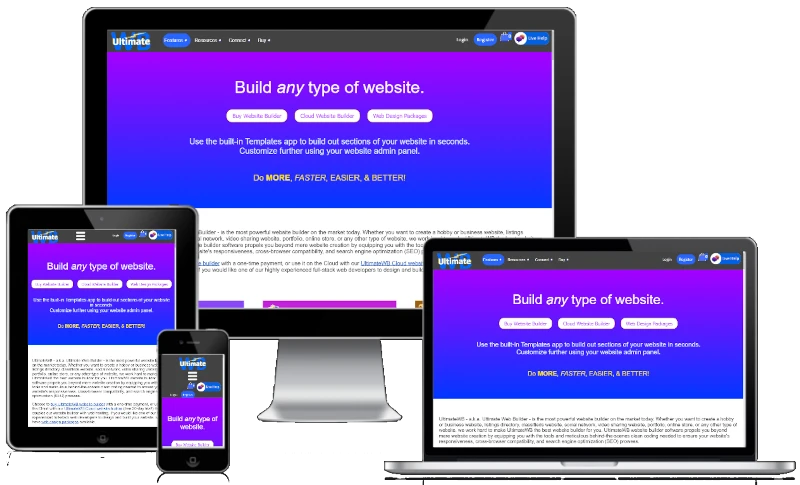
"Can you provide a detailed step by step guide to create a responsive .com website, including how and where to get a domain name, where to host my site, how to design it, and how to publicize the site?"
Having a professional and responsive website is essential for individuals and businesses alike. This guide will walk you through the detailed steps to create your own .com website using UltimateWB, an all-in-one website builder, including how to get a domain name,
... Continue reading
Posted in Ask David!, Website Design
Tagged buy domain name, buy website builder, check domain name availability, cms, design website, domain name, domain name availability, google analytics, Google Search Console, host website, mailing list, publicize website, register domain name, responsive app, step-by-step guide, styles manager, ultimatewb cloud, web hosting, web hosting choice
Leave a comment
What are your preferences for making a website custom or CMS-based? If choose one, why?
As a web developer, I prefer to use UltimateWB. It makes the web development process and maintainance a lot easier and faster. It has lots of built-in features that are very flexible and customizable, and you get web hosting choice - unlike hosted website builders like WIx, Weebly, or Squarespace - so you get the pros of building your website from scratch with also the pros of using a CMS.
Got a techy/website question? Whether it’s about UltimateWB or another
... Continue reading