






-
Recent Posts
- “My Partner Wants to Use WordPress Because 50% of the Web Uses It. Help!”
- Does EmDash Solve WordPress’s Problems, or Do You Need UltimateWB?
- How Not to Use AI: Stanford University Can Tell You
- Best Website Builder for SEO: WordPress vs. Wix vs. UltimateWB
- How to Make Sure Your Website Colors Have Enough Contrast for Accessibility
- Mobile-Friendly Website Checklist: 20 Things to Check
- Beehiiv Website Builder Review: The Problem Isn’t the Design – It’s the Lack of Control
- Elementor’s “Angie” AI Is More Than Bloat: Credits, Subscriptions, and a Growing Platform Problem
- How to Pass Google Business Profile Video Verification for Service Businesses
- The Great Deskilling: Why AI Dependence is Turning Developers into Prompt Babysitters
- The Three-Month Fuse: The Everest Forms Pro Attack and Why a Patched Plugin Can Still Put Websites at Risk
- Computer Screen Has Black Bars on the Sides: How to Fix It
- Could AI Make Humans Extinct Within the Next Decade?
- Is Weebly Getting Out of the Website-Builder Business?
- Are You “Leaking SEO” by Linking to Other Websites?
- Wix Harmony Is Now in Google Gemini. So Why Are Users Still Complaining?
- When AI Sounds Confident but Gets It Wrong: The Mount Shasta Rescue
- When AI Agents Start Working Together, Who Is Really in Control?
Categories
Category Archives: Website Design
Do You Need to Have Coding Experience to Build a Website with UltimateWB?

The short answer: No!
One of the most common questions people have when they’re thinking about building their own website is:
“Do I need to know how to code?”
With UltimateWB, you don’t.
You can start with no coding experience and build a complete, professional website using the built-in tools and applications.
But there’s another side to this, too.
If you do know how to code - or decide to learn along the way - you can use those
... Continue readingWhen do you use a 301 redirect vs 410 redirect?

Choose a 301 Redirect when:
- The content has moved permanently: You've simply relocated the page to a new URL.
- You want to preserve SEO value: 301 redirects pass most of the link equity and ranking signals from the old URL to the new one.
- A relevant replacement exists: The old page has a clear and related counterpart on your website.
Choose a 410 Response when:
- The content is permanently gone: The page has been deleted and will never return.
- No
Does Google have a 410 redirect budget?

The concept of a fixed "410 redirect budget" for websites is not a formally defined term by Google. However, the number of 410 (Gone) responses in your .htaccess file can indirectly impact your website's SEO in a few ways:
- Crawl Budget: While not a strict budget, search engines like Google have a finite amount of resources to crawl and index your website. Excessive 410 responses can signal to the search engine that these pages are no longer relevant, potentially diverting
Posted in Ask David!, Search Engine Optimization (SEO), Website Design
Tagged 410 redirect, bloat, bounce rate, broken links, duplicate content, fast loading times, high-quality content, htaccess, redirect, search engine optimization, search engine ranking, seo, slow website, technical seo, user engagement, user experience, website health
Leave a comment
Should you have two versions of your images on your website – WebP and one of the classic formats like JPG or PNG?

Yes, you should generally have two versions of your images on your website:
- WebP: This modern format offers significantly better compression than traditional formats like JPEG, resulting in smaller file sizes and faster loading times.
- JPEG/JPG (or another widely supported format like PNG): This serves as a fallback for browsers that don't support WebP.
Here's why this approach is beneficial:
- Improved Performance: WebP significantly reduces page load times for users with compatible browsers, leading to better user experience
Posted in Ask David!, Website Design
Tagged classic image fomat, convert to webp, fast loading times, htaccess, picture tag, webp, webp converter, webp vs jpg
Leave a comment
When does it make sense to build a website versus an app ?

Choosing between building a website and an app depends heavily on your target audience, desired user experience, and business goals. Websites offer broader reach and easier discovery, while apps excel at providing enhanced user experiences, offline functionality, and high user engagement.
Build a Website When:
- Broader Reach: You want to reach the widest possible audience, including those on desktops, laptops, tablets, and smartphones.
- Easier Discovery: You rely heavily on search engine optimization (SEO) to drive traffic.
- Lower Barrier to Entry:
Posted in Ask David!, Website Design
Tagged app development, budget, business goals, competition, database, mobile app, offline functionality, progressive web app, push notifications, pwa, resources, search engine optimization, seo, showcase, target audience, ui, user experience, user interface, ux, web app, website development, website vs app
Leave a comment
How do I know if my website needs a UI redesign, and how much does it typically cost?

Is Your Website Ready for a Refresh?
A well-designed website is crucial for attracting and retaining visitors. Here are some signs that your website might need a UI redesign:
- Outdated Look and Feel: Does your website look outdated or not visually appealing?
- Poor User Experience: Is it difficult for visitors to find information or complete desired actions?
- Low Conversion Rates: Are you not converting visitors into customers or leads?
- Mobile friendly?: Does your website not display well
How Do You Stay Creative When Building Websites?

Staying creative while building websites is both a challenge and an opportunity. With the constant demand for fresh designs, unique functionality, and meaningful user experiences, creativity plays a pivotal role in keeping your work engaging and innovative. But how do you sustain that creative energy when juggling technical constraints, deadlines, and sometimes repetitive tasks? Here are some strategies to help you stay inspired and inventive in your web development process.
1.
... Continue readingUltimateWB’s Built-in Directory: A Powerful Tool for Creating Online Directories

UltimateWB offers a robust, built-in directory app that empowers users to create and manage comprehensive online directories without the need for additional plugins or third-party software. This versatile tool is packed with features that cater to a wide range of directory needs.
Key Features of UltimateWB's Directory App
- Flexible Listing Management:
- Create, edit, and delete listings with ease.
- Organize listings into types, categories, and subcategories.
- Customize listing fields to capture specific information.
- Advanced Search and
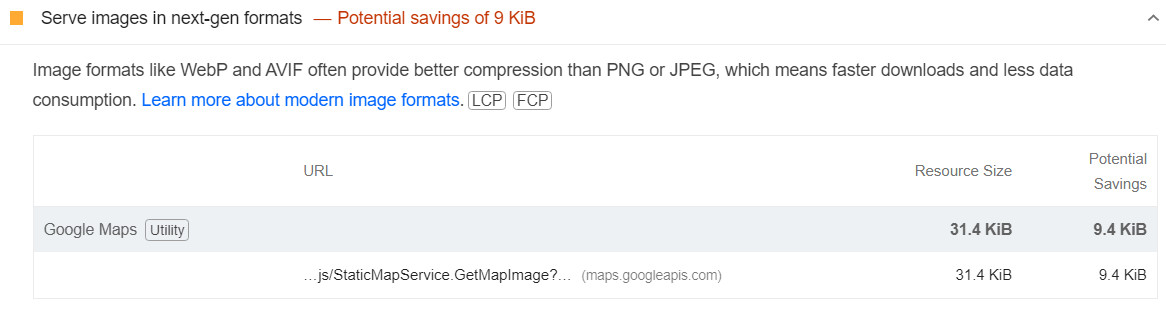
Why Doesn’t Google Maps Use WebP? A Deep Dive

WebP: A Modern Image Format
WebP, a modern image format developed by Google, offers superior lossy and lossless compression compared to traditional formats like JPEG and PNG. This translates to smaller file sizes, faster loading times, and reduced data consumption. UltimateWB offers WebP support, with easy tools to automatically convert images to WebP. Given Google's pioneering role in
... Continue readingCreating Interactive 3D Elements for Your Website: A Beginner’s Guide

Have you ever seen a website with a 3D object that moves and reacts as you scroll? It's a captivating way to engage your audience and make your website stand out. In this post, we'll explore how you can create similar interactive 3D elements using Blender and web technologies.
Understanding the Basics
To create interactive 3D elements, you'll need a basic understanding of:
- 3D Modeling: Creating 3D objects using software like Blender.
- 3D Animation: Bringing your models to life with
Posted in Website Design
Tagged 3d animation, 3d elements, 3d graphics, 3d javascript libraries, 3d library, 3d modeling, 3d object, animation, animation triggers, babylon.js, blender, compatibility, cross-device compatibility, export model, interactive 3d elements, interactive elements, interactivity, lighting, rigging, rotation, scaling, textures, texturing, three.js, user experience, web-based 3d graphics, youtube
Leave a comment