


-
Recent Posts
- “My Partner Wants to Use WordPress Because 50% of the Web Uses It. Help!”
- Does EmDash Solve WordPress’s Problems, or Do You Need UltimateWB?
- How Not to Use AI: Stanford University Can Tell You
- Best Website Builder for SEO: WordPress vs. Wix vs. UltimateWB
- How to Make Sure Your Website Colors Have Enough Contrast for Accessibility
- Mobile-Friendly Website Checklist: 20 Things to Check
- Beehiiv Website Builder Review: The Problem Isn’t the Design – It’s the Lack of Control
- Elementor’s “Angie” AI Is More Than Bloat: Credits, Subscriptions, and a Growing Platform Problem
- How to Pass Google Business Profile Video Verification for Service Businesses
- The Great Deskilling: Why AI Dependence is Turning Developers into Prompt Babysitters
- The Three-Month Fuse: The Everest Forms Pro Attack and Why a Patched Plugin Can Still Put Websites at Risk
- Computer Screen Has Black Bars on the Sides: How to Fix It
- Could AI Make Humans Extinct Within the Next Decade?
- Is Weebly Getting Out of the Website-Builder Business?
- Are You “Leaking SEO” by Linking to Other Websites?
- Wix Harmony Is Now in Google Gemini. So Why Are Users Still Complaining?
- When AI Sounds Confident but Gets It Wrong: The Mount Shasta Rescue
- When AI Agents Start Working Together, Who Is Really in Control?
Categories
Tag Archives: ux design
Your Website is Your Silent Salesperson: Is “Basic” Costing You Money?

Should I upgrade my website?
Every dollar matters when you’re building a small business. Early on, it’s natural to look for the fastest and cheapest way to get online, which is why so many businesses start with “basic” website templates.
At first glance, these platforms seem practical. They’re quick, affordable, and require little technical knowledge. But over time, a more important question emerges:
What is your current website actually costing you in lost trust, missed leads, and reduced conversions?
Because
... Continue reading
Posted in Ask David!, Business, Website Design
Tagged bloat, bounce rate, conversion optimization, conversions, convert leads, core web vitals, crawlability, custom websites, design trends, digital marketing, fast load times, fast website, first impressions, indexing, mobile friendly, online business, plugins, responsive, roi, scalability, seo, slow website, small business, templates, trustworthy, up-to-date, ux design, visibility, web development, website builder, website design, website performance, website ROI
Leave a comment
What Makes a Website Design Truly Stand Out in 2026?

We’ve all seen websites that look amazing but don’t perform - and others that are minimal, even plain, yet somehow convert like crazy. So what’s the secret? In 2026, truly standout website design goes beyond looks. It’s about creating an experience that feels personal, fast, and effortless.
Here’s what’s defining great web design in 2026 - and how to make your site part of that next wave.
1. Purpose-Driven Design
Pretty doesn’t equal effective. Every button, image, and line
... Continue reading
Posted in Website Design
Tagged accessibility, accessible websites, authentic design, authenticity, bloat, branding, clarity, clutter, colors, fast website, fonts, high-contrast colors, hover effects, microanimations, microinteractions, minimalist websites, mobile-first design, performance, purpose, real photos, responsive, responsive app, search engine optimization, seo, transitions, typography, UI trends, ux design, web design 2026, web design tips, webp, webp converter, WebP images, website performance, website trends, whitespace
Leave a comment
Is AI Really Taking Your Web Design Job?

If you’ve been following tech news, you’ve probably seen headlines warning that AI is replacing entry-level web design jobs. And yes, AI tools like ChatGPT, MidJourney, and automated website builders are changing the way websites are built. But what does this really mean for designers starting out?
What’s Actually Happening
AI can handle repetitive tasks - like generating layouts, writing boilerplate code, or resizing images - but it’s far from replacing human creativity, strategy, and user experience skills. Junior
... Continue reading
Posted in AI, Technology in the News
Tagged accessibility, adapting to AI, ai, AI and creativity, ai automation, ai in website design, AI tools for designers, AI web design, Andrew Yang, andrew yank, brand identity, branidng, chatgpt, coding, creativity, entry-level designers, entry-level web design, future of web design, generating layouts, junior designers, matt garman, MidJourney, performance, performance optimization, resizing images, search engine optimization, seo, speed up workflows, strategy, user behavior, user experience, ux, ux design, web design career, web design jobs, web design tips, web designer
Leave a comment
Tutorial: How to Instantly Make Your Designs Look Cleaner

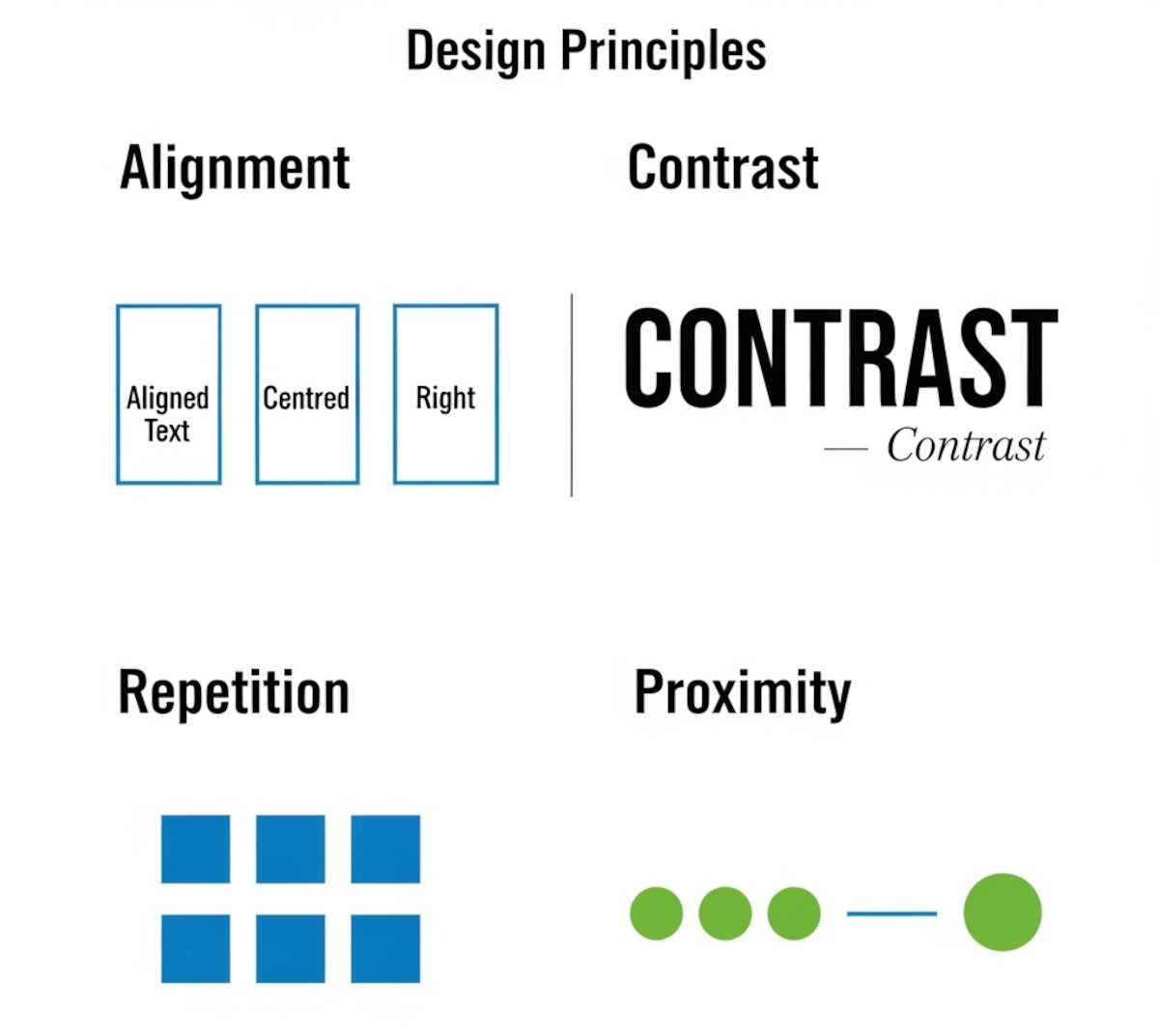
Ever notice how some websites or graphics just feel “off,” even if you can’t put your finger on why? Most of the time, it comes down to a few small mistakes that make a layout look messy. The good news: once you know what to look for, you can fix these issues quickly and make your work look more polished and professional.
Here’s a simple tutorial on the four core principles that will clean up almost any design.
1. Alignment:
... Continue reading
Posted in Website Design
Tagged alignment, avoid clutter, beginner design guide, clarity, clean design, clutter, color, consistency, contrast, design consistency, design hacks, design principles, design repetition, design tricks, design tutorial, fonts, good design, improve website design, layout design, proximity, repetition, spacing, trust, trustworthy, ux design, visual hierarchy, web design tips, white space, whitespace
Leave a comment
What Makes a Simple Website Feel Trustworthy? (From Real User Experience, Not Theory)
When you’re visiting a website built by a solo creator or small team - not a big-name brand - you make a snap judgment: Can I trust this? That first impression often decides whether you stick around or bounce.
As someone who loves studying user behavior and indie websites, I’ve noticed a few key elements that consistently build trust, even on simple, self-made sites.
Here’s what makes me - and many others - stay.
1. Clear Purpose, Fast
If I
... Continue reading
Posted in Ask David!, Business, Website Design
Tagged brand personality, build trust, clarity, communicate clearly, contrast, fonts, indie web, personal website, personality, small website, solo creator, trust signals, user experience, ux design, web design tips, website credibility, website trust, white space
Leave a comment
Web Design Fundamentals: A Comprehensive Guide

Introduction
Web design is always evolving, combining creativity, usability, and functionality to build websites that are not just visually appealing, but also easy to use and effective. Whether you're a beginner or an experienced designer looking to refine your skills, understanding the fundamentals of web design is crucial. In this guide, we will explore key concepts and best practices that are
... Continue reading
Posted in Website Design
Tagged accessibility, alt text, aria labels, brand identity, branding, build trust, call to action, color psychology, color scheme, color theory, colors, consistency, contrast, contrasting color, cta, digestible content, easy navigation, fast loading times, font sizes, fonts, goals, header tags, headings, line spacing, logo, mobile friendly, paragraph length, purpose, responsive, responsive app, search engine optimization, search engine ranking, seo, short paragraphs, styles manager, subheadings, target audience, typography, user engagement, user experience, user-centered design, user-friendly, ux, ux design, visual hierarchy, website goals, whitespace
Leave a comment
What are the key elements of great UX design and how can you improve your skills in creating it?

There are two main areas that contribute to great UX design: usability and user-friendliness. Let's break down the key elements of each:
Usability:
- Useful: Does it solve a user's problem or fulfill a need?
- Usable: Can users easily understand and navigate the design?
- Learnable: Is it intuitive and easy to pick up, even for new users?
- Effective: Does it achieve the intended goal or task efficiently?
- Accessible: Can users with disabilities interact with the design?
User-friendliness:
- Memorable: Is
Posted in Ask David!, Website Design
Tagged accessibility, aesthetic, effective, efficient, intuitive, learnable, memorable, usability, user-friendly, ux, ux design
Leave a comment
What is Jackobs Law in UX?

Jakob's Law, named after usability expert Jakob Nielsen, is a fundamental principle in UX design, or user experience design. It states that users prefer websites and apps to function in a way that is consistent with their past experiences on other similar products. In simpler terms, users like things to be familiar.
Here's the gist of Jakob's Law:
- Users develop mental models based on their past experiences with digital products. These mental models are essentially how users think a website
Posted in Ask David!, Website Design
Tagged common design patterns, jackob's law, learning curve, user experience, user friendly, ux, ux design, web design
Leave a comment
What do you think is the most crucial aspect of user experience (UX) design for web applications, and why?
The most crucial aspect of User Experience (UX) design for web applications is User-Centered Design, and here's why:
User-Centered Design Focuses on the User's Needs:
At its core, UX design is all about creating web applications that provide value and utility to the users. User-Centered Design places the user's needs, preferences, and expectations at the forefront of the design process. By understanding what the users want and need, you can create a web application that aligns with their goals
... Continue reading