


-
Recent Posts
- Thinking About Switching From WordPress? What Should You Consider Before You Move?
- The Airtable Acquisition Raises a Bigger Question: Do You Really Own the Software Your Business Runs On?
- How to Use Google Search Console’s New Generative AI Data to Improve Your SEO
- How to Update the Same Website Content on Multiple Pages at Once
- Discovered vs. Crawled Not Indexed in Google Search Console: What’s the Difference and How to Fix Each
- The Small Business Guide to Auditing Google Ads and Website Costs
- Do Professional Writers Still Need SEO in the Age of AI?
- Search Engine First vs. People First Content: Why Generic FAQ Dumps Harm Your SEO
- Looking for a Website Builder Without AI? Which One Should You Choose?
- Keyword Cannibalization: How to Find and Fix the Pages Stealing Your Own Google Traffic
- Why Great Content Gets Stuck on Page 8 (And How to Fix It)
- Why MySQL FULLTEXT Search Returns 0 Results (And How to Fix It)
- The Reality of Domain Speculation on New TLD Launches: Is It Still Worth It?
- The Hidden Domain Name Lock-In: Which Registrars Restrict Nameservers?
- Paying $10,000 a Month for SEO? Here’s How to Tell If You’re Getting Your Money’s Worth
- Introducing New WordPress Magazine Layouts in UltimateWB 9 (With Early Access)
- How to Fix the WordPress “Critical Error” on the Widgets Page After a PHP Upgrade
- The Hidden Risk of SaaS Website Builders: Lessons from the Recent Wix Outage
Categories
Category Archives: Backend
The “Calendar Screenshot” Scam: How Booking Phishing Emails Target Web Agencies

Getting an unsolicited lead for a major website redesign, SEO, and “the works” is usually cause for celebration. Lately, though, it might be a trap. A booking scam is making the rounds, specifically designed to compromise web agencies and freelancers during standard discovery calls.
There’s no software exploit here. No malware attachment. Just deceptive workflow manipulation. By looking at how this fake client inquiry phishing pattern (a booking link phishing attack) works, we can see how it manages to
... Continue readingHow to Diagnose a Sudden Traffic Drop: The Technical SEO Checklist

A founder or developer logs into their website dashboard, sees a cliff-like drop in the traffic charts, and instantly panics. The immediate accusation almost always targets the exact same phantom: “Google penalized us!”
Before you start ripping apart your content, changing URL structures, or panic-hiring an expensive recovery agency, take a deep breath.
Most sudden traffic drops are not Google penalties. Jumping to conclusions usually leads to changing random SEO settings out of desperation, which can often break a
... Continue reading
Posted in Search Engine Optimization (SEO), Website Traffic
Tagged 301 redirect, 404 errors, canonical tags, data tracking glitch, database optimization, disallow, disavow toxic backlinks, email blacklist, google ads, google algorithm penalties, google analytics, google penalties, Google Search Console, Googlebot, gsc, linkedin ads, mail reputation tools, Meta advertising, migration error, MXToolbox, noindex, organic traffic, paid ads, robots.txt, seo, server failure, sitemap, thin content, traffic drop, visbility, xml, xml sitemap
Leave a comment
Why is the Discover tab missing now from Google Search Console?

"Ask David" question:
"I noticed today that the Discover tab is completely missing from my left-hand sidebar in Google Search Console. It used to be under the Performance section, but now it’s just gone. Did my account break, or did Google remove this feature?"
Answer:
Don't worry, your account isn't broken. If you are wondering why the Discover tab is missing now from your Google Search Console page, it comes down to a specific built-in feature of Google's
... Continue reading
Posted in Ask David!, Search Engine Optimization (SEO), Website Traffic
Tagged core web vitals, discover, E-E-A-T, evergreen content, Google algorithm update, google analytics, Google Search Console, high-quality conetnt, mobile-friendly, responsive, robots, robots meta tag, search engine optimization, seo, trust, trust signals
Leave a comment
Is Your Google Search Console “Average Position” Lying to You?

You log into Google Search Console (GSC) and see massive numbers under your daily impressions. Your site is popping up in thousands of search results! Then, you check your sitewide Average Position metric. It hovers somewhere between 10 and 15. On really good days, you might even celebrate hitting the coveted single digits - positions 7–9.
But then you look at your actual traffic, and the click count is surprisingly low.
With AI Overviews and Featured Snippets now eating up
... Continue reading
Posted in Search Engine Optimization (SEO), Website Traffic
Tagged ai overviews, average position, bloat, clean code, click-through rate, clicks, ctr, fast loading times, fast website, featured snippets, Google Search Console, gsc, html, impressions, long-tail keywords, plugins, ranking position, search engine ranking, seo, third-party plugins
Leave a comment
WordPress Kirki Customizer Takeover: The Automatic Bait-and-Switch Plugin Trend

The WordPress community is currently witnessing a troubling and "despicable" trend: the acquisition and subsequent "bloating" of popular, lightweight plugins. This isn't just a manual update issue - it is a systemic problem where sites are being fundamentally changed through automatic updates without the owner’s consent.
The recent crisis involving the Kirki Customizer framework and the historical "bait-and-switch" of WP User Avatar serve as a reminder in why the WordPress "plugin stack" model is a risky gamble for
... Continue reading
Posted in Compare Website Builders, Technology in the News, Website Security
Tagged auto-update, bloat, BuddyX, Droip, fatal errors, feature creep, Kirki Customizer, plugins, ProfilePress, Reign, security issues, security liability, slow website, Themeum, third-party plugins, website security, WordPress, WP User Avatar, XStore
Leave a comment
Custom Email for Your Business: cPanel vs. Neo vs. Google Workspace

Choosing the right email solution for your website is about more than just sending messages; it’s about branding, deliverability, and your bottom line. When you use UltimateWB, you have several powerful options at your fingertips.
In this post, we’ll break down how the free cPanel Mail included with UltimateWB hosting compares to third-party services like Neo and Google Workspace.
1. cPanel Mail (Free with UltimateWB Hosting)
The most cost-effective way to get a professional @yourdomain.com email is right inside your
... Continue reading
Posted in Emails
Tagged autoresponder, BoxTrapper, branding, cPanel Mail, DKIM, DMARC, email deliverability, email delivery status, email filters, email spam, email spam box, email spam filter, email tracking, gmail, Google Workspace, hosting, Neo, Neo email, Roundcube, spam filters, SpamAssassin, SPF
Leave a comment
Beyond the Hype: The Systemic Security Risk in AI Agents

If you follow tech news, you might have heard about a "zero-click" flaw in Claude’s desktop app back in February. But as of April 2026, this story has evolved from a single app's problem into a systemic warning for the entire AI industry.
The Latest: The MCP SDK Flaw
Recent investigations have confirmed that the vulnerability isn't just a "bug" in one software version. It is built into the Model Context Protocol (MCP) SDK itself. This is the official
... Continue readingThe Developer’s Guide to Identifying and Optimizing Slow MySQL Queries

This tutorial will guide you through identifying, extracting, and analyzing your most problematic database queries using the command line on a WHM/cPanel server.
If you’re using UltimateWB for your backend, chances are you won’t need any of this. We optimize UltimateWB to run fast whether your website is small or large. But in case you need it - for example, if you are adding complex custom code or building a project from scratch - this guide has you covered.
... Continue reading
Posted in Coding, Server Admin & Security, Web Hosting
Tagged cpanel, database optimization, fast website, guide, mysql, mysql database, mysqldumpslow, optimize database, Percona Toolkit, server performance, slow mysql queries, slow query log, software development, SQL optimization, technical seo, terminal, tutorial, web performance, whm
Leave a comment
How to Audit Your Website Disk Space: A Step-by-Step Guide

If you’ve received a notification that your disk space is full - or if it seems to be filling up faster than expected - it’s time for a "digital deep clean." Most of the time, the culprit isn't the website itself, but hidden files, unoptimized media, or software "hoarding."
Here is how to find exactly what is taking up the room.
1. Get the Stats in cPanel
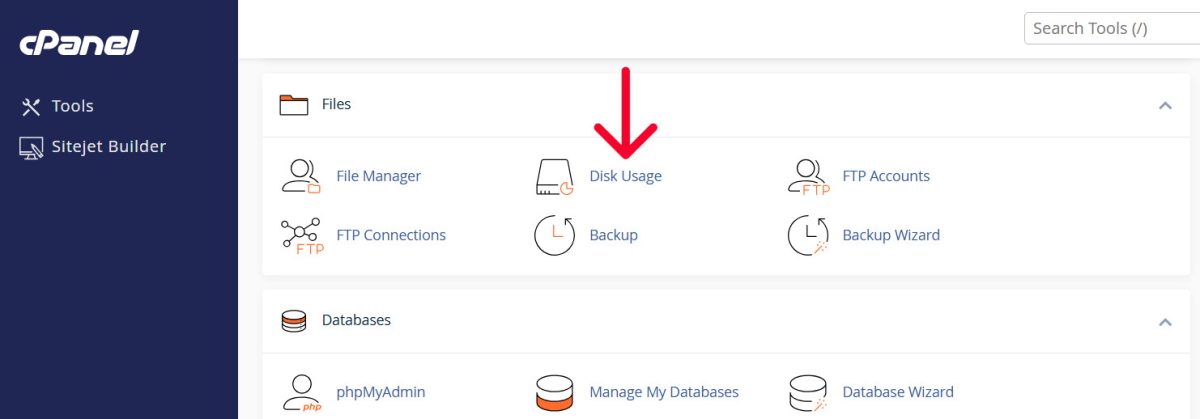
Don't guess where the space is going. Use the Disk Usage tool in
... Continue reading
Posted in Ask David!, Web Hosting
Tagged cpanel, cPanel Disk Usage tutorial, cPanel tutorial, disk space, disk space cleanup, disk usage, integrated blog vs full site, optimize website images, plugins, security, security risks, technical seo, third-party plugins, web hosting storage, website disk space, website performance optimization, WordPress bloat, WordPress storage audit
Leave a comment