


Looking for the best website builder for SEO? If you want to rank high on Google, the builder you choose can make or break your site’s success. Some make it harder to optimize your site’s performance, speed, and structure. Others require third-party plugins that add unnecessary bloat and potential security risks.
If you’re looking for a builder that’s optimized for search engines right out of the box, UltimateWB is the clear winner. Let’s break down what makes a website builder good for SEO – and why UltimateWB stands out as the best.
✅ What Makes a Website Builder Good for SEO?
Before we dive into what UltimateWB offers, here are the key SEO features a great website builder should include:
- Fast loading speeds
- Mobile responsiveness
- Clean, valid HTML/CSS code
- Built-in support for meta titles and descriptions
- Easy use of header tags (H1, H2, H3…)
- Image optimization options (alt tags, lazy loading, WebP converter, compression, etc.)
- Accessible design (labels for form fields, proper contrast)
- SEO-friendly URLs
- No forced third-party plugin dependency
These features don’t just make your site search-engine-friendly – they also improve user experience and help boost your PageSpeed Insights scores, which is increasingly important for SEO.
🚀 Why UltimateWB Is the Best Website Builder for SEO
⚡ Blazing Fast Loading Speeds
UltimateWB is built for speed – and it shows. Your website can score high on Google PageSpeed Insights straight out of the gate.

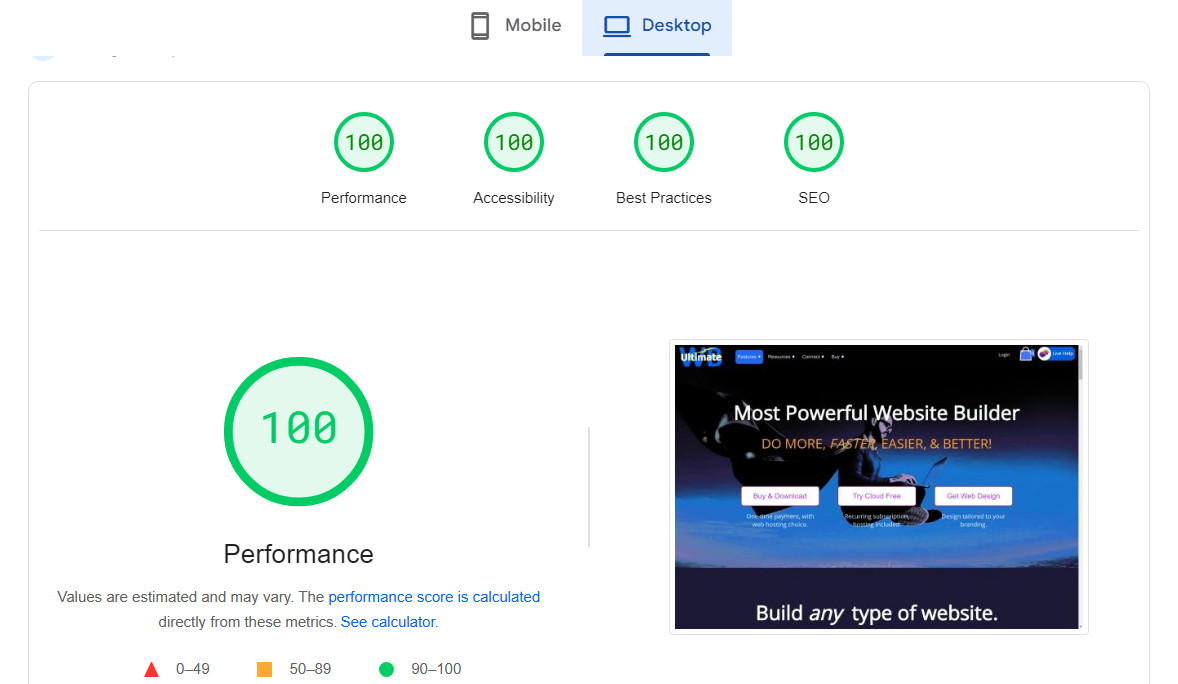
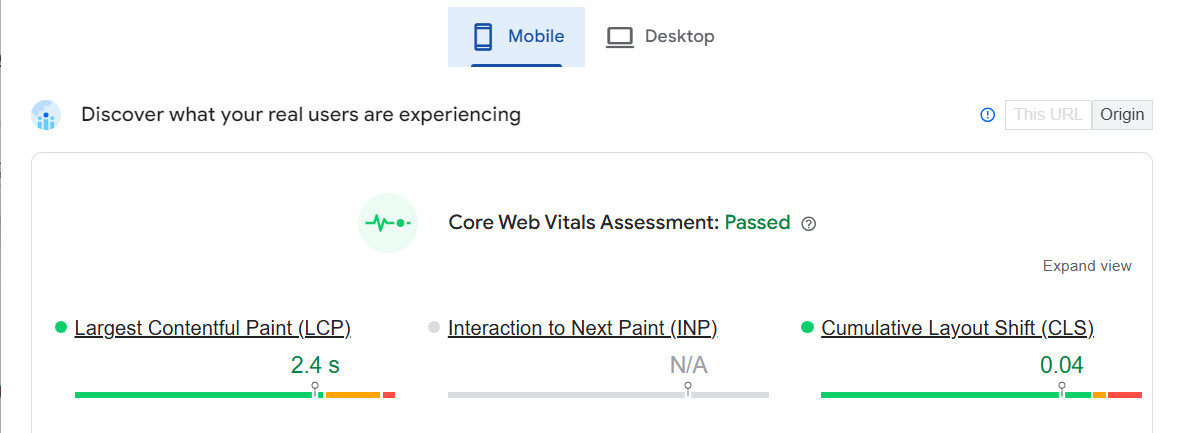
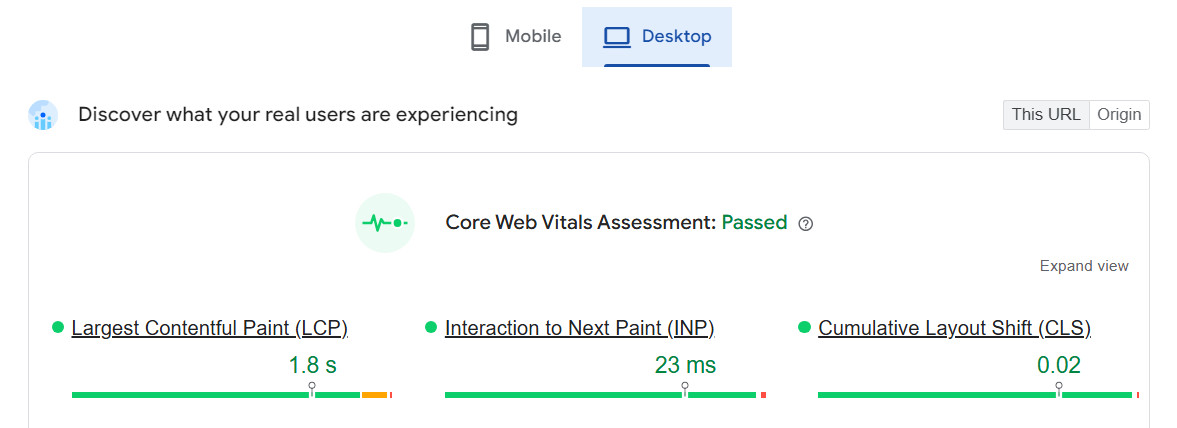
With clean, efficient code and built-in performance tools, you don’t have to fight with slow load times or bulky plugins. Just fast, smooth websites that your visitors (and search engines) will appreciate.
Related: What is the best CMS for fast loading websites?
🧼 Clean Code & Valid Markup
Messy code can drag your site down. UltimateWB keeps things tidy under the hood – check it on the W3C Validator and you’ll see just how clean the markup is.

That translates to better compatibility across browsers, faster rendering, and stronger SEO. Clean code isn’t just for developers – it benefits your whole site.
Related: Valid HTML Matters: How Clean Code Boosts SEO, Accessibility, and Trust
🦾 Powerful, Streamlined Backend
UltimateWB gives you full control without being overwhelming. The backend is built to be clean, logical, and easy to use, so you can make changes without digging through settings or installing more tools. Everything you need to optimize your site is already built in – and nothing you don’t.
♿ Built-In Accessibility Features
Accessibility isn’t just good for users – it’s also good for SEO. UltimateWB comes with built-in support for best practices like:
- Proper label tags on forms (just check out the contact form – every field is labeled for screen readers)
- Logical heading structure
- Keyboard navigation support
- Good contrast and ARIA support – easily choose your font colors and background colors for each section, your menus, and links via the UltimateWB built-in Styles Manager.
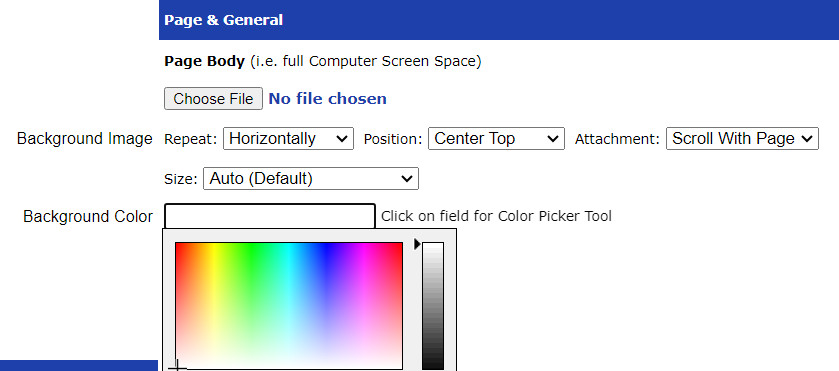
Google considers accessibility signals when ranking your site. With UltimateWB, you don’t have to do anything extra for your backend – it’s already included.
🏷️ Meta Titles & Descriptions Made Easy
Search engines rely on your meta title and description to understand what your page is about – and UltimateWB makes it simple to get it right. You can easily add custom meta titles, descriptions, and keywords for every page right from the Add/Edit Page screen.
No plugins, no extra steps – just optimized content that helps your pages show up in search results and encourages more clicks.
📝 SEO-Optimized WordPress Blog Integration
If you’re using the integrated WordPress blog option in UltimateWB, you don’t need to worry about bloat or plugins. You can add meta descriptions easily there too without installing anything extra – which keeps your blog fast, secure, and fully optimized. It’s all streamlined for performance and simplicity.
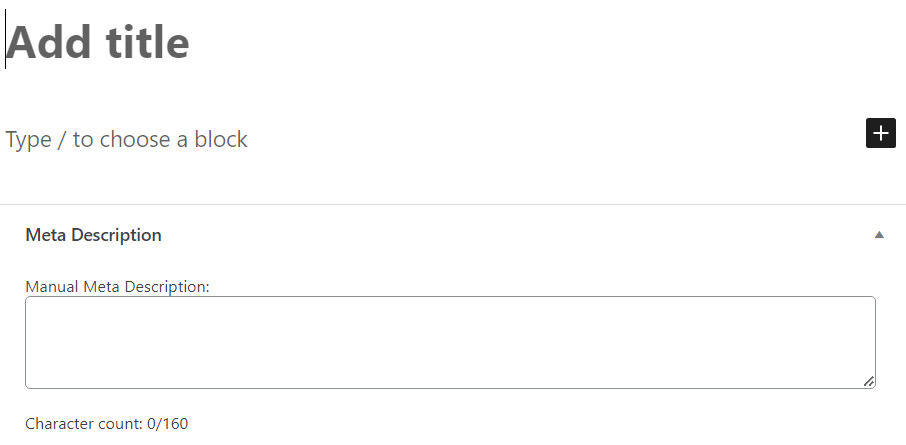
Helpful tips: Boost Website Traffic! How to Write Title Tags & Summaries
🔠 Header Tags & Page Structure Control
Your site’s content structure plays a big role in both SEO and user experience. With UltimateWB, you get full control over your content hierarchy using the built-in Page Editor.
You can format text with H1, H2, H3, and other heading tags right from the editor – no need to mess with source code or install any external page builders. It’s all native and intuitive. It’s easy to keep your pages well-structured and readable, which helps both your visitors and search engines navigate your content.
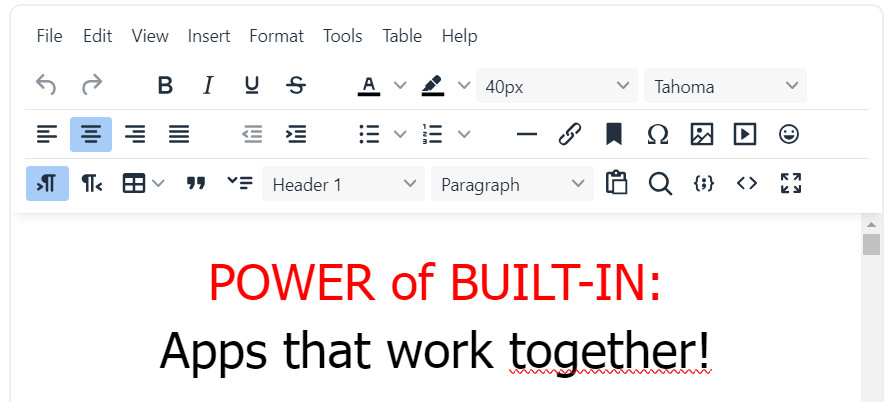
Make sure to get the correct heading order: Why an H1 Shouldn’t Come After an H3 – And Why It Matters for SEO and Accessibility
🔒 No Plugin Bloat or Security Risks
One of the biggest issues with platforms like WordPress or Shopify is how much you rely on third-party plugins just to get basic features – especially for SEO. Every extra plugin you install can slow down your site, introduce security vulnerabilities, or cause compatibility issues.
With UltimateWB, you don’t need plugins for SEO, speed, accessibility, meta tags, or even your blog. It’s all built in – clean, lightweight, and secure. That means fewer updates, less maintenance, and way less worry.
Read more on the side effects of using plugins:
- Why Avoiding Third-Party Plugins Makes Your Website Faster, Safer, and Easier to Manage
- Why Relying on WordPress Plugins Can Backfire (And How to Avoid It)
📱Mobile-Friendly & User-Friendly: Built-In Responsive App
Whether someone’s browsing your site on a phone, tablet, or laptop, it should just work – no pinching, zooming, or awkward scrolling. That’s why UltimateWB includes a built-in Responsive App right in the Styles Manager. With just one click, your website automatically adapts to any screen size – no coding or technical skills needed.
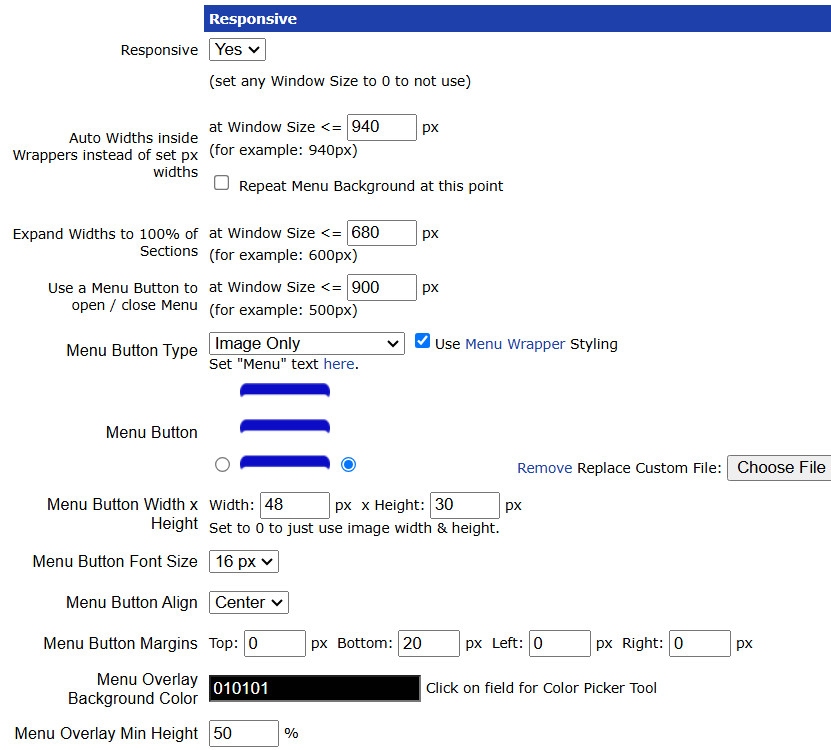
You can fully customize the design to match your brand and deliver a seamless, app-like experience on mobile. The result? Better engagement, lower bounce rates, and a mobile-friendly site that both your visitors and search engines will love.
🖼️ Smarter Image Optimization for Speed & SEO
Images can make or break your site’s performance – but optimizing them doesn’t have to be a hassle. With UltimateWB, it’s all built in and super easy:
- Add alt tags in the Page Editor to boost SEO and accessibility.
- Lazy load images so they only load when needed – speeding up your pages.
- Convert and compress images to the WebP format with a single click, right from the Page Editor for your page content, and Styles Manager for your styling images.
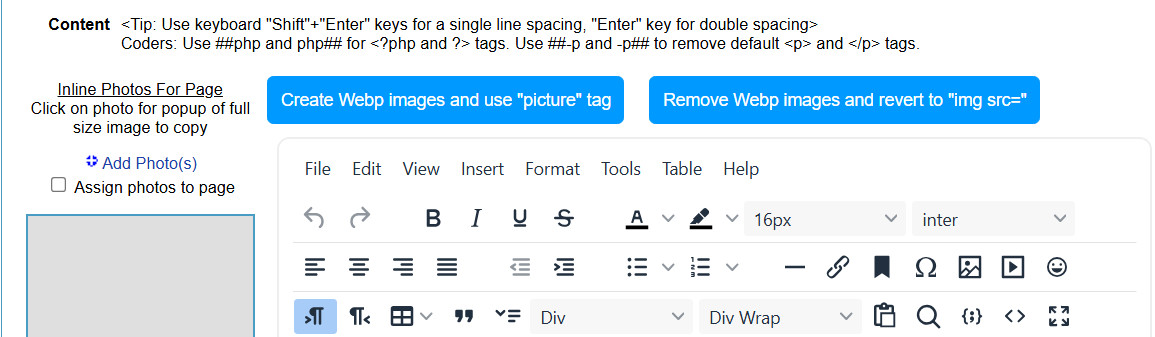
No extra tools, no plugins, no guesswork. You get fast-loading images that look great and keep your PageSpeed score high.
Related: Power Consumption and Image Formats: JPEG vs WebP vs AVIF – Which is Better?
🔗 Clean, Custom URLs That Work for SEO and Users
Forget messy links filled with random numbers and question marks. With UltimateWB, every page you create – from your homepage to blog posts to product listings – gets a clean, readable URL you can fully customize.
Want to include keywords for better SEO? Easy. Prefer a short, shareable link? Done. Even UltimateWB’s built-in social apps like listings directory, forums, classifieds, and media sharing apps use pretty, SEO-friendly URLs by default.
The result? A well-structured site that search engines index faster, users trust more, and links you’ll actually want to share. Hello Google!
🗺️ Automatic Sitemap Generation for Better Indexing
UltimateWB Lite and UltimateWB Full also include an automatic sitemap generator that creates an XML sitemap for your website behind the scenes. This sitemap lists all your important pages and updates dynamically as you add or remove content.
Why does this matter? Search engines like Google use sitemaps to discover and index your pages more efficiently, especially for new or updated content. Having a sitemap improves your chances of faster indexing and better coverage in search results – without you lifting a finger or installing extra plugins.
With UltimateWB, sitemap generation is automatic, reliable, and fully integrated – another reason why it’s the best builder for SEO out of the box.
Read: How To Easily & Automatically Create A Sitemap For Your Website
❌ How Other Website Builders Get It Wrong for SEO
Not all website builders are built with SEO in mind. In fact, many make it harder to rank on Google – even if they claim otherwise. Here are some common ways they fall short:
Bloated Code, Slow Loading Times, HTML Truncation and the 2MB Crawl Limit
Many website builders rely on drag-and-drop editors or third-party plugins that generate messy, bloated code. This slows down your website and hurts your PageSpeed – a major SEO ranking factor.
Not only that, but Googlebot officially caps its crawl at the first 2MB of uncompressed HTML per page. If your builder generates bloated code, heavy inline CSS, or massive tracking scripts, your page can easily exceed this limit. When that happens, Googlebot stops reading – leaving your text, links, and structured data at the bottom of the page completely invisible to search results.
Limited Control Over SEO Settings
Some builders restrict your ability to customize essential SEO elements like meta tags, heading structure, URLs, or canonical tags. Without full control, you’re limited in how well you can optimize your site for search engines.
Plugin Dependency
With platforms like WordPress, you often have to install multiple plugins just to get basic SEO functionality – and that comes with the risk of conflicts, version issues, and slow performance.
Inconsistent Mobile Optimization
Not all templates on popular builders are fully responsive by default. If your website doesn’t perform well on mobile devices, your rankings will suffer – especially since Google uses mobile-first indexing.
Poor Accessibility and Structure
Improper use of headings, missing alt text, and poor layout structures not only hurt user experience but also negatively impact SEO. Many website builders overlook these best practices.
Locked-In Hosting
Worse, SaaS website builder – hosted platforms like Wix, Squarespace, Webflow, Shopify, or Framer, lock you into their proprietary, shared hosting servers. If their servers are sluggish, your Time to First Byte (TTFB) suffers, and there is absolutely nothing you can do about it. Except start your website all over and rebuild from scratch on a platform like UltimateWB that gives you web hosting choice.
Follow this guide if you need to make the website builder switch and don’t want to lose your SEO juice or website traffic: Maintain SEO Power During Your Website Migration & Rebuild: A Smooth Builder Switch
UltimateWB avoids all of these problems by design.
With clean code, fast loading speeds, mobile responsiveness, full SEO control, and zero plugin bloat, UltimateWB helps you build a website that search engines (and users) love.
UltimateWB’s ultra-clean, minified code keeps your HTML incredibly lean, ensuring Googlebot indexes 100% of your content.
And with UltimateWB, you can choose your own high-performance hosting, ensuring your server response times match your clean code.
For a more in-depth comparison of WordPress, Wix, and UltimateWB for SEO, read: Best Website Builder for SEO: WordPress vs. Wix vs. UltimateWB.
💡 SEO Built In, So You Can Focus on Content
With UltimateWB, the features you need for SEO (and more) are already built in – meaning a lighter, faster, and safer website. If SEO matters to your business (and it should), your choice of website builder is critical. While others may advertise SEO features, UltimateWB actually delivers – with fast loading times, clean code, built-in accessibility, and powerful SEO tools right at your fingertips.
You don’t need a stack of plugins, a developer on call, or hours of optimization work. With UltimateWB, great SEO is just part of the package.
And of course, don’t forget the heart of SEO – your content. Content is both king and queen when it comes to ranking well. UltimateWB gives you all the tools to optimize your site’s performance and structure, but it’s your quality, relevant content that truly wins over visitors and search engines alike. So focus on creating engaging, helpful, and original content – UltimateWB takes care of the rest.
💬 Frequently Asked Questions (FAQ)
Is a website builder bad for SEO?
Not necessarily, but many popular SaaS website builders do make it much harder to rank. Many platforms rely on drag-and-drop frameworks that produce bloated source code, which slows down page load times and hurts user experience. Others lock you into slow shared servers. UltimateWB is designed specifically to solve this – combining clean, lightweight markup with the freedom to choose your own high-performance web hosting.
Can I get a 100/100 PageSpeed score with UltimateWB?
Yes! Because UltimateWB generates clean, standards-compliant HTML/CSS and features built-in tools like WebP image conversion and lazy loading, getting perfect mobile and desktop performance scores on Google PageSpeed Insights is absolutely achievable straight out of the box – without installing dozens of speed optimization plugins.
Do I need Yoast or other SEO plugins on UltimateWB?
No. Unlike WordPress, which requires heavy third-party plugins to manage basic SEO tasks, UltimateWB has every necessary SEO tool built directly into the core system. You can manage custom meta tags, clean URLs, image alt tags, responsive styling, and XML sitemaps natively without any extra bloat or security risks.
What is Google’s 2MB HTML limit, and does UltimateWB prevent it?
Googlebot officially stops crawling and truncates pages where the raw HTML source code exceeds 2MB uncompressed. Sluggish, plugin-heavy drag-and-drop builders easily cross this limit due to massive inline CSS and JavaScript bloat. Read: JavaScript SEO Problem: Why Your AI-Generated Website Isn’t Getting Indexed
UltimateWB uses highly efficient, externalized styling, keeping your file sizes tiny so search engines can index 100% of your content.
Externalized styling is the key. Under the hood, Googlebot applies the 2MB limit to the initial HTML document response (which includes inline CSS/JS and HTTP headers). By externalizing CSS and JS into separate files, each of those assets gets its own separate 2MB fetch budget. UltimateWB’s architecture is built strictly on solid engineering principles.
Can I migrate my existing website to UltimateWB without losing traffic?
Absolutely. As long as you maintain your current URL structure or set up proper 301 redirects, you can easily rebuild your site on UltimateWB. In fact, switching to our clean code architecture typically results in a noticeable boost in search rankings and page speeds.
Related Articles:
What Many “Best Website Builder for SEO” Articles Get Wrong
How do I choose the best website builder?
What are the Most Bloated and Sluggish Website Builders of Today?
What Makes Your Website Content “High-Quality Content”? We Spill the Tea!
How to Create Website Content That Engages and Converts
Ready to build a website that ranks?
👉 Try UltimateWB today and start climbing those search results. We also offer web design packages if you would like your website designed and built for you.
Got a techy/website question? Whether it’s about UltimateWB or another website builder, web hosting, or other aspects of websites, just send in your question in the “Ask David!” form. We will email you when the answer is posted on the UltimateWB “Ask David!” section.