






-
Recent Posts
- “My Partner Wants to Use WordPress Because 50% of the Web Uses It. Help!”
- Does EmDash Solve WordPress’s Problems, or Do You Need UltimateWB?
- How Not to Use AI: Stanford University Can Tell You
- Best Website Builder for SEO: WordPress vs. Wix vs. UltimateWB
- How to Make Sure Your Website Colors Have Enough Contrast for Accessibility
- Mobile-Friendly Website Checklist: 20 Things to Check
- Beehiiv Website Builder Review: The Problem Isn’t the Design – It’s the Lack of Control
- Elementor’s “Angie” AI Is More Than Bloat: Credits, Subscriptions, and a Growing Platform Problem
- How to Pass Google Business Profile Video Verification for Service Businesses
- The Great Deskilling: Why AI Dependence is Turning Developers into Prompt Babysitters
- The Three-Month Fuse: The Everest Forms Pro Attack and Why a Patched Plugin Can Still Put Websites at Risk
- Computer Screen Has Black Bars on the Sides: How to Fix It
- Could AI Make Humans Extinct Within the Next Decade?
- Is Weebly Getting Out of the Website-Builder Business?
- Are You “Leaking SEO” by Linking to Other Websites?
- Wix Harmony Is Now in Google Gemini. So Why Are Users Still Complaining?
- When AI Sounds Confident but Gets It Wrong: The Mount Shasta Rescue
- When AI Agents Start Working Together, Who Is Really in Control?
Categories
Tag Archives: cpanel
How to Audit Your Website Disk Space: A Step-by-Step Guide

If you’ve received a notification that your disk space is full - or if it seems to be filling up faster than expected - it’s time for a "digital deep clean." Most of the time, the culprit isn't the website itself, but hidden files, unoptimized media, or software "hoarding."
Here is how to find exactly what is taking up the room.
1. Get the Stats in cPanel
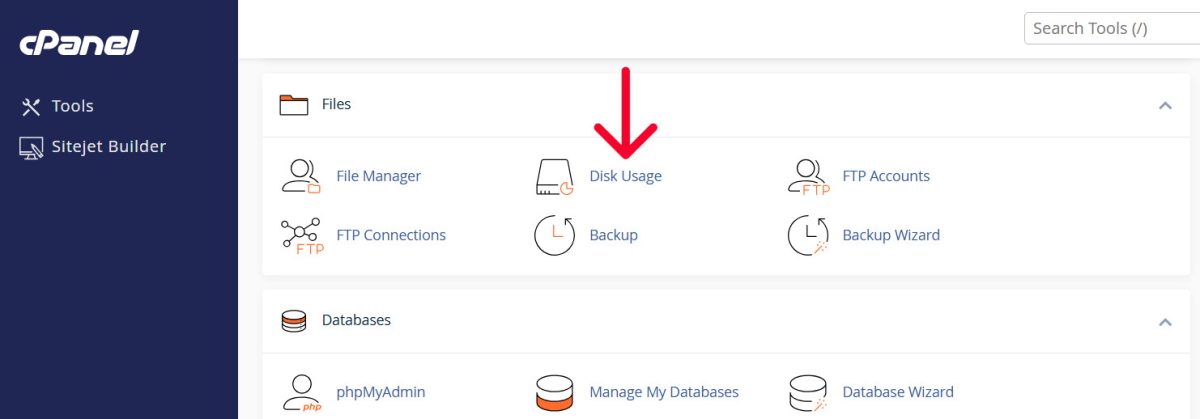
Don't guess where the space is going. Use the Disk Usage tool in
... Continue reading
Posted in Ask David!, Web Hosting
Tagged cpanel, cPanel Disk Usage tutorial, cPanel tutorial, disk space, disk space cleanup, disk usage, integrated blog vs full site, optimize website images, plugins, security, security risks, technical seo, third-party plugins, web hosting storage, website disk space, website performance optimization, WordPress bloat, WordPress storage audit
Leave a comment
How to Block Unwanted Visitors? Use .htaccess for IP Blocking on Your Website

Ever felt the need to restrict access to your website from certain visitors? Maybe you've been targeted by spammers or bots, or perhaps you want to limit access for security reasons. In such cases, IP blocking with your website's .htaccess file can be a handy tool. You have this option available with the downloadable UltimateWB website builder, accessible via your cPanel - or other - web hosting control panel File Manager. Let's dive into the world of .htaccess and
... Continue readingMaintain SEO Power During Your Website Migration & Rebuild: A Smooth Builder Switch

Ask David! question: "What is the process of migrating your website, doing a rebuild using the same domain with a different builder? Are there any potential issues that I need to be aware of?"
Answer:
Revamping your website? Don't lose SEO juice! Don't worry we've got your back.
This guide shows you how to seamlessly switch website builders while keeping your search engine ranking as you migrate your content. Learn redirect magic using .htaccess and how to leverage UltimateWB, a
... Continue readingHow to Set Up Browser Caching for Your Website

Browser caching is one technique to speed up your website by storing static files in a visitor's web browser. This enables returning visitors to load your site faster, as their browsers can retrieve cached content without making multiple server requests. In most cases it won't be necessary for your website if it's built on UltimateWB, but let's walk through the steps to set up browser caching for your website:
1. Access Your Website's .htaccess File
Browser caching is typically configured
... Continue readingFree Website Builder for Nonprofits: UltimateWB Features and Benefits

A nonprofit website is more than just a place to share information - it is often the first place people connect with your mission, understand your impact, and decide to support your work.
For many organizations, building and maintaining a professional website can feel challenging due to limited budgets and technical resources.
UltimateWB helps remove that barrier by giving you flexible website building tools - and offering a free website builder option for eligible nonprofit organizations, so more of
... Continue reading
Posted in Announcements
Tagged branding, cpanel, customizable, customization, donations, engagement, flexibility, free ssl, free website builder, fundraising, mobile-friendly, non-profit organization, nonprofit fundraising, nonprofit organization, nonprofits, ownership, responsive, responsive app, secure hosting, seo, social media, ssl, ultimatewb cloud, visibility, web hosting, web hosting choice
Leave a comment
Lost Your Website? Here’s How to Restore It

Losing access to your website can be a stressful experience. Whether it’s due to accidental deletion, a server glitch, or malicious activity, the good news is that recovery is often possible. In this blog post, we’ll guide you through how to restore a website and share preventative tips to help you avoid future data loss.
Step 1: Diagnose the Cause of the Website Loss
Before you can restore your site, it’s important to understand what caused the issue. Ask yourself:
How can I safeguard my website’s content and data when using website builders, and what backup choices are accessible?
It really depends on the website builder. With UltimateWB, it is just a one-time fee for the website builder and then you can host your website with UltimateWB or on your own web host. Either way, you can get access to cPanel - which makes it very easy to backup your website. With other website builders that are hosted by the company only - such as Wix, Weebly, or Squarespace - you don’t get web hosting choice and your website
... Continue reading
Posted in Ask David!
Tagged cpanel, hosted website builder, web hosting choice, website backup
Leave a comment
Custom (proprietary) web hosting control panels vs cPanel
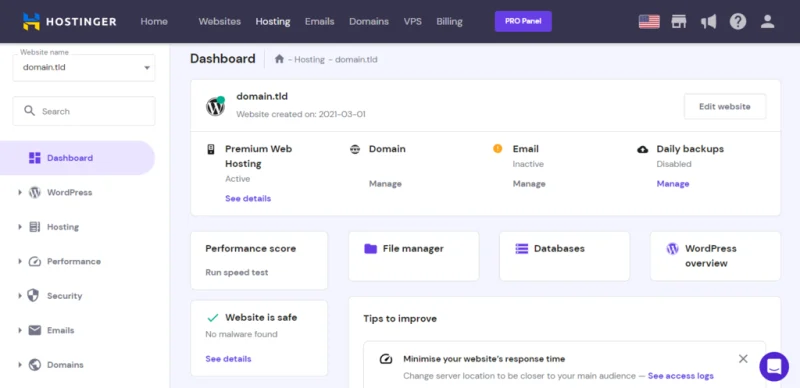
Updated 2026: This post has been updated to reflect major industry shifts, including popular hosts moving away from cPanel and toward proprietary "lock-in" systems.
In our earlier post, "Best web hosting control panel? cPanel," we discussed why we offer cPanel free in all UltimateWB hosting packages. It is the interface you use to manage your files, databases, email accounts, and traffic statistics. But there is one reason we choose cPanel that is more important than all the others: your
... Continue reading
Posted in Web Hosting
Tagged 1&1, cpanel, custom web hosting control panel, dreamhost, horde, horde fetchmail, hosted web solution, ipage, IXwebhosting, liquidweb, mediatemple, netfirms, network solutions, rackspace, saas, software as a service, switch web hosting, transfer content, transfer database, transfer email, web hosting choice, web hosting flexibility
Leave a comment
Best web hosting control panel? cPanel

Different web hosting companies may offer different control panels to help you manage your files, database, create personal email accounts, make backups, and check on your traffic statistics. While they all may do the same functions, how they do it are not the same.
Our preference is cPanel web hosting control panels, and it is what we offer with our web hosting packages too. It is easy to use, with all the features you need. Moreover, you can create a
... Continue reading
Posted in Ask David!, Web Hosting
Tagged cpanel, godaddy web hosting, web hosting, web hosting control panel
1 Comment