


-
Recent Posts
- Is a Neo Sites “Free” Domain and Website Really Free? The 1-Year Subscription Catch Exposed
- The “Who’s Who in America” Invitation: Real Honor or Just a Sales Funnel?
- Beat the System: Avoid Paying Website Builder Transaction Fees
- The AI Scraping Free-for-All Is Over: Welcome to the Era of Licensing (2026)
- The $10 Billion “Echo”: Why Paying Experts to Train AI Might Be a Bridge to Nowhere
- Stop Renting Your Business: Why UltimateWB Beats the Bubble “Success Tax”
- AI Hype vs. Reality: Pulling Back the Curtain on the Digital Wizard
- Webflow’s Client Seats Complicate Ownership – How UltimateWB Gives Control Back
- No, AI Did Not Secretly Build Its Own Society
- Does Google still use PageRank to rate your website?
- Does “Test Live URL” help Google index your webpage faster?
- Using a URL Shortener and Passing the SEO Link Juice
- Is TikTok Censoring Anti-Trump Content? User Complaints Lead to Investigation
- From Sidewalk Robots to Real‑World Limits: The Promise and Pitfalls of AI Deliveries
- Will AI Really Replace Junior Frontend Developers?
- Meta Descriptions Too Short? What Bing’s Warning Really Means and How to Fix It
- How to Make Your FAQ Section More Engaging for Users
- Why You Should Remove Redundant Header Tags from Your Web Pages
- What Is the IndexNow Message in Bing Webmaster Tools?
- How to Automatically Share Your WordPress Blog Posts to Instagram
Categories
- Accessibility
- Advertising
- Affiliate Programs
- Announcements
- Apps Comparison
- Ask David!
- Business
- Compare Website Builders
- Computer Tips
- Domain Names
- E-commerce
- Emails
- Facebook Application
- General
- Graphic Design
- Integration Tutorials
- Mailing List Application
- Marketing
- Photos Management
- Search Engine Optimization (SEO)
- Social Media
- Social Networking
- Software Showcase
- Technology in the News
- Traffic Statistics
- Troubleshooting
- Web Content
- Web Hosting
- Website Design
- Website Security
- Website Traffic
- WordPress Customization
Meta
Best Website Builder – Top 10 Reasons why it is Ultimate Web Builder software!

Are you searching "what is the best website builder" on Google, trying to find the best software to buy? Here are the top 10 reasons why the answer is Ultimate Web Builder software.
1) Best CMS - content management system. Not only can you keep track of your content and organize it, but you can format and reformat easily. Manage not just your webpages, but all your other content, including photos, members, subscribers, ads, items for sale,
... Continue readingBuild your own affiliates program for your website easily!
With Ultimate Web Builder software you can easily build your own affiliates program for your website in minutes. Set a sitewide referral commission rate, and even choose to set commission rates on a per member/affiliate basis. You can create and offer banners and text ads for your affiliates to use and copy/paste in their own websites and email networking. The software does all the coding and referral tracking for you. From your website admin panel you can even set how... Continue reading
Ultimate Web Builder Software Upgrade 2.8 Released!
Ultimate Web Builder software upgrade 2.8 is released! The demo and all hosted accounts have been upgraded. If you are upgrading yourself (i.e. you're on another server), just follow the upgrade instructions here. Check out what's new in each upgrade on the What's New page.
What's new in Ultimate Web Builder 2.8:
Admins (Moderators) App Added:
- Create Admins and set access permissions, i.e. which sections of the Admin Panel the Admin has access to
- Mail App upgraded to easily
Get special promotions & deals info on our Facebook page!
Like RE Designs on Facebook to get updates & special offers, promotions, and deals info on our Facebook page: www.facebook.com/redesignsorg .... Continue reading
SocialGO vs Ning – best social networking website builder?
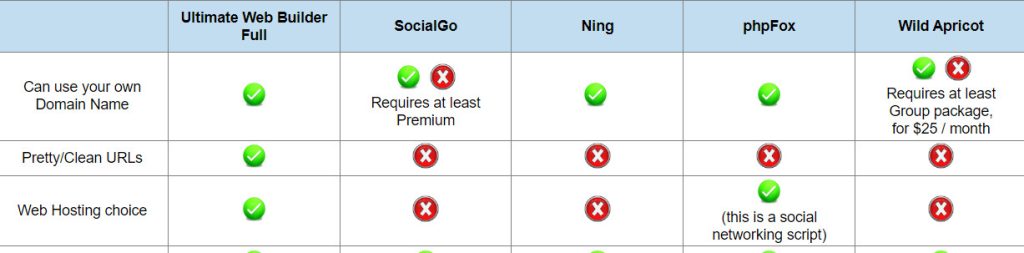
**Update: SocialGo is out of business.
Comparing SocialGO vs Ning you will find that they are pretty similar. They both provide a social networking website builder solution that is hosted - i.e. you have to use their web hosting. Neither SocialGO nor Ning provide any software you can use on any web host, as they are hosted solutions. Unfortunately, this means that you are forced to pay their monthly fees and even increased fees
... Continue readingWhat do you need to create your own website?
You need the following three things to create your own website:
1) Domain Name - i.e. www.your-website.com . This is the URL of your website, the website address your website can be found. It can be a .com address, .org, .net, and several other domain name extensions.
2) Web Hosting - this puts your website online, and makes it available for others logging onto the internet to access your website.
3) The website itself! Best is to use Ultimate Web... Continue reading
Dreamweaver for beginners? Dreamweaver for web designers, programmers?

Wondering if you need to know coding to create a website with Dreamweaver? The straight answer is Yes. Here's top 3 reasons why:
1) If you want a website that will work on all the major internet browsers correctly, and look right on all major internet browsers too (like Internet Explorer, Chrome, Firefox), using Dreamweaver's tools won't cut it. You need to know css and web coding to fix Dreamweaver's auto-code. How many times have you noticed questions on Yahoo
... Continue reading
Posted in Compare Website Builders
Tagged beginner, dreamweaver, web coding, web designer, web programmer
Leave a comment
Build your website on any computer – mac, pc, or even ipad, tablet!
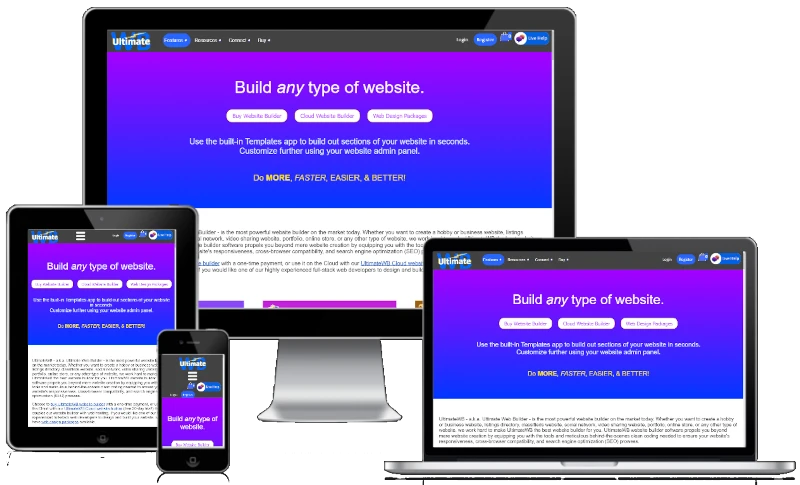
Did you know you can design, build, and manage your website on a mac, pc, or even an ipad / tablet? You can even use a combination of them all - you are not stuck on one computer, or computer type with Ultimate Web Builder software. Because it is web-based software, you can use one computer, and then pick up from where you left off on another computer, or tablet. You just need an internet connection. And unlike other web-based
... Continue reading
Posted in Compare Website Builders, General
Tagged hosted website builder, ipad, mac, pc, tablet, web-based software, web-based website builder
Leave a comment
How to use your website sitemap with Google Webmaster Tools
You can create your website sitemap easily with Ultimate Web Builder software, and choose the filename too. And you can submit the url of your sitemap to Google with Google Webmaster Tools. You can use your gmail account or any google account you already have, for example for adsense or adwords. On the Google Webmasters Tools page, first add your site. Next, verify that you have admin access to your site using their process outlined (uploading the provided google
... Continue reading
Posted in Search Engine Optimization (SEO)
Tagged google, google webmaster tools, sitemap, sitemap tool
Leave a comment