


-
Recent Posts
- Etch Pre-Sale Promises: What’s Been Delivered and What’s Still Missing?
- Why Reddit Threads on Website Builders Miss the Point (And What to Look For Instead)
- Epileptic Woman Dies After Using ChatGPT for Medical Advice; Family Sues OpenAI
- Best Practices for Image Filenames and Alt Tags: A Quick SEO Checklist
- Best Website Builder for a Web Development Business: Build Your Own Website and Client Websites
- How to Make a Website Without AI for Free
- Is Wix Safer Because It Doesn’t Use PHP? Wix Security Vulnerabilities Tell a Different Story
- Rank Math PRO Supply Chain Attack: Why Updating the Plugin May Not Be Enough
- How to Safely Upgrade Legacy PHP (5.6, 7.0–7.3) to Modern, Supported Versions
- Critical PHP Vulnerabilities (“PHP2Shell”): What You Need to Know & Which Platforms Are Affected
- What Happened to GeoCore Classifieds? From Commercial Software to Community Project
- Why Vibe Coding Isn’t the Only Way to Build a Website Without Monthly Fees
- How to Create a Simple Website to Receive Client Files and Scheduling Requests
- Can You Fork a Paid WordPress Plugin Instead of Paying the Subscription?
- When Google Decides Not to Index a Page, Can You Change Its Mind?
- The Events Calendar Alternative: Why Pay More for WordPress Plugins You Don’t Need?
- Firefox Is Starting Automatically When You Log In? Here’s How to Stop It
- Wix vs. WordPress vs. UltimateWB: Which Is Best for a Personal Training Business?
Categories
Tag Archives: check platform
How can you tell if a website was created using UltimateWB, WordPress, Squarespace, Weebly, WIX, or other website builders?
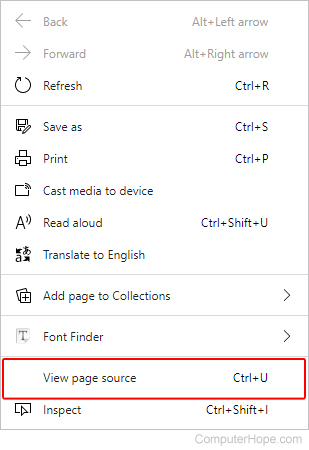
Determining the platform a website was created with often involves looking for specific markers or signatures in the site's HTML, CSS, and JavaScript. Here are some methods and tips to identify the platform:
1. View the Page Source
- Right-click on the webpage and select "View Page Source" or "Inspect".
2. Check for Specific Markers
UltimateWB
- UltimateWB sites have specific mentions of "Ultimate Web Builder" or "UltimateWB" in the HTML comments or meta tags.
WordPress
- Look for comments in the HTML