


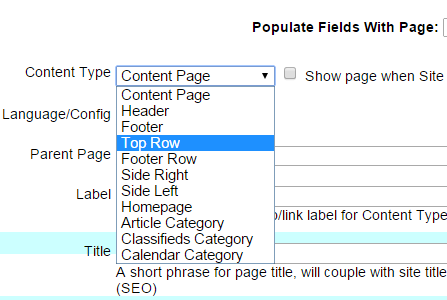
Use the built-in “Top Row” feature in UltimateWB. This content type is designed to stay fixed at the top of the page as users scroll. Just go to List Pages > Add Page or Edit Page, and choose Content Type: Top Row. You can customize the look and layout of this fixed header from your Styles Manager in the admin panel – no coding needed.
Why use a fixed header?
A fixed (or “sticky”) header helps improve navigation and user experience – especially on long pages. It keeps your logo, menu, or important buttons always accessible, which can reduce bounce rate and increase conversions.
Extra tip: You can even add a call-to-action button, shopping cart icon, or search bar to your Top Row to boost functionality.
Related User Manual topic: Add Non-Scrolling Top Row with Menu, Login (or Footer Row)
Got a techy/website question? Whether it’s about UltimateWB or another website builder, web hosting, or other aspects of websites, just send in your question in the “Ask David!” form. We will email you when the answer is posted on the UltimateWB “Ask David!” section