


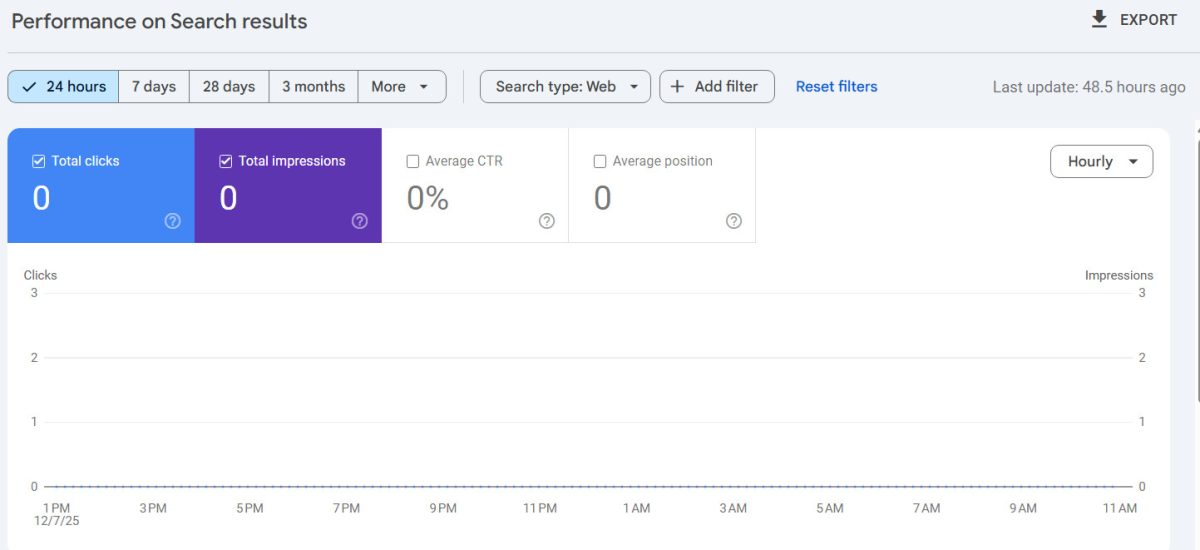
If you rely on Google Search Console to keep an eye on your site, you may have noticed something unsettling recently: the “last 24 hours” view showing flat zeroes – no clicks, no impressions, nothing. You might be thinking… Google Search Console is broken!
Or, if you are not in tune with your traffic stats via another channel, your first thought might the obvious one:
“Did Google drop my site?”
Short answer: no.
Long answer: this is a Google Search Console reporting issue, not a traffic or ranking collapse.
So if you’re wondering if anyone else is experiencing all 0’s on Google Search Console, the answer to that is yes.
Let’s break down what’s actually happening – without the panic, and without the fluff.
Related: Why You Should Be Using Bing Webmaster Tools (Even If You’re Already on Google Search Console)
What changed in Search Console?
Google recently pushed changes to how near-real-time data is processed and displayed inside Search Console, especially in the 24-hour and “recent data” views.
Unlike the older 7-day or 28-day reports, the 24-hour view depends on a faster, less stable data pipeline. When that pipeline lags or stalls, Search Console doesn’t show “partial” data – it often shows nothing at all.
That’s why so many site owners saw:
- Entire days stuck at zero
- A sudden cutoff where data just stops
- Indexing and performance reports out of sync
This isn’t your site failing. It’s Search Console failing to finish processing the data.
Why Google Search Console zeros don’t mean zero traffic
Here’s the key thing most people miss:
Search Console does not measure traffic directly.
It reports processed search data after Google finishes aggregating logs, anonymizing data, filtering bots, and finalizing metrics. When that backend processing gets delayed, the dashboard has no numbers to show – even though users are still visiting your site.
That’s why many people noticed:
- Google Analytics traffic looking normal
- Server logs showing real visitors and Googlebot activity
- Rankings remaining stable
The site is working. The reporting isn’t.
Why this keeps happening lately
Search Console has become more complex over time:
- Faster “recent” reporting
- More privacy filtering
- More granular metrics
- Integration with indexing systems
The downside? More moving parts – and when one part stalls, the UI quietly breaks instead of saying “data is delayed.”
Google tends to fix these issues silently, then backfill the data later. When that happens, your “missing” numbers usually reappear as if nothing happened.
What you should do (and what you shouldn’t)
✅ Do this
- Check Google Analytics, not just Search Console
- Look at server access logs for real traffic
- Use URL Inspection for individual pages if you’re concerned
- Wait a few days before reacting
❌ Don’t do this
- Don’t rewrite content based on one broken report
- Don’t assume an algorithm penalty
- Don’t start “fixing SEO issues” that don’t exist
Related: How does Google’s algorithm affect SEO?
If Search Console shows zeroes but real users are still visiting your site, nothing is wrong with your SEO.
Why this matters for site owners and developers
This is a good reminder that hosted dashboards are not truth – they’re interpretations.
If your business depends on real data:
- You should always have your own analytics
- You should be able to access raw server logs – You can do this with UltimateWB web hosting plans
- You shouldn’t depend on a single third-party UI to tell you whether your site is “alive”
This is one area where having more control over your infrastructure (UltimateWB!) – instead of relying entirely on locked-down platforms (hosted website builders like Wix, Webflow, Squarespace, Shopify, etc.) – really pays off.
The bottom line
If Google Search Console’s 24-hour report shows all zeros:
- Your site is almost certainly not deindexed
- Your traffic probably did not disappear
- Google’s reporting pipeline is just behind
Wait it out, cross-check your data, and don’t make rushed changes based on a temporarily broken dashboard.
Google will fix it – and when they do, the numbers usually come back.
Ready to design & build your own website and run analytics on it? Learn more about UltimateWB! We also offer web design packages if you would like your website designed and built for you.
Got a techy/website question? Whether it’s about UltimateWB or another website builder, web hosting, or other aspects of websites, just send in your question in the “Ask David!” form. We will email you when the answer is posted on the UltimateWB “Ask David!” section.