


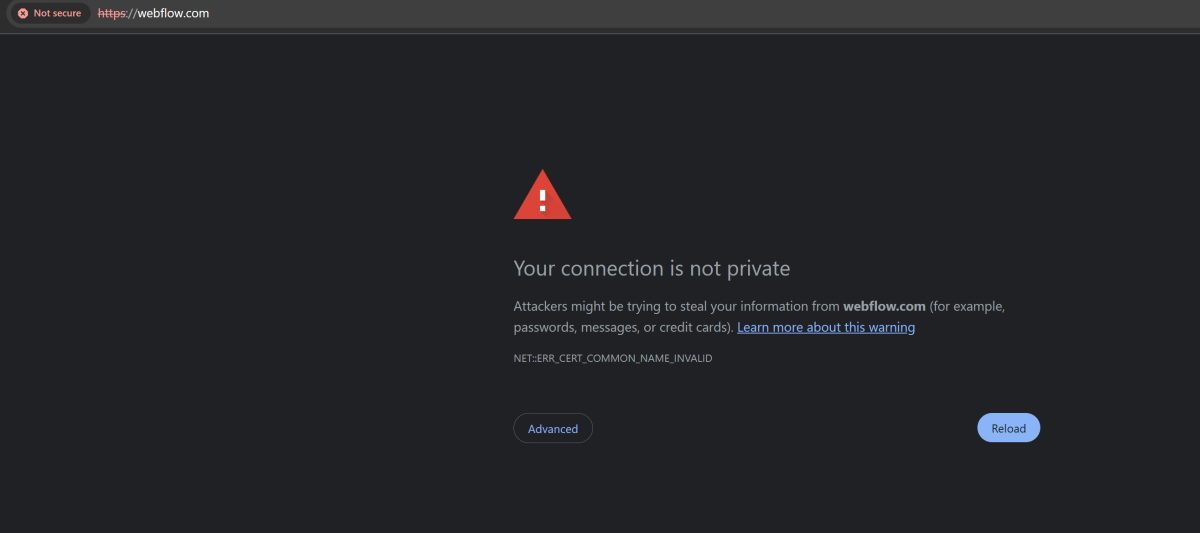
A recent outage affecting Webflow caused widespread disruption across the platform, with users reporting SSL errors, API failures, publishing issues, and broken workflows.
On Reddit and social platforms, users shared screenshots of core systems failing simultaneously. Among the reports was a bizarre “50 chars limit” error appearing during the incident – a strange validation bug surfacing while the platform’s deeper logic began to desync.
Strange Errors Are Often Symptoms of Larger Failures
The “50 chars limit” error wasn’t the main issue; it was a symptom. This mirrors a similar incident in April 2026, where a platform-wide glitch caused a “50 item CMS limit” error. In that case, the system incorrectly reverted premium accounts to “Starter” plan restrictions, effectively locking users out of their own data because the platform “forgot” their subscription status.
During incidents like these, users often encounter:
- Unexpected validation errors (like the 50-character or 50-item bugs)
- Failed saves or publishes that leave work in limbo
- API timeouts and SSL handshake failures
- Inconsistent UI behavior where the dashboard remains accessible but non-functional
When multiple systems fail at once, the platform produces outputs that don’t match normal rules. Features may still respond, but not reliably. This creates a dangerous “partial functionality” state where users aren’t sure if their work is being saved or corrupted.
The Single Point of Failure: When “Easy” Becomes Loss of Control
Modern SaaS website builders remove complexity by consolidating everything – hosting, CDN, SSL, and CMS – into a single managed layer. The appeal is speed, but the cost is consolidation risk. When everything is tightly connected, failures don’t stay isolated; a glitch in the API layer can bring down the entire frontend.
The real issue isn’t just the outage itself – outages happen to everyone. The issue is the total loss of agency. In a self-managed or “Web-First” environment, a team can often intervene: they can reroute traffic, restart a specific service, or roll back a configuration. In a closed SaaS environment, those options don’t exist. You don’t just lose functionality; you lose the ability to act. Recovery depends entirely on a provider’s global timeline, leaving you to wait on a status page that might not even acknowledge the problem yet.
Related: Why So Many Businesses Are Switching from Hosted Platforms to Self-Hosted Builders
Why This Incident Frustrated So Many Users
There’s the bugs and then there’s the status page mismatch. During this May 2026 outage, many users reported significant delays between the actual start of the failure and the official acknowledgment. This leads to:
- Users wasting hours troubleshooting locally (checking DNS or browsers) when the issue is platform-wide.
- A lack of transparency regarding “intermittent” issues that are actually total lockouts.
- Data Portability Freeze: During an outage, you cannot even export your data to move it elsewhere. You are effectively “trapped” until the vendor resolves the issue.
Deployment Lock-In and Workflow Freeze
When the publishing system stops, it’s not just downtime; it’s an operational halt. Updates cannot be deployed, client revisions cannot be delivered, and release cycles freeze. For agencies on a deadline, the platform ceases to be a tool and becomes a bottleneck.
When “Easy” Becomes Operational Exposure
SaaS platforms solve real problems by reducing technical overhead, but they create a clear trade-off:
| Higher Convenience | Lower Control |
| Faster setup & deployment | Limited recovery options during outages |
| No server maintenance | Total dependence on vendor infrastructure |
| Reduced technical decisions | Zero visibility into underlying failures |
| Lower overhead | Data & Workflow Lock-in |
Final Thoughts
The recurring outages of 2026 are not unique to one platform. In just the last few days, we’ve seen major stability failures across the entire managed ecosystem:
- Wix suffered a massive disruption that locked users out of the Editor and broke e-commerce checkout flows.
- Squarespace was plagued by “Site Loading and Editing” failures, with users reporting 503 errors and an inability to activate new subscriptions.
- Shopify saw its admin panels and login pages go dark for hours, leaving merchants unable to manage orders or update their storefronts.
- Netlify and Vercel both struggled with upstream AWS issues, resulting in DNS resolution failures and frozen deployment queues.
- Cloudflare had two major wobbles that took down half the internet (including many “open” sites).
Even infrastructure giants like AWS (US-EAST-1) hit the headlines with a “thermal event” (overheating) that crippled services for everyone from Coinbase to FanDuel.
Related: When Cloud Providers Fail You: Lessons from a Developer’s Nightmare with AWS
These incidents reinforce a vital question: How much control are you willing to trade for convenience?
You don’t have to choose one or the other – you can get the perks of both sides with managed hosting with UltimateWB. You get full access to your cPanel web hosting account, allowing you to manage your own backups, databases, and files, while also enjoying the expert tech support and easy-to-use tools from UltimateWB.
When a website is central to a business, the infrastructure matters as much as the design. Moments like these are a reminder that in closed systems, you don’t just depend on the platform while it works – you depend on it to define what “working” is allowed to mean. For businesses where uptime and ownership are non-negotiable, the “easy” path can quickly lead to an operational dead end.
Related: Webflow Outages Again? What Reddit Reveals About the Real Risk of Hosted Platforms
Webflow’s Breaking Point: Downtime, Bugs, and a Community Fed Up
Webflow’s Shifting Focus: A Blow to Membership Sites and a Rise in Costs
👉 Ready to take full control of your website? Try UltimateWB today – no website builder monthly fees, no hidden limits, just powerful, flexible tools that put your business first.
Got a techy/website question? Whether it’s about UltimateWB or another website builder, web hosting, or other aspects of websites, just send in your question in the “Ask David!” form. We will email you when the answer is posted on the UltimateWB “Ask David!” section.