
Member Website Notifications
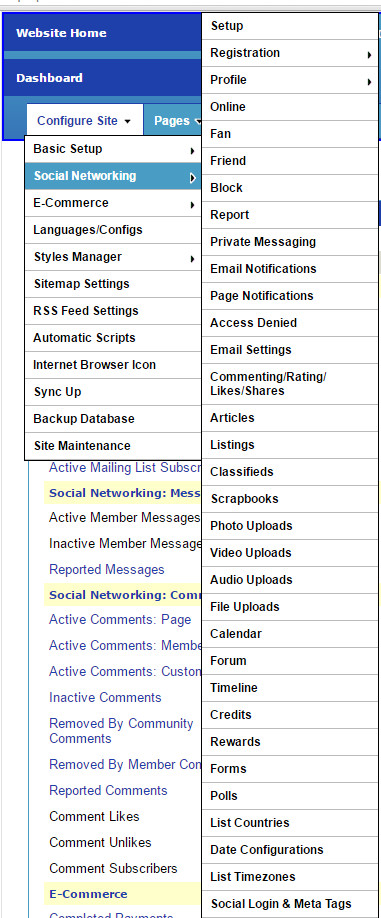
You can setup your member website notifications from the Configure Site > Social Networking > Page Notifications page.
On this page you can customize the settings, icons, and phrases, and get the Placeholder Texts for the Website Notification button(s) and Notifications page.
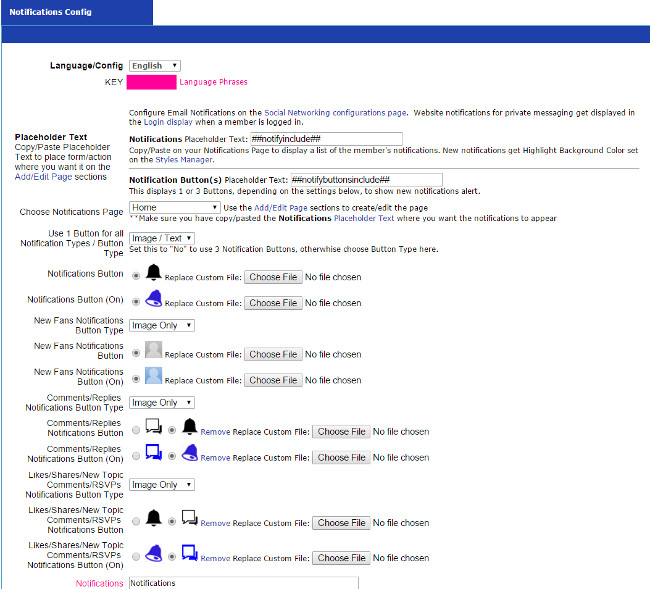
To integrate the notification button(s) just copy/paste the Notification Button(s) Placeholder Text on the Pages > Add/Edit Page where you want it, such as on the website Header page, to have it on the top of each of your webpages. The Placeholder Text for the notification button(s) will display 1-3 icons depending on your configurations on this page - whether you are using 1 button for all types of notifications, or using icons for the 3 different types of notifications.
To integrate the notifications page, just copy/paste the Notifications Placeholder Text on the Pages > Add/Edit Page where you want it.
Configure Website (1)
SEO Tool & Tips (1)
Stylize Website (1)
Responsive App (2)
Content Management (9)
Photos App (5)
Mosaic Grid App (1)
Password Protect, Members Restrict Acess (1)
Members & Social Networking App (17)
Social Login & Meta Tags (5)
Comments & Ratings App (5)
Page/Upload Likes & Unlikes App (1)
Page/Upload Shares App (1)
Timeline App (1)
Mailing List App (5)
Contact Form App (1)
E-Commerce App (10)
HTML Ad(d)s App (1)
Ad(d)s App (1)
Docs App (1)
Feeds App (1)
Backup Database Tool (1)
Custom Coding (1)
Sitemap Generator Tool (1)
RSS Feed Generator Tool (2)
Custom Internet Browser Favicon (1)
Admins & Moderators Management (1)
Multi-Language Website, Multiple Configurations (3)
Articles App (1)
Forms & Surveys Builder (1)
Polls App (1)
Calendar Events App (2)
Credits App (1)
Rewards App (1)
Listings Directory App (5)
Classifieds App (1)
Message Boards (Forum) App (1)
Scrapbooks App (1)
Photo Uploads App (2)
Video Uploads App (1)
Audio Uploads App (1)
File Uploads App (1)
Site Maintenance Redirect App (1)
Web Hosting Control Panel (11)


Report a concern
Add Comment
