


Options: Mailer Attachments, Email Priority, Avoiding Server Overload

Adding attachments to your mailer: You can add up to 2 attachments to your mailer (scroll down on the Compose Mailer page for uploading the file(s) by clicking on the "Browse" buttons to locate the file on your computer). For adding more files, simply zip your files and the upload as a single or two attachment(s). Please note due to mailing application attachment/download limits, generally it is recommended that your total attachment file size does not exceed 10mb, to make sure the mailers go through. After you Save a Mailer, and then go back to Edit or resend it, your file attachments, if any uploaded, will be saved for you as well, so you won't have to reupload them. You can also choose to change the file attachments, and reupload new files to replace the current attachments, or remove the file attachments from the mailer.
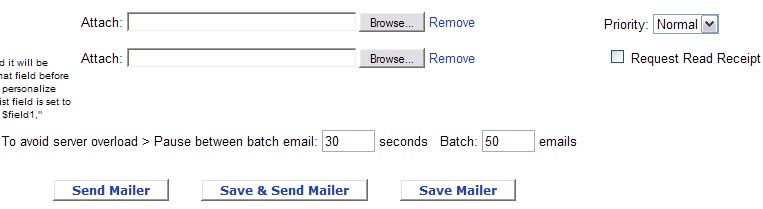
Setting Priority on Mailers: As you can tell from the screenshot above, on the bottom right of the Compose Mailer page you can set the Priority on your mailer - you can choose High, Normal, or Low.
Request Read Receipt: You can request a read receipt to your mailer by checkmarking the "Request Read Receipt" box on the bottom left of the Compose Mailer page. If the recipient of the mailer approves confirming receipt of your mail, you will receive email notification that the email recipient received and read your mail.
How to avoid Server Overload: To avoid server overload when sending lots of mailers at once, on the bottom of the Compose Mailer page you can set how many seconds to pause between batches, and how many emails are in a batch. The default is 30 seconds and 50 emails, respectively.
 Report a concern
 0 Ratings
 Add Comment